




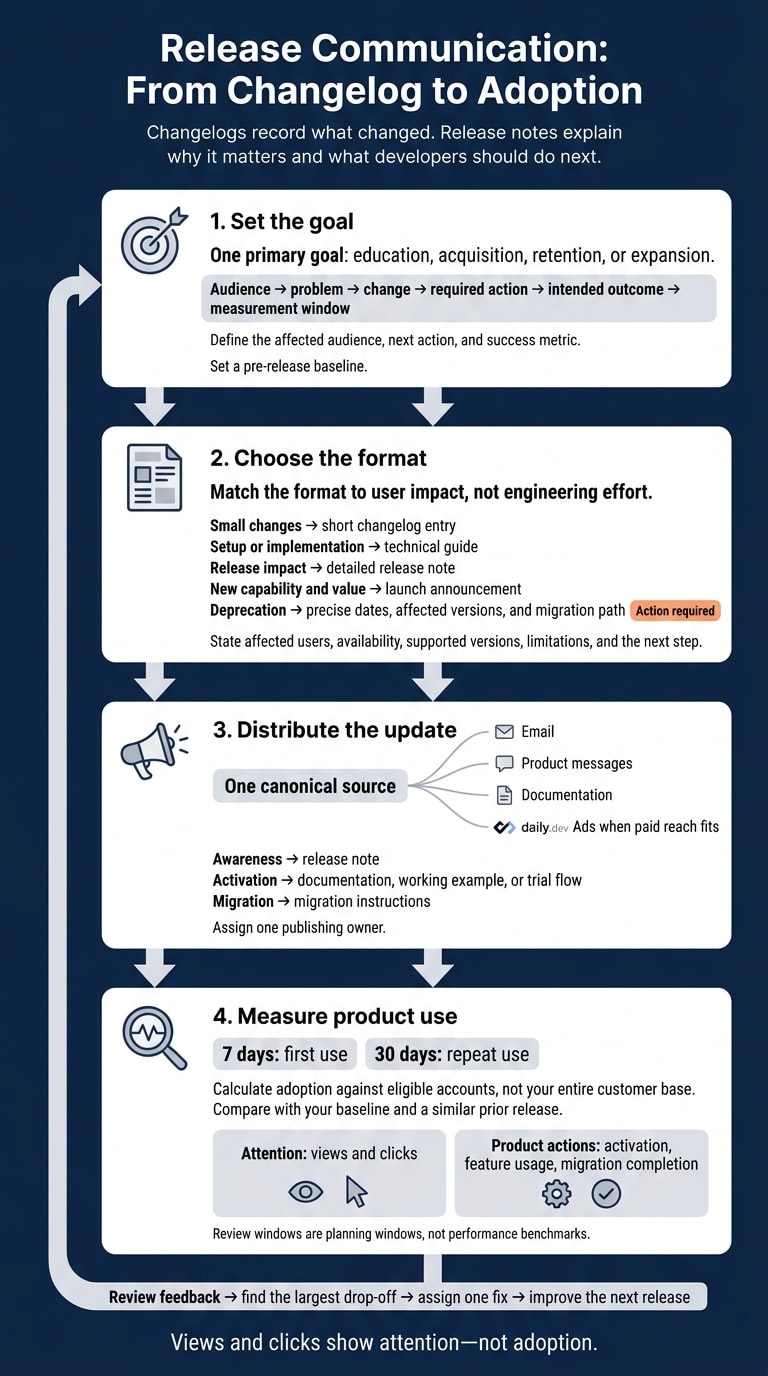
Changelogs record what changed. Release notes explain why it matters and what developers should do next. Give each release one goal - education, acquisition, retention, or expansion - and one measurable action, such as enabling a feature or completing a migration.
A useful release communication plan covers four steps:
- Set the goal: Define the affected audience, next action, and success metric.
- Choose the format: Use a short entry for small changes and detailed guidance for setup, breaking changes, or deprecations.
- Distribute the update: Keep one canonical source, then share it through email, product messages, documentation, or daily.dev Ads when paid reach fits.
- Measure product use: Review first use at 7 days and repeat use at 30 days, using eligible accounts as the adoption denominator.
The priority is helping developers act. Views and clicks show attention - not adoption.
1. Set goals for release communication
Give each release one primary goal: education, acquisition, retention, or expansion. Connect that goal to a specific developer action - not an internal feature milestone.
Connect product changes to developer needs
Lead with the developer’s problem, not the internal feature name. Before you write, map audience → problem → change → required action → intended outcome → measurement window. State availability, affected plans or versions, and limitations. Pick an action you can measure: a completed workflow, feature-enabled account, migration, qualified signup, or upgrade conversation.
Match the metric to the goal. Documentation visits show interest. Adoption requires a product-usage event, while migration requires completion tracking. Set a pre-release baseline, then choose review windows that fit the adoption cycle, such as 7, 30, and 90 days. These are planning windows, not performance benchmarks.
With the goal and metric in place, choose a format based on what the reader needs to do.
| Format | Use it when the reader needs to… | Required content |
|---|---|---|
| Changelog | Find what changed and when | Dated summary, impact, and links |
| Detailed release note | Assess how a release affects their work | Affected users, behavior changes, rollout, limitations, and required action |
| Launch announcement | Understand why a new capability deserves attention | Problem, audience, value, supporting evidence, and availability |
| Task-oriented documentation | Configure, implement, or migrate | Prerequisites, exact steps, compatibility details, and troubleshooting |
Learn from public changelogs
Review Linear, Vercel, and Stripe for information structure rather than wording: dated entries, clear titles, browseable history, and links to docs. For 2026, separate general product updates from versioned API changes. Stripe’s versioning model shows why API communication needs the exact version, compatibility status, and migration steps, rather than only a benefit-led headline.
That structure also guides how you publish and distribute each release.
2. Choose a format and write clear release notes
Choose a format for each change
Match the format to user impact, not engineering effort. Keep routine maintenance easy to find without giving it the same prominence as required migrations.
Break each change into the smallest set of assets readers need to discover it, assess it, and put it to use. Each format should point to one measurable next step, such as adoption, migration, or an upgrade. Choose the simplest format that gives readers enough information to act.
| Format | Depth needed | How long it stays relevant | Best channel |
|---|---|---|---|
| Short changelog entry | Low: changed behavior and relevant links | Brief attention window; permanent archive record | Product changelog or release feed |
| Detailed release notes | Medium: impact, eligibility, and activation | Throughout the supported release | Documentation hub |
| Technical guide | High: prerequisites, steps, and validation | Until the documented version becomes unsupported | Documentation |
| Launch announcement | Medium to high | Medium to long | Blog or newsletter |
| Deprecation notice | Precise dates, affected versions, and migration path | Through removal, then a permanent record | Changelog, documentation, product notifications, and direct communication to affected users |
Once you’ve chosen the format, make the content easy to scan and act on.
Give developers the details they need
Lead with the outcome. Then explain what changed, who it affects, when it ships, and what it breaks. Add the docs link and the next step, along with supported versions and limitations. Clearly separate beta from GA and automatic rollout from manual setup. Leave internal project names out of the headline.
For breaking changes or deprecations, place Action required near the top. Name the affected users, products, and versions. Explain the old and new behavior, and state the exact effective date. Link to migration instructions that cover code changes, validation, rollback options, and support contacts. Announce deprecations before removal, using a removal date or version instead of “coming soon.”
Give every entry a canonical URL, publication date, tags, affected version, and named owner. Keep a searchable archive, and add a last-updated date whenever instructions change. Make sure readers can distinguish the publication date from a later rollout date or removal deadline.
Assign writing, review, and publishing tasks
Start with a brief that defines the audience, problem, change, docs destination, distribution channels, and success metric. Assign one publishing owner, with clear roles for the other contributors: product or engineering checks behavior and compatibility, technical marketing or DevRel shapes the developer-facing copy, and demand generation adjusts it for distribution.
Before publishing, check accessibility, links, code samples, versions, dates, analytics, and archive metadata. Keep promotional copy aligned with the canonical note - especially its limitations and migration requirements - so every release asset uses the same source of truth.
3. Distribute releases through owned channels and daily.dev Ads
Once the note is written, distribution determines who sees it, when, and in what form. Tailor the canonical release note to each channel: give subscribers a clear reason to care, summarize related changes in newsletters, and show in-product messages only to affected users. For paid distribution, explain the problem to developers who don’t know your product. Link to implementation guidance from the affected documentation.
Set publishing cadence by user impact
Send breaking-change notices early enough for affected users to act, with reminders timed around migration deadlines. Publish security guidance as soon as responsible disclosure allows. Announce major capabilities only when both the feature and its documentation are ready.
When release volume is high, group small improvements into weekly or biweekly digests. Skip standalone promotion for maintenance-only updates. Then choose a paid format that fits the audience and the action you want them to take.
Reach relevant developers with daily.dev Ads
Use daily.dev Ads when a release solves a recognizable problem for a defined technical audience. In-Feed Native Ads build awareness through labeled sponsored cards . A Sponsored Post gives releases room for more explanation, with guaranteed feed impressions, digest distribution, a read-floor commitment, and canonical republishing that keeps your domain as the source of record . Digest newsletter sponsorships by topic track fit updates tied to a specific technical interest .
Target by tech stack, seniority, geography, and interests, guided by the release’s actual requirements . Match each destination to the next action:
- Send awareness traffic to the release note.
- Send activation traffic to documentation, a working example, or a trial flow.
- Send migration traffic to migration instructions.
Keep these destinations connected to the canonical note. Exposure doesn’t guarantee adoption, and a read-floor commitment isn’t an activation commitment. Track delivery, reads, and downstream product actions separately .
Use Engagement Ads for major launches
Use Engagement Ads for releases that need attention over time - not just a single appearance or promotion of routine fixes. Choose one or two formats: Branded Tags to connect the launch with a theme, Keyword Spotlights for relevant technical terms, Custom Upvotes for selected content, Tag Page Takeovers for a topic area, or Stack Placements for a technology context .
Pair those formats with in-depth technical content and one clear action. Make sure readers can reach the documentation and access the product without barriers.
4. Measure adoption and improve release communication
Measure whether your release note led readers to take the action you asked for.
Track product adoption and downstream pipeline impact
Before launch, record the eligible audience, activation event, owner, attribution window, UTM tags, and release ID. Once distribution starts, use that ID to connect exposure, product use, and pipeline.
Check first use at 7 days and repeat usage at 30 days. Compare both with your baseline and a similar prior release. Calculate adoption against eligible accounts, not your entire customer base.
Track reach and attention separately from documentation visits, activation, feature usage, upgrades, qualified conversions, and influenced opportunities. Report existing-user adoption separately from acquisition. Treat exposure-based comparisons as directional; they don't prove cause and effect unless a controlled test supports that claim.
Use feedback to improve the next release
Review adoption alongside support tickets, developer questions, doc search terms, unsubscribe rates, negative feedback, and setup drop-offs. High clicks but low activation point to a mismatch between the promise, prerequisites, or docs.
Tag issues by release, find the largest drop-off, and assign one fix. Small teams can start with one release brief, one accountable owner, and one primary adoption metric. Use those patterns to sharpen the next release note and distribution plan.
Review the release-marketing checklist
Before closing the cycle, check developer impact, technical claims, format fit, canonical source, audience selection, link tracking, and product-event instrumentation. On the agreed review date, record the result, the next change, and who owns it.
When targeted amplification fits the release and you have a measurable next action, talk to daily.dev Ads about distribution.
FAQs
How can I separate release marketing impact from organic adoption?
Track product outcomes, not just clicks or impressions. Before launch, define an activation event - such as a successful API call or deployment - and tie it to a stable user or account ID.
Record consistent UTM data at signup, then link it to product events. Calculate activation rate by dividing activated signups by eligible signups within a fixed time window. Compare release-marketing cohorts with your organic baseline to assess marketing’s impact.
When should I use daily.dev Ads to promote a release?
Use daily.dev Ads when your release needs developer discovery or technical evaluation. Choose In-Feed Native Ads to drive landing-page traffic, or a Sponsored Post for a tutorial or integration guide. Sponsored Posts include guaranteed feed impressions, a read-floor commitment, and canonical republishing to maintain SEO equity.
For visibility around a topic, choose Digest newsletter sponsorships by topic track. For brand recall, use Engagement Ads.
How can I prevent release announcement fatigue?
Focus on major changes and useful technical resources instead of announcing every update. Tie each announcement to a specific goal - not a recurring schedule.
Reach the right developers through focused channels, such as the daily.dev feed or Digest newsletter sponsorships by topic track. Link every announcement to a tested, runnable technical resource or an integration guide so developers can get something working right away. Prioritize product activation over awareness.