



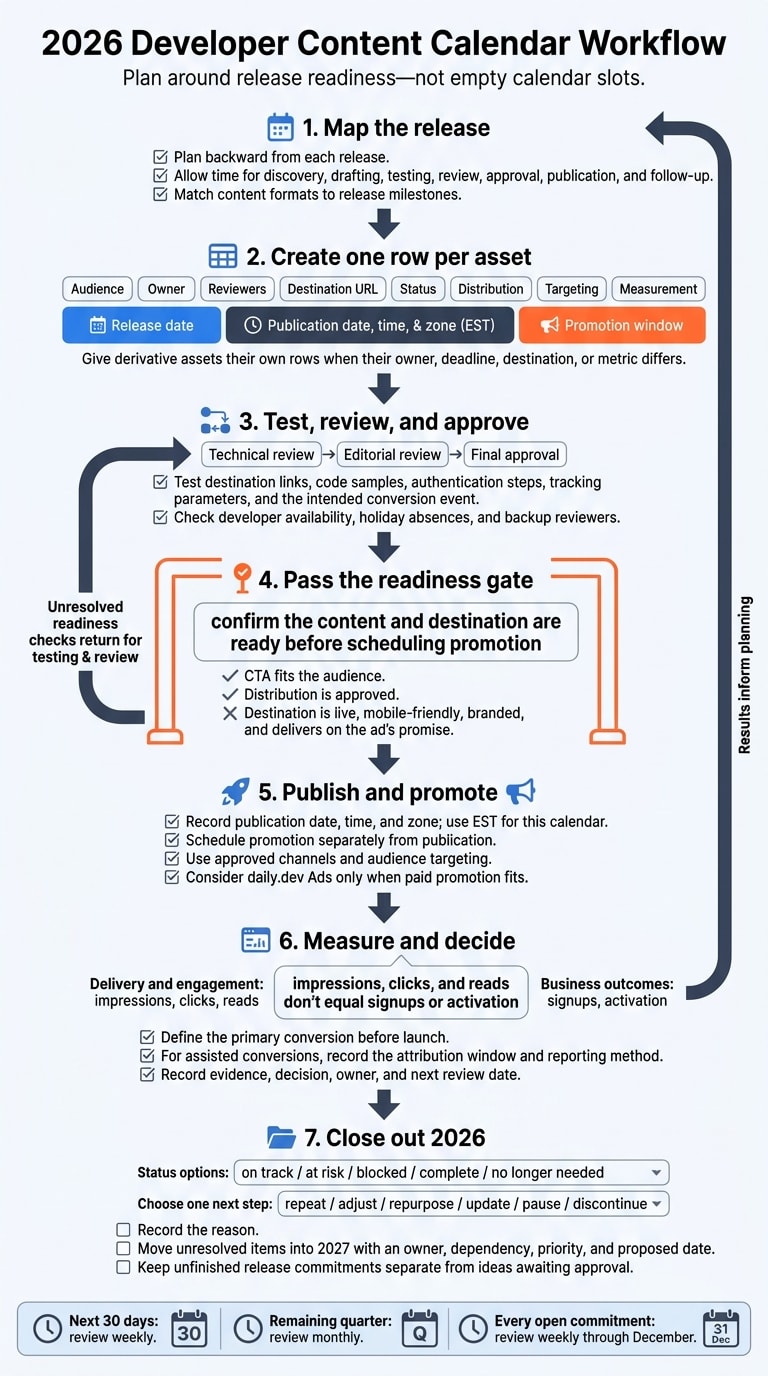
I plan developer content around release readiness - not empty calendar slots. For November and December 2026, I give each asset its own row, assign an owner and reviewers, and track release, publication, and promotion dates separately.
Here’s what I put in the plan:
- Release-linked content: docs, changelogs, tutorials, comparisons, and community recaps, with time for testing and approval.
- Scheduling checks: developer availability, holiday absences, backup reviewers, and publication times in EST.
- Distribution: approved channels, audience targeting, working links, and daily.dev Ads options when paid promotion fits.
- Results and next steps: signups or activation tracked separately from clicks and reads, plus a decision to repeat, adjust, or stop.
I review the next 30 days weekly, close out year-end results, and move unfinished work into 2027 with an owner and proposed date. My rule: confirm the content and destination are ready before scheduling promotion.
2. Match content cadence to releases
Plan backward from each release, leaving time for discovery, drafting, testing, review, approval, publication, and follow-up. Use this template to match each release type with its lead time, reviewers, and follow-up tasks.
| Release or moment | Recommended formats | Suggested lead time | Reviewers | Follow-up |
|---|---|---|---|---|
| Major launch | Announcement, updated docs, tutorial, comparison, community recap | 6 to 8 weeks | Product, engineering, documentation, QA, support, security, DevRel | Review adoption questions, support volume, tutorial completion, and update needs after 2 to 4 weeks |
| Feature release | Changelog, focused docs update, workflow tutorial, short announcement | 3 to 4 weeks | Feature owner, technical writer, engineering or QA | Review feedback and code-sample issues after 1 to 2 weeks |
| Maintenance update | Changelog, affected-reference updates, concise release note | 1 to 2 weeks | Maintainer, documentation owner | Check links, versions, and regression issues |
| Deprecation | Deprecation notice, migration guide, compatibility FAQ, reminders | 8 to 12 weeks | Engineering, product, documentation, support, affected customer teams | Track migration progress and send reminders before the effective date |
| Integration | Setup guide, reference documentation, tutorial, comparison of implementation approaches | 4 to 6 weeks | Integration owners, QA, documentation, partner or platform reviewer | Review installation success, common errors, and integration changes quarterly |
| Community event | Pre-event guide or announcement, live resources, recap, FAQ based on questions | 3 to 6 weeks | Community, DevRel, subject-matter expert, product when announcements are included | Publish a recap only when there are useful questions, takeaways, or resources to share |
With the release map in place, assign a content format to each milestone.
Publish docs and changelogs with each release
Make documentation part of the release’s definition of done. Ask a technical reviewer to check prerequisites, supported versions, permissions, commands, expected output, and migration steps.
Publish the changelog close to release. Explain what changed, who’s affected, and what they need to do, with direct links to instructions. Draft entries as the work happens so you don’t have to piece the details together later.
Build tutorials and comparisons around workflows
Start with a task and define what success looks like. Have an engineer test the tutorial in a clean environment, record the versions used, and add troubleshooting guidance. Test examples again after API changes.
For comparisons, set the criteria before drafting: setup effort, compatibility, security, and maintenance burden. Compare implementation approaches using current documentation or reproducible tests - not unsupported claims. Schedule an accuracy check every quarter, and check sooner after breaking changes.
Turn community questions into content plans
Review support questions and public discussions monthly or quarterly. Use gaps in information to guide docs fixes, multi-step problems to shape tutorials, and repeated workflow needs to plan future campaign themes.
Publish recaps only when there’s useful material to share. Link to public discussions, credit their sources accurately, and keep community commentary clearly separate from official announcements.
3. Fill in the 2026 calendar template
Give each asset its own row, rather than grouping an entire campaign into one row. This keeps release milestones, review steps, and promotion windows visible. Store details in separate fields so you can sort and update the calendar easily. Follow the example below for each asset.
Milestone Format and working title Audience Owner Technical review Editorial review Final approval Publication date, time, and zone Promotion window Distribution Targeting Destination URL Status Primary measurement Secondary metrics Repurposing SDK release Tutorial: SDK quickstart Developers evaluating the SDK Developer marketing December 1, 2026: outline and technical review December 3, 2026 December 4, 2026 December 8, 2026, 10:00 a.m. EST December 8–18, 2026 Company blog, documentation hub, email, community channels, approved paid channels Relevant SDK tech stack, seniority, geography, and interests Approved SDK tutorial URL Planned First API call in product analytics Tutorial visits, qualified clicks, signups, assisted conversions Documentation snippets, a short community post, and an email summary Hypothetical workflow example only; use your own audience availability before setting the promotion window. Use the developer attention calendar only to validate the promotion window. Then verify each row before scheduling.
Check each asset before scheduling
Check that the CTA fits the audience and that distribution is approved. Test destination links, code samples, authentication steps, tracking parameters, and the intended conversion event.
Split combined columns whenever you need to filter their details separately, especially release dates, reviewers, channels, and targeting criteria. Give each derivative asset its own row if its owner, deadline, destination, or metric differs. Record the source asset, reuse trigger, and owner so someone is clearly responsible for repurposing it.
Review the next 30 days weekly and the remaining quarter monthly. Keep completed and canceled rows. Add actual publication dates, results, reasons for changes, and repurposing outcomes so you have a planning record to use during the next release cycle.
With the calendar built, use approved placements to map distribution.
4. Plan distribution with daily.dev Ads
Once the release is approved, use the same row to plan paid distribution. Choose distribution only after the asset, audience, and release timing are set. Record the campaign objective, selected format, creative status, tracking method, and approved targeting by tech stack, seniority, geography, and interests.
Before reserving promotion dates, check that the destination is live, mobile-friendly, branded, and delivers on the ad’s promise.
Match ad formats to approved assets
Choose the format based on your distribution needs, not the release type.
| Distribution need | Format to consider | What to record |
|---|---|---|
| Give approved docs, tutorials, or comparisons visibility in the feed | In-Feed Native Ads | Destination URL, audience, and primary conversion |
| Promote an in-depth technical article with guaranteed feed impressions, a read-floor commitment, and canonical republishing | Sponsored Post | Destination URL, audience, and primary conversion |
| Reach readers around a focused interest area | Digest newsletter sponsorships by topic track | Relevant topic track and promotion window |
| Help readers discover content through relevant tags, keywords, stacks, or topic pages | Engagement Ads | Selected option: Branded Tags, Keyword Spotlights, Custom Upvotes, Tag Page Takeovers, or Stack Placements |
These formats are planning options - not guarantees of signups or activation. After choosing a format, use campaign results to decide whether to extend promotion, pause it, or repurpose the asset.
Use campaign results to plan next steps
Define the primary conversion before launch, and use consistent campaign identifiers and tracking parameters. Keep delivery and engagement separate from business outcomes: impressions, clicks, and reads don’t equal signups or activation. For assisted conversions, record the attribution window and reporting method before reviewing results.
Extend promotion when the asset still supports the objective. If engagement rises but qualified visits lag, tighten the destination message and CTA before extending promotion. If recurring questions point to a content gap, schedule a follow-up tutorial or docs update. Keep this planning loop in the same row by recording the evidence, decision, owner, and next review date.
5. Review results and close out 2026
Use the calendar fields from your 2026 plan to close out open work.
Review every open commitment weekly through December. Mark each item on track, at risk, blocked, complete, or no longer needed. Confirm its release dependency, publication date, format, destination URL, accountable owner, backup contact, and approval status.
Before keeping a date, check that the technical review is current and the destination matches the current product experience. Use the developer attention seasons guide to check the specific dates still open.
Archive the final asset, destination version, performance export, attribution window, and sales feedback. Record the outcome, then choose one next step: repeat, adjust, repurpose, update, pause, or discontinue. Include the reason.
Move unresolved items into the 2027 calendar with an owner, dependency, priority, and proposed date. Keep unfinished release commitments separate from ideas awaiting approval.
If approved assets still need distribution in 2026, schedule a conversation with daily.dev about the remaining daily.dev Ads placements.
FAQs
How should I adjust the calendar when a release slips?
Pause or reschedule your In-Feed Native Ads and Sponsored Post distributions right away to match the new deployment date. daily.dev Ads lets you adjust campaigns so your messaging stays in sync with product availability.
Use the extra time to update documentation and quickstart tutorials for the latest version. Coordinate these changes with the daily.dev team to keep your visibility steady throughout the revised launch window.
Which content should I prioritize with limited resources?
Put docs updates and one tutorial or quickstart first, focused on your top developer task. Start with one developer ideal customer profile (ICP), one message, and one primary call to action (CTA). Measure activation and the actions that follow - not just clicks.
Use In-Feed Native Ads for discovery and Sponsored Post to show how the integration fits. If needed, add Digest newsletter sponsorships by topic track to address the same problem. Use the 90-day plan to order your tests, and scale only once onboarding works.
How should I budget for daily.dev Ads promotion?
Choose a managed plan: Starter, Growth, or Scale. Pricing is quoted per company; there’s no public rate card. Before committing to a larger tier, start with a focused 90-day plan to test one developer audience, one problem, and one channel.
Fix anything blocking product activation and get your documentation ready before spending more. Request a custom plan scope based on your reach, targeting, and format needs.