




Getting a developer’s attention is only the start. In 2026, tool research spans search, AI assistants, communities, video, and documentation. Each path should lead to clear technical facts, working code, and a trial with a defined first-success milestone.
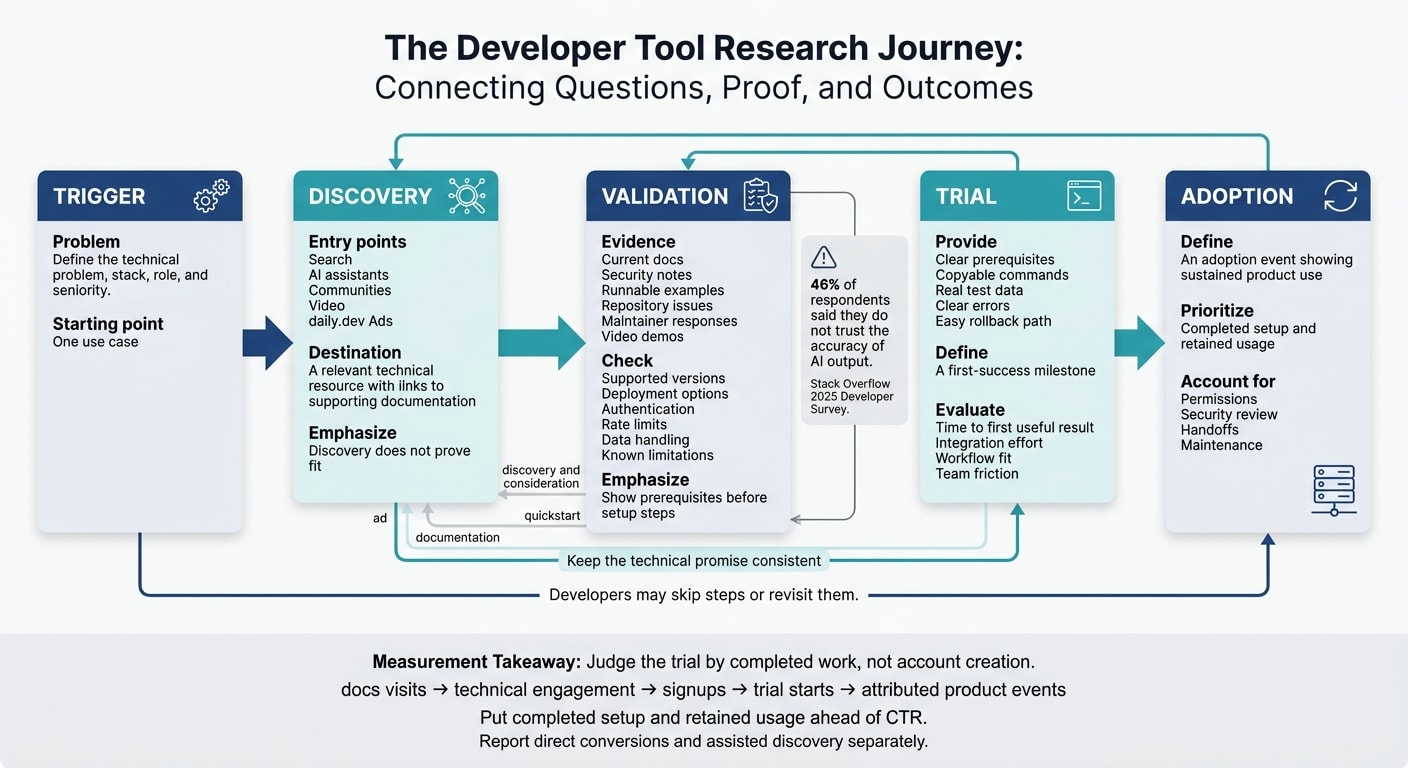
The journey has five stages: trigger, discovery, validation, trial, and adoption - but developers may skip steps or revisit them. Stack Overflow’s 2025 survey found that 46% of respondents distrust AI output accuracy, reinforcing the need for sources developers can check.
For marketers, the plan is simple:
- Connect discovery channels, including daily.dev Ads, to docs and setup guides.
- Show requirements, limits, security details, and rollback steps before signup.
- Measure completed setup and retained use - not just clicks or new accounts.
2. How search and AI assistants support research
A technical question may lead to search results, an AI answer, or a cited documentation page. Each entry point should provide an answer and a direct link to supporting technical details. These help developers discover options, but they don’t prove fit. Developers still need to check whether a tool meets their needs.
AI recommendations versus technical evaluation
Treat AI recommendations as a starting point. Then check them against current docs, security notes, and runnable examples. In Stack Overflow’s 2025 Developer Survey, 46% of respondents said they do not trust the accuracy of AI output. Help developers verify recommendations with current compatibility notes, API references, security docs, and runnable code.
Test a fixed set of questions about supported environments, authentication, integration limits, and migration. Log the date, sources, errors, and missing prerequisites. Review the log regularly to decide which documentation corrections to tackle first - not to promise placement in AI answers.
Technical pages that help developers check fit
After discovery comes proof. Put key facts in crawlable text: supported versions, deployment options, authentication, rate limits, data handling, and known limitations. Show prerequisites before setup steps so developers can judge the effort before signing up. Use descriptive titles, stable headings, and links to canonical references.
For a small team, start with one high-intent use-case page and one implementation example that developers can reproduce. Include installation commands, configuration, expected output, error handling, cleanup instructions, and a tested version or date. Track page-to-doc clicks, quickstart completion, and trial starts separately from search and AI referrals.
3. How communities, video, and trials support evaluation
Once the docs show whether a tool fits, developers check public discussions, videos, and trial access before committing.
Repositories and discussions reveal tradeoffs
Check release history, maintainer responses, unresolved issues, and working examples for compatibility problems and migration blockers. Commit volume alone tells you little. Read how maintainers handle issues and breaking changes.
Where developers actually discuss new tools in 2026 covers where developers find and discuss tools. If the repository looks promising, check whether a demo backs up the description.
Video demos should lead to usable trials
On YouTube, show a complete task and explain where the tool fits. For migrations, show the work involved and how to roll back. Share benchmark versions, environment, workload, configuration, baseline, and test duration. Link to docs covering setup, compatibility, security, and failure handling. The trial should then let developers reproduce that result in their own workflow.
Judge the trial by completed work, not account creation. Measure time to first useful result, integration effort, workflow fit, and team friction - including permissions, security review, handoffs, and maintenance. Give developers real test data, clear errors, and an easy rollback path.
4. Choose channels and formats by research stage
Choose channels based on the question a developer needs answered. For a 2026 channel plan, daily.dev Ads supports discovery and consideration. It does not replace documentation, independent peer review, repository inspection, or testing.
The focus here isn’t reach. It’s matching each channel to the developer’s research stage.
The 2025 Stack Overflow Developer Survey points to several discovery paths: recommendations, articles, AI chat, videos, and human conversation. Use the table to connect each stage with the right evidence and format.
| Research stage | Why it matters | Best-fit format |
|---|---|---|
| Discovery | Support search and AI discovery with a relevant technical resource. | In-Feed Native Ads linking to a problem-focused guide. |
| Validation | Back up community, repository, and video research with implementation evidence. | Sponsored Post linking to documentation and working examples. |
| Trial | Give evaluators a clear path from the use case to setup. | In-Feed Native Ads linking to a walkthrough or quickstart. |
| Continued evaluation toward adoption | Stay relevant to the topic as developers revisit product fit. | Digest newsletter sponsorships by topic track or Engagement Ads for contextual visibility. |
Match the ad format to the content and goal
Use In-Feed Native Ads to state the problem, audience, and next step. Choose a Sponsored Post when the message needs more explanation. It offers guaranteed feed impressions, a read-floor commitment, and canonical republishing - not technical approval.
Choose Digest newsletter sponsorships by topic track for subject relevance. For branded category discovery, Engagement Ads include Branded Tags, Keyword Spotlights, Custom Upvotes, Tag Page Takeovers, and Stack Placements. Match the placement to the topic or stack, but don’t treat branded interaction as product evaluation.
Keep campaign results separate from promises
Define the research-stage objective before launch. Report delivery and CTR separately from documentation engagement, trial activity, activation, and qualified pipeline. Show each metric’s denominator and reporting window, then judge results against the campaign’s own objective and baseline. A delivery guarantee covers distribution, not adoption.
If clicks don’t lead to technical evaluation, fix the destination before scaling the channel mix.
5. Plan and measure the research journey
Once you’ve chosen channels for each stage, measure whether each research surface helps developers move from discovery to adoption.
Map one technical problem through to adoption
Start with the technical problem, stack, role, and seniority. Build one use case, one documentation page, and one trial path. Map how search, AI assistants, communities, and video bring developers to that page. Then define the adoption event that shows sustained product use.
For discovery traffic from daily.dev Ads, track later docs visits, trials, and adoption events wherever attribution is available. Target by tech stack, seniority, geography, and interests.
Keep the technical promise consistent across the ad, documentation, and quickstart. Include clear prerequisites, copyable commands, and a defined first-success milestone. This gives you one path to test, track, and compare.
Track progress and review the channel mix
Track each step separately: docs visits, technical engagement, signups, trial starts, and attributed product events. Report direct conversions separately from assisted discovery. When assessing adoption, put completed setup and retained usage ahead of CTR.
Review early engagement at campaign checkpoints, but give developers time for technical validation, trials, and procurement before judging adoption. Shift budget based on docs engagement and trial outcomes - not last-click credit. If useful, review your campaign plan with daily.dev before launch.
FAQs
How can we attribute trials to AI-assisted discovery?
Measure more than clicks. Use conversion pixels with view-through attribution and incrementality tests. AI tools may not provide direct referral links, so track branded search volume, assisted conversions, and technical content performance to gauge the impact of AI citations.
Keep documentation crawlable with stable URLs, descriptive headings, and up-to-date technical facts. Link discovery to product events - such as a first successful API call - to measure activation.
How do we identify where developer evaluations stall?
Link channel reports, campaign identifiers, and landing-page context to product-activation events, such as a first successful API call or completed deployment. This helps you spot where evaluations get stuck.
Compare documentation starts with setup completions. Check whether landing pages deliver what your ads promise, and measure the time from arrival to the first meaningful product event. Before spending more, test one audience and one technical asset at a time.
When should we scale our daily.dev Ads budget?
Scale your daily.dev Ads budget only when your campaign drives activation - not just clicks. Start with one audience and one technical problem. Use that test to check whether your quickstart or documentation page turns visitors into active users.
Before spending more, check conversion pixel data and run incrementality tests. Verify that paid distribution leads to measurable product events, such as a first API call or a successful deployment.