

To market an AI coding assistant in 2026, I’d start with one task developers can test, not a broad promise of faster coding. Show the result, explain what needs human review, and make costs and code privacy clear before asking anyone to sign up.
Here’s the plan I’d follow:
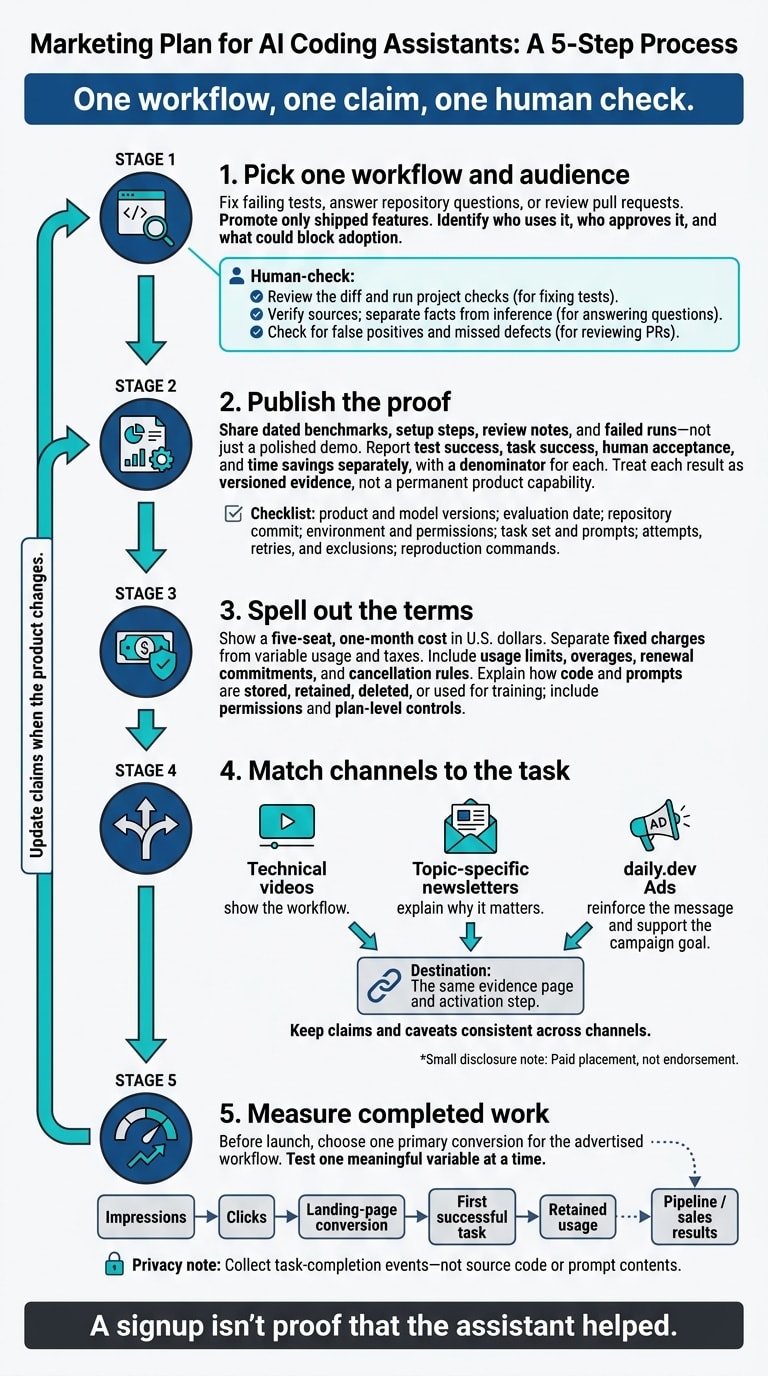
- Pick one workflow and audience. Fix failing tests, answer repository questions, or review pull requests. Promote only shipped features.
- Publish the proof. Share dated benchmarks, setup steps, review notes, and failed runs - not just a polished demo.
- Spell out the terms. Show a five-seat, one-month cost in U.S. dollars, usage limits, and how code and prompts are handled.
- Match channels to the task. Use technical videos, newsletters, and daily.dev Ads to send developers to the same proof page.
- Measure completed work. Track first successful tasks, repeat use, and sales results separately from clicks.
My rule: one workflow, one claim, one human check. A signup isn’t proof that the assistant helped.
1. Choose your workflow and developer audience
Start with a task developers can test
Pick one observable workflow instead of promising “faster coding” across the board. Spell out what the assistant does: suggests changes, edits files, runs commands, or opens a pull request. Developers should know what they need to review.
Before approving campaign copy, check capabilities against current product documentation as of October 24, 2026. Record the exact editor or interface, supported environments, repository access, file editing, command execution, version-control links, and plan limits. Mark each capability as shipped, limited availability, requires configuration, or roadmap. Only label shipped capabilities as available.
Apply the same proof standard to every campaign: one workflow, one claim, one human check.
| Use case | What to verify | Human review |
|---|---|---|
| Fixing failing tests | Starting repository state, failure, expected patch, rerun results | Review the diff and run project checks |
| Researching an unfamiliar repository | Answers tied to source files | Verify sources; separate facts from inference |
| Reviewing pull requests | Flagged issues and code references | Check for false positives and missed defects |
A narrowly defined workflow gives developers a clearer way to test the claim and decide whether to trust it.
Define who the assistant serves best
With the workflow set, focus on developers most likely to test that use case.
Users of Cursor, GitHub Copilot, Claude Code, Codex, or Windsurf need a clear reason to try another assistant. Show them the verified workflow, how it fits their toolchain, and which approval controls they get.
Identify who uses it, who approves it, and what could block adoption. That might mean security review, deployment requirements, access controls, procurement, or budget ownership.
Existing tool familiarity is one way to segment the audience - not the only one. Also consider repository complexity, engineering role, team size, and purchasing constraints. Match the message and activation event to that audience’s task. For a repository-research campaign, the target action should be getting a source-backed answer developers can verify, not just signing up.
2. Publish the evidence developers need
Show benchmarks and workflow demonstrations
Once you’ve chosen one workflow and one audience, publish the proof behind your claim.
Create a technical evaluation page for that workflow. Include a reproduction guide that lists the assistant version, model and version, IDE or CLI version, evaluation date, OS, repository commit, language and framework versions, hardware, network conditions, context-window settings, tool permissions, and agent configuration.
Publish the task set, prompts, system instructions where disclosure is allowed, sampling settings, attempt count, stopping rules, and reproduction commands. Have an engineer review the setup before publication. Treat each result as versioned evidence, not a permanent product capability.
Report test success, task success, human acceptance, and time savings separately, with a denominator for each. Define the unaided baseline, and count time spent prompting, waiting, debugging, testing, and reviewing. Repository-level evaluations measure the whole agent system - including its tools and orchestration - not just the model.
Pair the results with a recording others can reproduce. Show the starting repository, request, assistant actions, diff, test output, and reviewer notes. Include a failed or partly completed run, and explain what intervention it needed. Disclose task-selection rules, exclusions, retries, and incomplete runs. A polished demo shouldn’t suggest the assistant works reliably in every case.
Buyers also need to know the costs and privacy terms that apply when they use the product.
Explain assistant costs, privacy, and purchase terms
Show current seat and usage pricing in U.S. dollars, dated as of publication. Explain included allowances, metering units, model-specific limits, overages, minimum seats, renewal commitments, and cancellation rules.
Link to current pricing and use verified rates to calculate a five-seat, one-month total. Separate fixed charges from variable usage and taxes. If additional usage is billable, don’t present the seat price as the full cost.
Document how code, prompts, diffs, telemetry, and feedback are stored, retained, deleted, or used for training. Specify plan-level defaults, training controls, subprocessors, access permissions, authentication, audit logs, and permission revocation. Link to security documents, intellectual-property terms, and any indemnity scope.
Assign someone to recheck these claims whenever models, plans, or policies change, and maintain a dated change log.
When promoting the evaluation page in daily.dev Ads, keep campaign wording within what the evidence supports. Don’t turn a limited benchmark into a promise that applies to every use case.
3. Choose channels and daily.dev Ads formats
Once the evidence page is ready, give each channel a clear job. Technical YouTube reviews show the workflow. Topic-specific newsletters explain why it matters. In-Feed Native Ads reinforce the message. Send them all to the same evidence page and activation step.
Match each format to a campaign goal
Choose the format based on what you want the buyer to do next. The daily.dev Ads product overview covers the options below. Measure each placement against its job - not just its clicks.
| Campaign goal | Content | Proof | daily.dev Ads format | Audience signal | Success metric |
|---|---|---|---|---|---|
| Category education | Problem-focused explainer | Definitions, workflow examples, limitations | In-Feed Native Ads | Interests, seniority, tech stack | Qualified landing-page visits and documentation engagement |
| Product evaluation | Integration guide or benchmark walkthrough | Reproducible methodology, tested version, implementation steps | Sponsored Post | Tech stack, interests, seniority | Read-floor completion, engaged reads, documentation visits, evaluation actions |
| Enterprise demand generation | Security and procurement guide | Privacy terms, admin controls, pricing structure, support model | Sponsored Post plus In-Feed Native Ads | Seniority, geography, stack, enterprise-relevant interests | Qualified demo requests, account creation, sales-qualified opportunities |
| Developer adoption | Quick-start guide or task-based tutorial | Working code, setup steps, time-to-first-success evidence | In-Feed Native Ads | Stack and interests | Activations, completed setup, qualified signups |
| Brand recall | Association with a relevant developer category | Consistent positioning and useful technical claims | Engagement Ads | Relevant tags, keywords, stacks, interests | Branded engagement, assisted visits, repeat visits |
| Newsletter reach | Technical insight or launch message | One specific finding, use case, or resource | Digest newsletter sponsorships by topic track | Web development, AI and machine learning, DevOps and cloud, security and AppSec, or data and databases | Newsletter clicks, engaged sessions, assisted conversions |
Tailor targeting and content to each format
Target by tech stack, seniority, geography, and interests. Stack targeting helps you reach developers whose tools fit your product. Seniority separates evaluators from buyers, while geography supports market-specific acquisition. Match Digest newsletter sponsorships to the right topic track.
Sponsored Post offers guaranteed feed impressions, a read-floor commitment, and canonical republishing. That makes it a good fit for longer technical explanations.
For Engagement Ads, choose the placement that fits the context:
- Branded Tags for topic association
- Keyword Spotlights for relevant research terms
- Custom Upvotes for branded participation
- Tag Page Takeovers for topic visibility
- Stack Placements for compatibility-led messaging
Link each placement to the matching technical resource. Treat branded participation as paid placement, not endorsement.
Use the daily.dev Ads AI coding tools advertising resource to plan your channel mix.
Keep product evidence consistent across channels
Give reviewers access to the documented product version and its matching onboarding instructions. Keep one campaign evidence sheet so video descriptions, newsletter copy, feed ad copy and visuals, and the landing page all use the same claims and caveats.
Disclose sponsorships plainly and keep them separate from editorial judgment. Review assets weekly and whenever the product changes.
4. Measure adoption and improve results
Track the path from a daily.dev Ads impression to activation
Once every channel points to the same evidence page, track what happens after the click. Before launch, choose one primary conversion for the advertised workflow. Define the supported task, what counts as completion, and the completion window. Measure impressions, CTR, landing-page conversion, first successful task, retained usage, and pipeline separately.
Pass consistent UTM parameters and campaign IDs through signup and product analytics. Keep both first-touch and later-touch sources, and report last-touch and assisted conversions separately. Add "How did you hear about us?" to record discovery that tracking misses. Collect task-completion events - not source code or prompt contents.
Update claims and test for qualified outcomes
Use the same workflow evidence to assess which claims lead to adoption. Review activation and retention by workflow, then by campaign claim, tech stack, seniority, geography, and interest segment.
Test one meaningful variable at a time. Keep budget, targeting, conversion definitions, and attribution windows steady. Record test dates, sample size, product version, and any attribution or tracking gaps.
Throughout the rest of 2026, recheck benchmark methodology, model versions, and usage limits whenever the product changes. Clicks don't prove assistant performance. Keep claims that lead to successful workflow use; revise those that draw clicks without adoption.
Bring your workflow, evidence, terms, audience, and measurement plan when you discuss campaign fit with daily.dev.
FAQs
How can I build credibility without customer case studies?
Lead with transparent benchmarks and hands-on technical content. Publish latency, throughput, and evaluation scores that others can reproduce, and explain how you ran each test. Provide demos, tutorials, and copy-paste-ready code snippets that solve specific problems and show what your product can do.
Be upfront about your tool’s limits and the use cases it supports. Skip the inflated promises. Clear expectations help build trust and let developers judge whether your tool fits their workflow.
How should I market an assistant that handles proprietary code?
Build trust with clear privacy policies, no-training guarantees, and SOC 2 compliance where applicable. State whether training is opt-in or opt-out. Publish clear data terms, details about your security architecture, and limitations.
Show what the product can do with reproducible demos that don’t need access to private code. Share technical benchmarks and explain how you measured them, including SWE-bench Verified scores and latency metrics. This helps engineering leads weigh performance against security risks.
When should I scale my daily.dev Ads campaign?
Scale your daily.dev Ads campaign only when your ad delivers a fast “first win” and shows steady adoption - not just clicks. In 2026, look for consistently short time-to-first-value and successful task completion in the first session. Use view-through attribution and incrementality holdouts to confirm lift.
If metrics stall early, refine your benchmarks, workflow demos, and targeting by tech stack, seniority, geography, and interests before increasing your budget.