




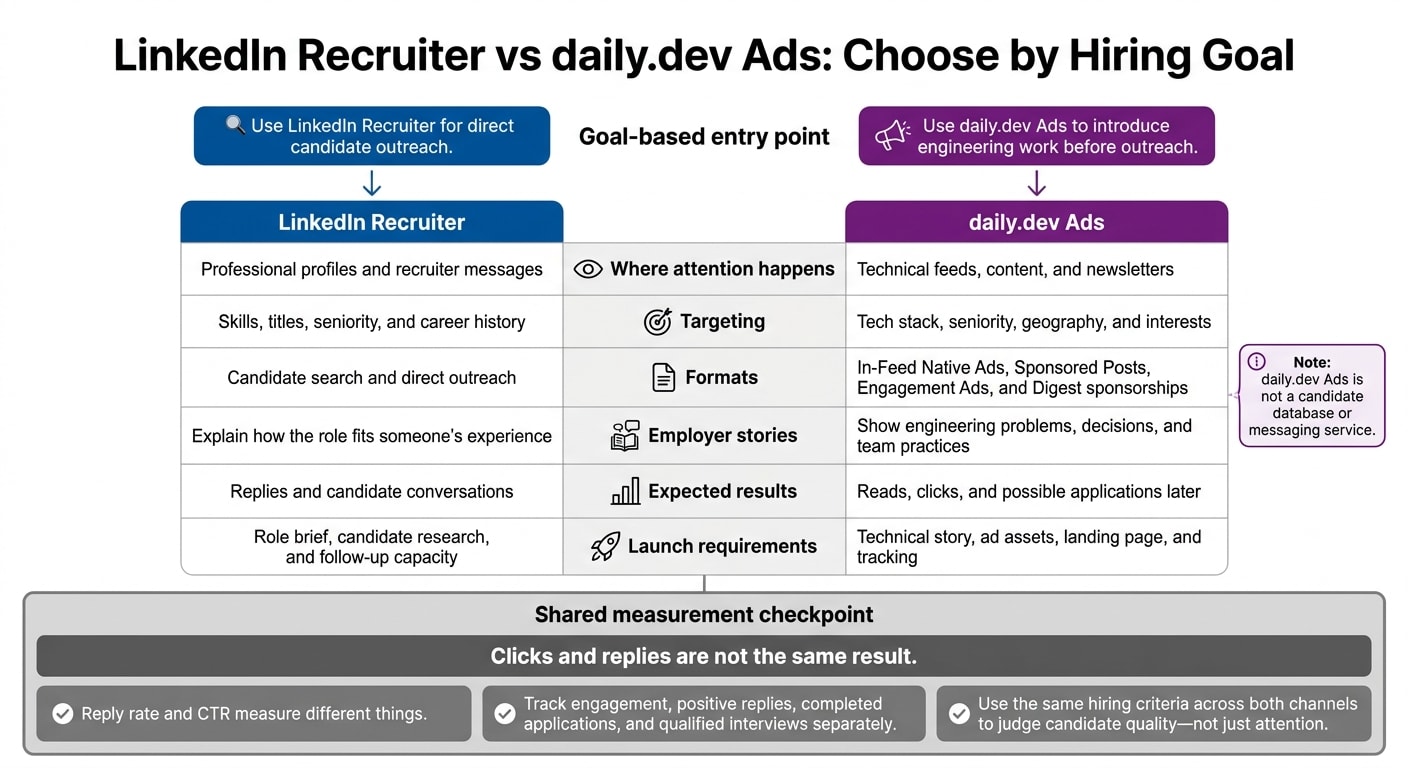
Use LinkedIn Recruiter for direct candidate outreach. Use daily.dev Ads to introduce engineering work before outreach. For an approved role, start with a defined search and personalized messages. For earlier awareness, pair technical content with a role-specific landing page.
The choice comes down to 6 factors: where developers spend attention, targeting, formats, employer stories, expected results, and launch requirements.
Quick Comparison
| Factor | LinkedIn Recruiter | daily.dev Ads |
|---|---|---|
| Where attention happens | Professional profiles and recruiter messages | Technical feeds, content, and newsletters |
| Targeting | Skills, titles, seniority, and career history | Tech stack, seniority, geography, and interests |
| Formats | Candidate search and direct outreach | In-Feed Native Ads, Sponsored Posts, Engagement Ads, and Digest sponsorships |
| Employer stories | Explain how the role fits someone’s experience | Show engineering problems, decisions, and team practices |
| Expected results | Replies and candidate conversations | Reads, clicks, and possible applications later |
| Launch requirements | Role brief, candidate research, and follow-up capacity | Technical story, ad assets, landing page, and tracking |
Clicks and replies are not the same result. Track engagement, positive replies, completed applications, and qualified interviews separately. Use the same hiring criteria across both channels to judge candidate quality - not just attention.
1. Use LinkedIn Recruiter to find and contact candidates
Direct sourcing on LinkedIn works best when you’ve defined the role and need specific candidates, not broad awareness. Use advanced filters and Boolean search to narrow your search by skills, title, experience, and location. For broad technical searches, include related titles instead of requiring one exact match. For leadership roles, look beyond title seniority: review team scope, architecture ownership, hiring responsibility, and career progression. Once you’ve narrowed the search, your message needs to explain why the role fits that person.
Filters find possible matches. Profile review helps you decide whom to contact. Treat profile matches and interest signals as starting points, not proof of fit or intent. Check recent responsibilities for hands-on experience, since profiles can be incomplete or outdated. Use interest signals to prioritize outreach. Your role brief then gives you the details to write a specific message that earns a reply.
Prepare the role brief and outreach process
Before building your search, separate must-have capabilities from preferred experience. Agree on technical scope, decision authority, reporting lines, location, compensation, and priorities for the first six months. Your own profile should also make your employer, recruiting focus, and place on the hiring team clear.
Research each shortlisted candidate before reaching out. Connect one verified detail from their work to the role’s technical problem. Explain what they would own and set location expectations before asking for a conversation. Don’t make technical claims or promise benefits you haven’t verified.
Create one project per role, with stages, notes, and next actions. Decide how much follow-up your team can handle before launch, and give candidates something useful in each follow-up. Record concerns about compensation, location, scope, or timing so you can refine the brief and stay on good terms with people who aren’t ready to move. Use pipeline tracking and supported ATS connections to keep notes and handoffs intact.
2. Use daily.dev to reach developers through technical content
When it’s too early for direct sourcing, use daily.dev Ads to introduce your team’s work before recruiter outreach. Passive developers discover engineering stories through personalized feeds, Digest newsletters, topic discussions, communities, and open-source content. daily.dev Ads puts employer content in that mix - it’s not a candidate database or messaging service. Learn more about reaching passive developer candidates before recruiter outreach.
Match ad formats to employer stories
Choose the format based on how much explanation your story needs. In-Feed Native Ads work for a short introduction with a clear next step. Published specifications call for a 1,024 × 512 pixel image, a headline of up to 80 characters, and 350 to 650 characters of body copy.
Use a Sponsored Post when an architecture decision, migration, or tooling challenge needs more room. It includes guaranteed feed impressions, a read-floor commitment, and canonical republishing.
Digest newsletter sponsorships by topic track fit stories about a specific technical interest. Match the track to your engineering work, then link to a page that continues the topic - not a generic careers page.
Engagement Ads provide repeated exposure in context through Branded Tags, Keyword Spotlights, Custom Upvotes, Tag Page Takeovers, and Stack Placements. Pair these formats with detailed engineering content, not just a hiring slogan.
Define the audience and application path
Once you’ve set the story, make it easy for readers to apply or express interest. Target by tech stack, seniority, geography, and interests, but treat these as signals of relevance - not job intent.
Send developers to a role page that matches the stack and geography used in your targeting. Include geographic eligibility, required qualifications, compensation information where applicable, and a clear way to apply or join a talent community.
Use format-specific tracking tags. Measure content engagement separately from completed applications and qualified candidates.
3. Compare LinkedIn and daily.dev by hiring goal
Once the role is defined, use this table to choose the channel that fits your hiring bottleneck.
| Recruiting criterion | daily.dev | |
|---|---|---|
| Where attention happens | Professional network with profiles, roles, and recruiter messages. | Personalized feeds and technical content. |
| Targeting signals | Roles, skills, seniority, and career history. | Tech stack, seniority, geography, and interests. |
| Formats | Recruiter search, outreach, job promotion, and advertising. | In-Feed Native Ads, Sponsored Post, Engagement Ads, and Digest newsletter sponsorships by topic track. |
| Employer storytelling | Connect the opening to the candidate’s experience through tailored outreach. | Show engineering work through technical content. |
| Expected outcome | Direct conversations, referrals, screening calls, or declines. | Reads, clicks, engagement, and possible applications later. |
| Prerequisites | Defined search criteria and someone responsible for outreach and follow-up. | A well-supported story, defined audience, suitable ad assets, focused landing page, and conversion tracking. |
Reply rate and CTR measure different things. Reply rate shows how receptive people are to outreach. CTR shows how relevant the content is to them. A reply might be a polite decline. A click might show interest in a technical topic - not a job.
Neither metric proves candidate quality on its own. When choosing your channel mix around the hiring bottleneck, track qualified applications separately from engagement.
4. Choose your recruiting mix and measure candidate quality
Choose sourcing or awareness based on hiring needs
Let your hiring goal, audience, and team capacity guide the mix. Use LinkedIn Recruiter for defined roles that call for direct outreach. Use daily.dev Ads to build stack-specific awareness before outreach.
Build familiarity first, then direct interested readers to a role page. To plan that earlier stage, see how to reach passive developer candidates before recruiter outreach.
Set launch requirements and measurement
Set the brief and measurement plan before you spend. Document the seniority, stack, geography, work arrangement, and value proposition. Prepare technical proof and a role-specific page with a clear conversion event. Before launch, confirm the 2026 format set, targeting options, tracking requirements, and attribution rules.
For outreach, track replies and positive replies. For ads, track qualified traffic, engaged visits, and completed applications. Use source-tagged links, agree on attribution windows, and score all applicants with the same technical and role-fit rubric. Keep the original source attached when candidates return later.
Neither a click nor a case study proves candidate quality. Keep engagement metrics separate from evidence of hiring quality.
Plan your next step
If you're still unsure about the mix, use your audience, objective, and measurement plan to choose the next move. You can discuss campaign fit with daily.dev.
FAQs
How long should I test daily.dev Ads for recruiting?
Start with a 90-day pilot that looks beyond clicks. Track what happens next: signups, activations, and qualified opportunities.
Keep the scope tight: one specific audience, one core offer, and one primary conversion event. Aim for steady visibility, not short-term spikes. This helps you understand how repeated exposure shapes a candidate’s or developer’s path into your funnel.
How can I attribute delayed applications to daily.dev Ads?
Use campaign-tagged links to connect a candidate’s first visit with later conversions in your CRM or analytics platform. Look beyond immediate clicks: link ad visits to signups and activations to track later signs of hiring interest.
Ask your hiring team to record when candidates mention your technical content or engineering blog posts during interviews. Their feedback can help confirm whether your brand influenced their decision to apply.
What if my recruiting ads get clicks but no applications?
Clicks show interest. Applications need a clear fit and an easy next step. Your landing page may not match what developers are looking for or give them enough technical detail.
Spell out the problem, implementation requirements, and supported versions. For complex roles or tools, consider a Sponsored Post to add technical context and a read-floor commitment. Compare conversion rates by seniority or stack, and make sure the ad matches the work described.