

If you market to developers, a big part of your display budget may never reach them. The article’s main point is simple: many developers use ad blockers, so programmatic display often loses reach first, while first-party native placements, newsletter sponsorships, sponsored content, and community presence still get through more often.
Here’s the short version:
- Display ads can fail before they even load when they depend on third-party ad servers, scripts, or pixels.
- Tracking can fail too, which means retargeting pools shrink and attribution data gets patchy.
- Native is not always safe: if it runs through a third-party ad stack, it can still be blocked.
- Email-based sponsorships are outside browser blockers, so newsletters and digest placements keep working.
- Community and educational content can put your brand in front of developers without relying on display delivery.
- You should compare channels by blocker exposure, trust, targeting, and measurement.
- Multi-touch attribution matters because last-touch often misses earlier touches from newsletters, content, and community.
Bottom line: if you’re still putting heavy spend into blocked display, I’d rethink the mix and shift budget toward channels developers can still see.
Quick Comparison
| Channel | Chance of being blocked | Trust level | Targeting | Measurement | Best use |
|---|---|---|---|---|---|
| Programmatic display | High | Low | Medium | Low | Broad awareness |
| Native in-platform | Low | High | High | High | Trials and activation |
| Newsletter sponsorships | None | High | High | High | Launches and brand reach |
| Sponsored content | Low | High | Context-based | Medium | Product education |
| Community presence | None | Very high | Niche | Low | Long-term trust |
If you want the article in one sentence: stop trying to fix blocked display and put more budget into channels that developers still read, open, and trust.
What ad blockers actually stop in developer marketing
Ad blockers stop third-party ad requests, tracking pixels, and scripts. So if a campaign relies on an external ad server, it often never appears at all. When both the creative and the tracking pixel run through a third-party ad-serving domain, every request is exposed. And programmatic display depends on that setup from end to end.
Programmatic display loses reach first
Standard banner ads and third-party display tags pull scripts from outside ad-server domains. Filter lists flag those domains, so blockers shut them down with little trouble. Developers use ad blockers at rates well above the general internet population . That means a programmatic display campaign can lose a large chunk of its planned reach before a single impression is even logged.
There’s another problem too. When retargeting pixels and view-through trackers get blocked, attribution starts missing key data. As a result, display can look weaker than it actually is.
Native ads are more resilient, but not automatically immune
This is why the delivery path matters more than the ad label. Native ads aren’t safe by default. If a native placement is still served through a third-party ad server, it can still be blocked. First-party placements work differently: when an ad appears directly inside a platform’s own feed through that platform’s own infrastructure, there’s no outside ad-server request for a filter list to stop.
The same idea shows up across formats:
| Ad format | Blocker impact | Why it works or breaks |
|---|---|---|
| Programmatic display | High | Depends on third-party ad-serving scripts and domains |
| Native served through a third-party ad server | Moderate | Can be blocked if the serving domain or script is on a filter list |
| First-party native in-feed | Minimal | Rendered via the platform's own infrastructure, with no external request to catch |
| Newsletter sponsorships | Unaffected | Delivered through email, so browser blockers do not interfere |
Once you see what blockers strip out, the next step is figuring out which channels can still get in front of developers.
Which channels still reach developers who use ad blockers
For developer audiences with heavy ad blocker use, the delivery path can decide whether an ad gets seen at all. First-party placements, email, and community-led content tend to get through far better than standard display. So in practice, you’re usually looking at three paths: in-platform native, email, and community-led content.
Native in-platform placements inside a developer feed
When a placement shows up inside a platform’s own feed and is served through that platform’s own system, it’s less likely to get filtered than a standard display ad. The reason is pretty simple: the ad appears as part of the platform experience, so browser extensions have less to block.
That doesn’t mean every placement gets a free pass. It still needs to feel relevant. Good targeting helps the placement stay useful instead of becoming another annoyance in the feed.
When feed reach matters less than inbox reach, newsletters become the next option.
Newsletter sponsorships and digest placements
Email sits outside browser-based blockers. So a sponsored slot in a developer newsletter reaches subscribers in the inbox, not on a web page where an extension can filter it out.
That setting matters more than it may seem. People who subscribe to a technical newsletter have already opted in to that publisher’s relationship. Because of that, a sponsorship can borrow some of that trust. Personalized digest placements can work the same way when they’re sent through the publisher’s own distribution channel instead of a third-party display stack.
Sponsored content and community presence
Sponsored content works best when it adds something useful instead of interrupting someone in the middle of a task. A tutorial, deep dive, or explainer can earn attention in the places developers already read because it helps them do something better or understand something faster.
Community presence adds another path that blockers can’t strip away. If you show up often in forums, developer communities, and other discussion spaces, people start to recognize you over time. That kind of visibility isn’t blocked. It’s read, shared, and remembered. Those are the channels worth comparing when display reach falls apart.
How to rebuild your developer media mix for an ad-blocked audience
Once you know which channels still reach developers, the next move is simple: stop paying for display inventory that never gets seen.
Audit wasted reach before moving budget
Before you shift spend, line up reported impressions against clicks, trials, sign-ups, and retargeting growth. If impressions look strong but downstream activity stays flat, that's a red flag.
The biggest warning sign is a gap between what ad platforms report and what your pipeline shows. Check platform dashboards against server logs and CRM activity. When those numbers don't line up, you're usually looking at blocked delivery, weak tracking, or both. Put plainly: many developers never saw the display ads at all.
That gap gives you a practical way to decide where budget goes next.
Shift spend toward formats that survive ad blockers
Move budget away from programmatic display and into formats that don't rely on third-party ad scripts.
A few channel patterns tend to hold up well:
- Native in-platform placements are a strong fit for trial sign-ups and product activation.
- Newsletter sponsorships work well for product launches and brand building.
- Sponsored tutorials and explainers help with product education and trust-building.
- Community presence supports long-term validation.
The pattern here is pretty clear. The closer the format is to the place where developers already read, learn, and talk shop, the better your odds.
Compare channels by blocker exposure, developer trust, and measurement reliability
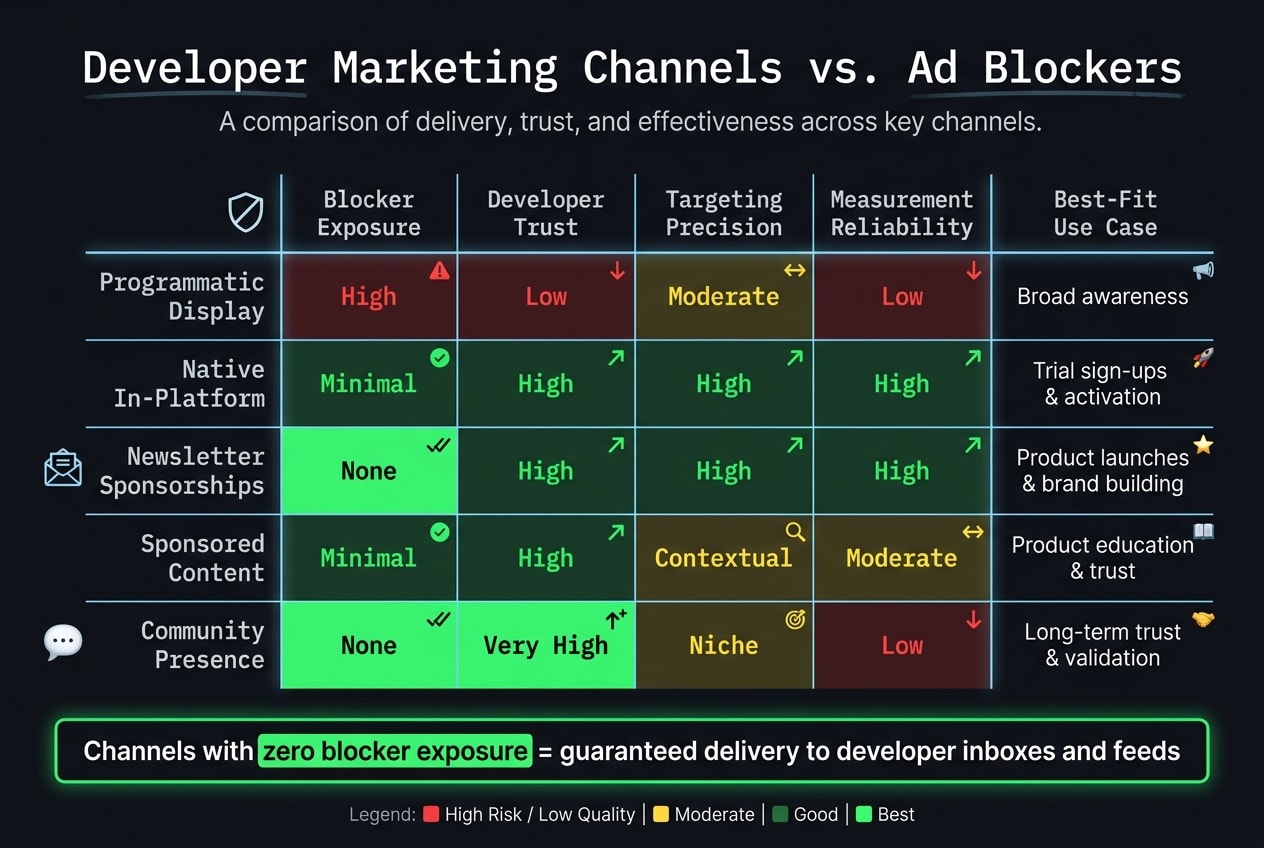
Use these four criteria to compare channels before moving budget: blocker exposure, developer trust, targeting precision, and measurement reliability.
| Channel | Blocker Exposure | Developer Trust | Targeting Precision | Measurement Reliability | Best-Fit Use Case |
|---|---|---|---|---|---|
| Programmatic Display | High | Low | Moderate | Low | Broad awareness |
| Native In-Platform | Minimal | High | High | High | Trial sign-ups and product activation |
| Newsletter Sponsorships | None | High | High | High | Product launches, brand building |
| Sponsored Content | Minimal | High | Contextual | Moderate | Product education, deep-funnel trust |
| Community Presence | None | Very high | Niche | Low | Long-term trust, early-stage validation |
Pay close attention to the measurement column. Channels with low measurement reliability can still drive real business impact, but that impact often gets missed in last-touch attribution.
That's where teams get tripped up. A developer might see your brand in a community, read a sponsored tutorial a week later, then convert from a direct visit or branded search. If you're using single-touch attribution, the earlier touches may get little or no credit.
Use multi-touch attribution for a better read. It gives brand-building channels more of the credit they often deserve and helps you avoid shifting budget based on an incomplete picture.
Conclusion: stop trying to rescue blocked display
That comparison points to one clear takeaway: the main issue is reach. A lot of developers never see display ads in the first place, and blocked campaigns are also much harder to measure with any precision.
Once delivery gets blocked, optimization stops doing much. At that point, channel choice matters more than bid tuning. Put budget into places developers still run into: native in-platform placements, newsletter sponsorships, sponsored content, and community presence. Native in-feed placements inside a developer feed show up where developers already spend time reading.
For developer audiences, reach comes from where the content lives, not from trying to push display through blockers.
Bottom line
- Blocked display doesn’t just underperform - for many developers, it never shows up.
- First-party native placements, email sponsorships, sponsored content, and community presence can reach developers that display misses.
- When blockers are in play, multi-touch attribution gives brand-building channels the credit they deserve.
FAQs
do ad blockers affect native ads?
Yes, but native ads tend to hold up better than standard display ads.
Here’s why: native ads sit right inside a platform’s content feed and are rendered server-side. So they’re less likely to get filtered out by ad blockers. They also blend into the browsing experience more naturally, which helps cut down on the banner blindness that often hurts display ads.
how do you advertise to people with ad blockers?
To reach developers who use ad blockers, step away from intrusive display ads. Those formats get blocked all the time anyway. Put more effort into native, in-feed, and in-workflow placements instead.
The goal is simple: show up in places developers already trust, in formats that feel like part of the experience rather than a disruption. In practice, that means leaning into developer-specific environments and writing ads that read more like useful content than a banner screaming for attention.
Technical proof matters here. Use things like code snippets, architecture diagrams, and concrete data to make your message feel grounded. And instead of relying on invasive tracking, focus on contextual targeting so the ad matches what the developer is already doing or reading.