
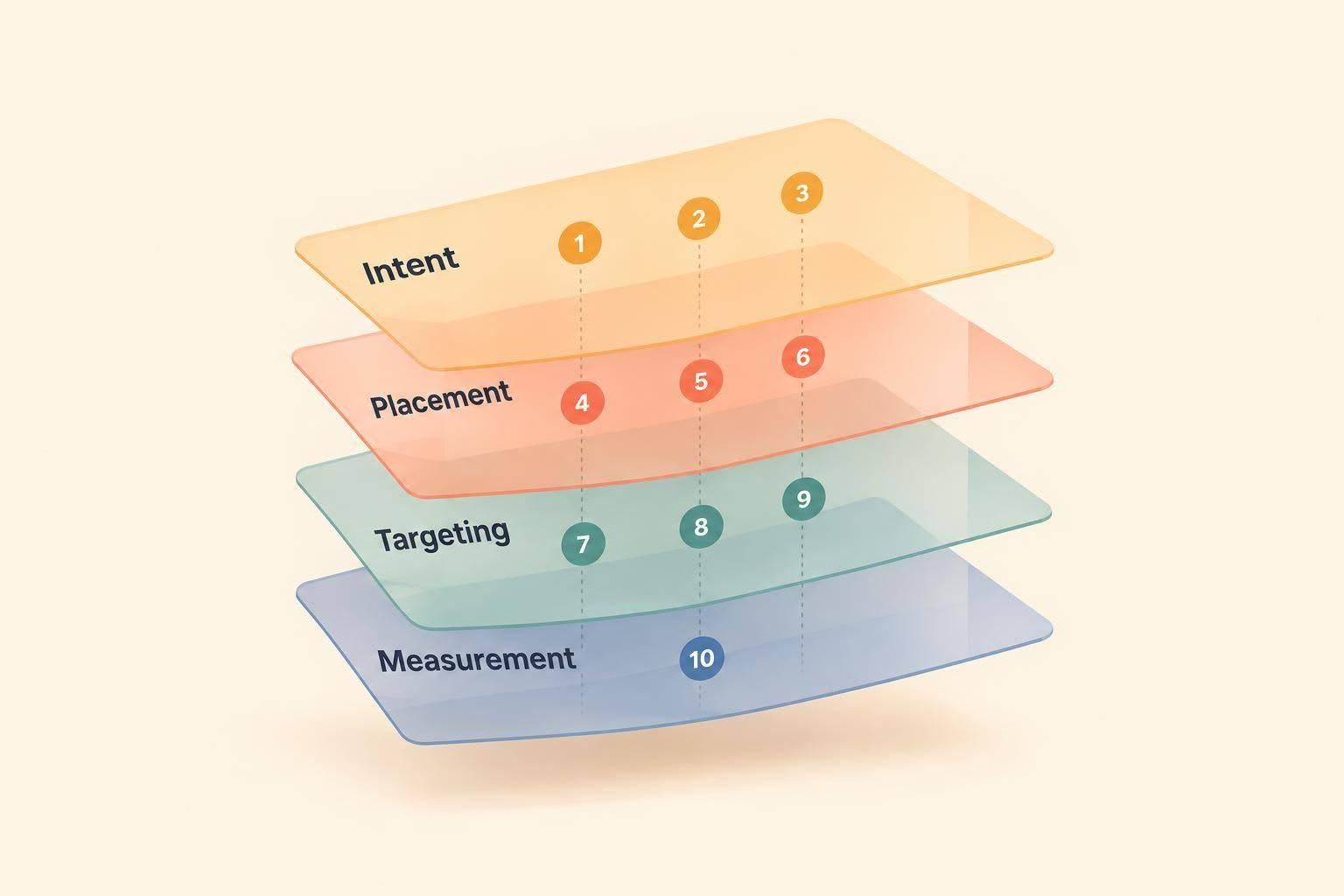
I’d choose a developer ad channel by what engineers are doing - not just who they are. Google fits searches for a fix, LinkedIn fits role-based outreach, and daily.dev fits technical discovery.
This comparison covers 10 channels as of October 7, 2026. I compare audience targeting, placements, buying stage, and measurement, including where stack, seniority, geography, and interests help - and where they don’t.
Quick Comparison
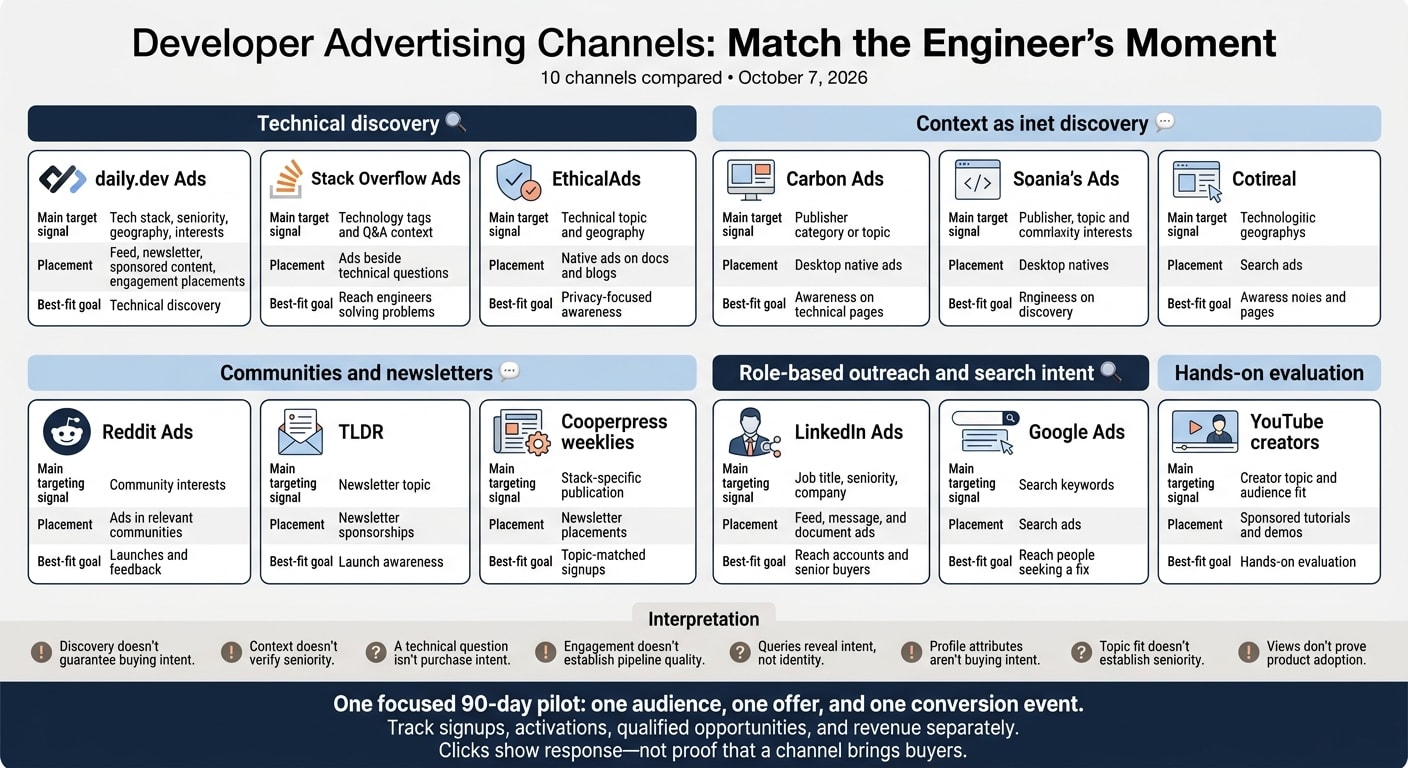
| Channel | Main targeting signal | Placement | Best-fit goal |
|---|---|---|---|
| daily.dev Ads | Tech stack, seniority, geography, interests | Feed, newsletter, sponsored content, engagement placements | Technical discovery |
| Stack Overflow Ads | Technology tags and Q&A context | Ads beside technical questions | Reach engineers solving problems |
| EthicalAds | Technical topic and geography | Native ads on docs and blogs | Privacy-focused awareness |
| Carbon Ads | Publisher category or topic | Desktop native ads | Awareness on technical pages |
| Reddit Ads | Community interests | Ads in relevant communities | Launches and feedback |
| LinkedIn Ads | Job title, seniority, company | Feed, message, and document ads | Reach accounts and senior buyers |
| Google Ads | Search keywords | Search ads | Reach people seeking a fix |
| TLDR | Newsletter topic | Newsletter sponsorships | Launch awareness |
| Cooperpress weeklies | Stack-specific publication | Newsletter placements | Topic-matched signups |
| YouTube creators | Creator topic and audience fit | Sponsored tutorials and demos | Hands-on evaluation |
My starting point: one 90-day pilot, one audience, one offer, and one conversion event. I’d match the message to the engineer’s role, then track signups, activations, qualified opportunities, and revenue separately. Clicks show response - not proof that a channel brings buyers.
1. daily.dev Ads
daily.dev Ads reaches software engineers during technical discovery, as they browse content and look for new solutions. Start with tech stack, then narrow your audience by seniority, geography, and interests. The tech-stack targeting guide explains how. Next, choose an ad format based on how much technical detail your message needs.
In-Feed Native Ads appear in engineers’ discovery feeds. Newsletter Ads reach their inboxes through the Digest, organized by topic track.
For deeper technical education, Sponsored Content offers guaranteed distribution, a read-floor commitment, and canonical republishing. Use it when buyers need more technical context before taking action.
Engagement Ads include Branded Tags, Keyword Spotlights, Custom Upvotes, Tag Page Takeovers, and Stack Placements. Homepage Sponsorship gives your brand a homepage presence. In 2026, Agent Ads are in early access for AI visibility on pages that AI agents read. After choosing your format, define success around the downstream action you want people to take.
Measure delivery, engagement, and business outcomes separately: impressions; clicks and interactions; then signups and activations. Use campaign-tagged links with your analytics or CRM to connect visits to signups and activations. Before launch, check reporting and attribution for your chosen format.
2. Stack Overflow Ads
Stack Overflow Ads reach software engineers as they solve technical problems, placing ads beside relevant Q&A threads.
Tag-targeted campaigns let advertisers focus on relevant technologies because Stack Overflow groups content by topic. Reports also show performance by technology tag. Add a post-signup question asking users how they found you to help track delayed conversions.
Ad blocking can reduce the reach of display ads.
3. EthicalAds
EthicalAds reaches software engineers through documentation sites, open-source projects, and technical blogs. It serves small native ads without third-party cookies, cross-site tracking, or behavioral profiling.
The tradeoff: you target context, not identity. Targeting options include technical topics such as Python, JavaScript, DevOps, Data Science, and Security, plus geography. EthicalAds works best for awareness and early consideration when your product fits documentation or technical reference content. Keep your ad copy specific and useful.
For buyers, the main limit is measurement depth. Reporting focuses mostly on clicks and geography. It doesn’t offer long-path attribution or verified professional identity.
4. Carbon Ads
Carbon Ads also reaches readers browsing documentation, but its ad inventory is more limited: desktop-only placements, one native text-and-image ad per page, and contextual targeting based on the publisher’s category or topic.
Use it for early awareness and consideration on technical pages with little clutter. Start with the technical problem, explain the solution, and give readers a clear CTA.
Measure response with CTR, and track qualified signups separately.
5. Reddit Ads
Reddit Ads reaches software engineers as they discuss technical problems in subreddits. That makes it a good fit for product launches and early feedback, especially when engineers are already talking about the problem your product solves. Lead with the problem, the technical angle, and the outcome - not salesy, brand-first claims. Reddit reaches engineers through conversations rather than search intent or job titles.
Use the Reddit Pixel to track signups and trials, and give each ad variant its own UTM parameters. Upvotes and comments show engagement, not pipeline quality. Reddit can help create demand, not just turn existing interest into responses.
6. LinkedIn Ads
When you need to reach a named account or senior buyer, switch from context-based channels to profile-based targeting. LinkedIn Ads works best for account-based campaigns aimed at senior technical buyers. Combine job titles with company lists or company-size filters. Then use seniority filters to separate individual contributors from managers and directors, giving each group a message that fits their role. It’s a good fit when role and account matter more than technical context.
Treat profile data as a role signal, not buying intent. Titles are self-reported and often out of date. Many users visit LinkedIn to hire, network, or build their brand - not to buy.
For 2026, use Sponsored Content, Message Ads, or Document Ads to share technical content. For employer branding, use single-image or video ads to show company culture and engineering work.
LinkedIn often reaches several roles within a buying committee. Import CRM outcomes - meetings booked, trial activations, SQLs, and closed-won revenue - and optimize for qualified pipeline, not form fills.
7. Google Ads
When role-based targeting is too broad, Google Search Ads can reach software engineers as they search for a technical fix. Queries reveal intent, not identity.
Start with exact-match and phrase-match keywords that reflect the problem your tool solves. Add negative keywords such as “jobs,” “salary,” and “hiring” to filter out recruiting searches.
Use the same technical language in your ads that engineers use in their queries. Align each ad and landing page with one outcome: a documentation visit, trial signup, or demo request.
Track UTMs in your product analytics and CRM, and import offline conversions into Google Ads. Add a post-signup survey to collect self-reported attribution that last-click reporting misses. Optimize for cost per signup and cost per trial - not clicks. Use this approach only when search intent is clear and measurable.
8. TLDR
TLDR is best suited to launch-time awareness: a single newsletter send can reach a broad technical audience, but it’s not built for precise targeting.
Choose based on topic fit, not total reach. For niche tools, reaching people outside your ideal customer profile can waste ad spend. Before booking, confirm available formats - sponsored blurbs, dedicated sends, and logo placements - and lead times. Placements may need 4 to 8 weeks of advance planning.
Set up reporting before the newsletter goes out. Track sends, sponsor link clicks, and attributed conversions separately. Then use your own analytics to judge results based on signups, trials, or demos.
9. Cooperpress weeklies
Cooperpress weeklies offer topic-specific newsletter placements for technical content and campaigns built to drive signups. They’re a good fit when engineers already read about the stack or framework you’re targeting. Pick the publication by stack, then tailor your message to its readers.
Options include JavaScript Weekly, Node Weekly, Golang Weekly, Ruby Weekly, Frontend Focus, and React Status. A topic match doesn’t tell you readers’ seniority, so ask for audience details before booking.
Also confirm each publication’s available placement formats, whether the run is recurring, and what reporting you’ll receive. Use separate UTMs for each title and send to track visits, signups, and ROI by placement. Each weekly serves a different technical audience, so treat each title as its own channel rather than combining them into one newsletter buy.
10. YouTube creators
Creator tutorials and product demonstrations can reach engineers as they evaluate a tool. Tutorials help viewers get hands-on; demonstrations show the product in action. Let creators explain technical details in their own voice rather than read a polished sales script.
A negotiated sponsorship sits within the creator’s video, while a platform-served ad runs separately. Work with the creator to agree on the segment, deliverables, and approach. Integrated segments are less exposed to browser-level blocking because they’re part of the video itself.
Before booking, check whether the creator’s topics fit your tech stack and the seniority level you want to reach. Agree on the campaign objective, technical claims, and clear sponsorship disclosures before production starts.
Send interested viewers to documentation, a repository, or a live sandbox that matches the video. Measure whether viewers try the tool - not just whether they watch. First API calls, sandbox session duration, and CLI downloads can help show that.
Some viewers find a tool on YouTube, then search for it directly later. Pair post-signup surveys with product signals to track that path. After the video goes live, watch for spikes in GitHub stars, npm/PyPI package installs, or documentation deep-views to understand its indirect impact.
2. Match targeting and ad messages to seniority
Match your targeting to the role you want to reach. daily.dev Ads lets you target by seniority, tech stack, geography, and interests. LinkedIn Ads uses professional attributes, including job title, company, and seniority. Documentation placements on EthicalAds and Carbon Ads offer context through signals like page topic - not proof of the reader’s role.
For junior engineers, start with a clear task and an easy next step. For senior engineers, explain the problem, integration requirements, and trade-offs. Make supported versions, limitations, and implementation details easy to find on your technical landing page.
For staff engineers, focus on architecture, adoption across teams, and migration risk. For engineering managers, show how the tool affects team productivity and rollout effort. Back any promised outcome with evidence. These are messaging ideas to test, not rules that apply to everyone with the same title.
Technical interest doesn’t mean buying authority. A click on a code example may point to a potential champion, but it doesn’t tell you who owns the budget. Engineers may recommend a tool while managers or other stakeholders approve the purchase. Use Developers vs. Engineering Managers: Who Decides to Buy Your Tool? to separate adoption signals from purchasing roles, and Tech Stack Targeting to sharpen technical relevance.
Build each ad around a specific problem and fit it to the placement. Show the product workflow, check technology references, and back performance claims with documented evidence. Make sure the landing page delivers on the ad’s promise. For technical evaluation, use calls to action such as “View the docs” or “See code examples,” and keep sponsorship disclosures clear.
3. Measure qualified outcomes, not just clicks
Once targeting is set, track what each channel delivers. Use the same scoring ladder across every channel, with separate measures for delivery, engagement, and business results. Before launch, define a qualified visit and connect it to a signup, activation, or demo request. Apply those rules consistently so you can compare channels on equal terms.
Keep creation, activation, PQL, SQL, and revenue separate. Define each stage once, then report them in sequence.
Set attribution windows before launch, too. Compare results over the same timeline and use the same outcome definitions for every channel. Report cost per activated account and cost per qualified opportunity, then track trial-to-paid conversion as later conversions come in.
4. Choose channels that fit your campaign goal
Match your channel to the moment of intent your campaign needs. Use the table below to compare placements and what each can - and can't - tell you.
| Campaign goal | Best-fit channel | Best placement | Watch out |
|---|---|---|---|
| Feed discovery | daily.dev Ads | In-Feed Native Ads | Discovery doesn't guarantee buying intent. |
| Documentation context | EthicalAds, Carbon Ads | Documentation placements linking to docs, GitHub repos, or free-tier signups | Context doesn't verify seniority. |
| Technical problem-solving | Stack Overflow Ads | Relevant Q&A placements | A technical question isn't purchase intent. |
| Community discussion | Reddit Ads | Relevant community placements | Engagement doesn't establish pipeline quality. |
| High-intent search | Google Search Ads | High-intent queries that signal a fix or comparison | Queries reveal intent, not identity. |
| Profile-based reach | LinkedIn Ads | Job-title and named-account campaigns | Profile attributes aren't buying intent. |
| Topic-matched newsletters | TLDR, Cooperpress weeklies, daily.dev Ads | Newsletter placements by stack or use case, including Newsletter Ads in the Digest by topic track | Topic fit doesn't establish seniority. |
| Hands-on evaluation | YouTube creators | Sponsored tutorials and demonstrations | Views don't prove product adoption. |
Once you've picked the best-fit moment, test it with one focused 90-day pilot: one audience, one offer, and one conversion event. Keep the test controlled so you can check whether the fit holds up.
If the fit looks right, book a daily.dev Ads conversation. Have your audience, offer, conversion event, and timeline ready.
FAQs
How much should I budget for a daily.dev Ads pilot?
A recommended starting budget for a daily.dev Ads pilot is $5,000. That gives you room to test targeting and fine-tune your campaigns.
Want to start smaller? A $500 budget lets you test a specific segment, such as software engineers who use a particular tech stack in a specific location.
Monthly budgets generally range from $2,000 to $10,000. Use the onboarding form to outline your campaign needs.
How narrowly should I target software engineers?
Balance precision and reach to avoid wasted spend. Target individual contributors separately from engineering managers - they care about different outcomes. To reach engineers who actively code, focus on the languages, frameworks, and tools they use, not just their job titles.
With daily.dev Ads, refine your audience by tech stack, seniority, geography, and interests. This keeps your messaging relevant without narrowing your targeting too much.
When should I scale my daily.dev Ads campaign?
Scale only after your initial 30-day test shows consistent gains in developer-attributed signups, first API calls, first deploys, and activation - not just clicks. Targeting should also keep working across iterations.
Start small. Expand the tech stack, seniority, geography, and interest segments that perform best when you can afford more spend without hurting performance.
For 2026 planning, move budget to winning segments within the same month and update ad copy and visuals every 7 to 10 days.