

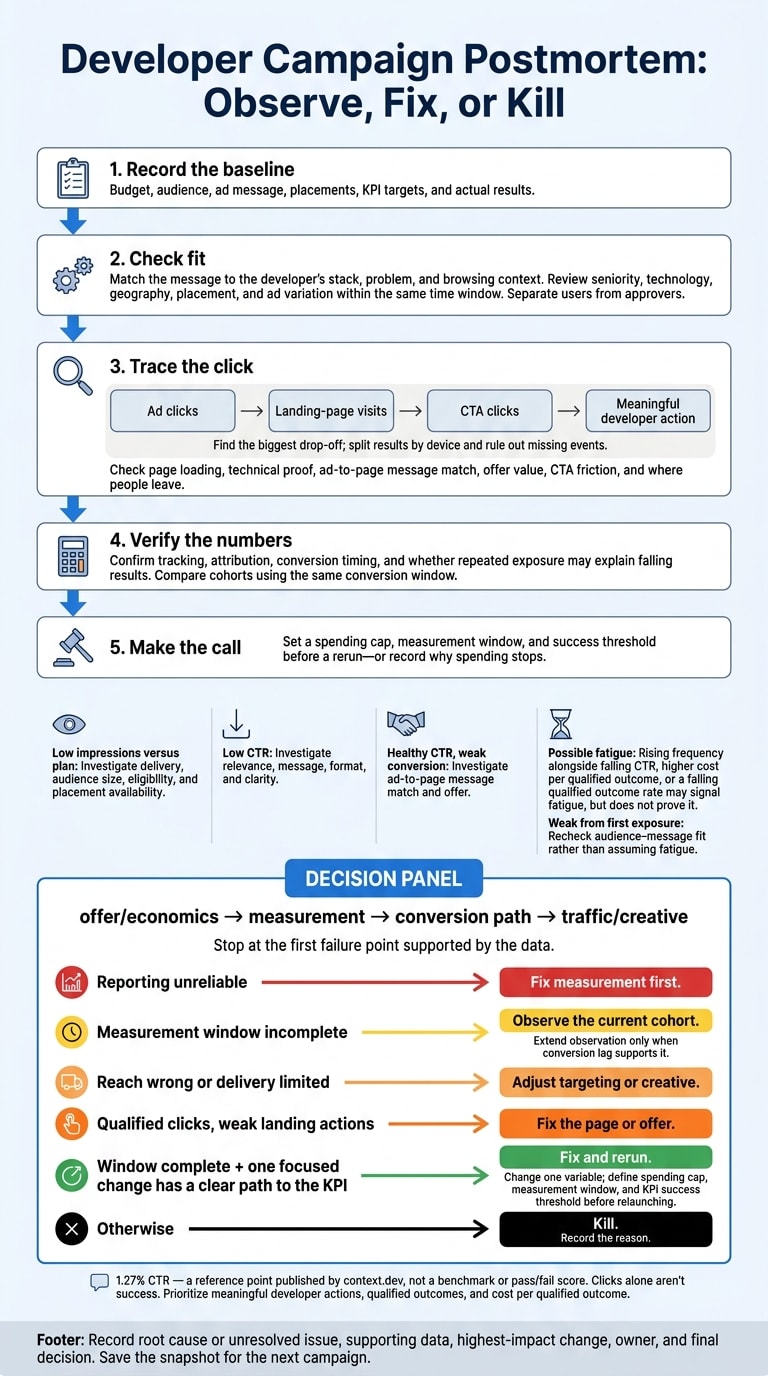
I don’t kill a developer campaign just because it missed its target. I check the offer, tracking, and conversion path first. Then I decide whether to test one change, wait for delayed conversions, or stop spending.
This postmortem template helps me separate what went wrong from what I’m only guessing:
- Record the baseline: budget, audience, ad message, placements, KPI targets, and actual results.
- Check fit: Does the message match the developer’s stack, problem, and browsing context?
- Trace the click: Check page loading, technical proof, CTA friction, and where people leave.
- Verify the numbers: Confirm tracking, attribution, conversion timing, and whether repeated exposure may explain falling results.
- Make the call: Set a spending cap, measurement window, and success threshold before a rerun - or record why I’m stopping.
I treat the article’s cited 1.27% CTR as a reference, not a pass/fail score. Clicks alone aren’t success. The test is whether they lead to meaningful developer actions and qualified outcomes.
Check audience, message, and placement fit
If the campaign missed its target, check fit before blaming delivery.
Match targeting and claims to the use case
☐ Audience fit: Match seniority, role, stack, and geography to the use case. Separate users from approvers.
☐ Message fit: State the developer problem and promised outcome. Verify every technical claim, and check that the offer makes sense to someone who doesn’t know your brand.
Review seniority, technology, geography, placement, and ad variation within the same time window.
Segment: ___ · Signal: ___ · Supporting data and sample size: ___ · Likely cause: ___ · Next test: ___
Check ad clarity and browsing context
☐ Clarity and readability: Can a developer spot the problem, value, and next step at a glance on desktop and mobile? Keep code and UI screenshots legible.
☐ Context fit: Match the language to the stack, reading mode, and objective without forcing a context switch.
For daily.dev Ads, check in-feed ad content against browsing behavior and post-page ad content against reading context. Make sure the CTA fits the objective and what the reader is doing.
Hypothesis: Changing ___ will improve ___ for ___ because ___. Change one major variable per test.
For a complex product, test a docs-first CTA against the existing CTA while keeping the audience, placement, and other creative elements unchanged; View docs can offer a lower-commitment next step.
Identify delivery and engagement issues
Treat these signals as hypotheses, not answers. Check whether clicks lead to the intended action and qualified outcomes.
| Signal | Investigate | Record the next check |
|---|---|---|
| Low impressions versus plan | Delivery, audience size, eligibility, placement availability | Which constraint limited delivery? ___ |
| Low CTR | Relevance, message, format, clarity | Which segment or variation was weakest? ___ |
| Healthy CTR, weak conversion | Ad-to-page message match and offer | Where did expectations stop matching the experience? ___ |
If both daily.dev Ads placements ran, complete the comparison below. Apply the same conversion and qualification criteria to both.
| Placement | User context | Intended action | Impressions | CTR | Conversion rate | Qualified outcome rate |
|---|---|---|---|---|---|---|
| In-feed | Browsing | ___ | ___ | ___ | ___ | ___ |
| Post-page | Reading | ___ | ___ | ___ | ___ | ___ |
If a segment or placement underperformed, check the landing page and offer next.
Audit the landing page and offer
If people clicked but didn’t convert, check the landing page and offer next.
Check message match, proof, and load performance
- Promise and proof: Match the landing-page headline to the ad’s promise. Show the same use case on the first screen, and keep terminology consistent. Lead with exact numbers, benchmarks, or technical specs - not vague claims like “fast.”
- Load and browser behavior: Test page loading and completion of the intended action in common desktop and mobile browsers. Check for device-specific problems before blaming the offer.
If the page loads properly and the message matches, check whether the offer or CTA is holding people back.
Check the offer and required action cost
Value and friction: Explain what developers get, and match the CTA to that value. Whether you’re offering tool access, technical resources, event registration, or demos, ask only for the information needed to deliver them. Explain account requirements, permissions, setup steps, and commitments before the click. Show value before asking for personal information.
Offer hypothesis: ___ · Friction: ___ · Evidence: ___ · One test: ___
If friction is low and the offer is clear, check where people leave the funnel.
Find the largest funnel drop-off
Find the biggest drop-off between an ad click and a meaningful developer action. Split results by device, and rule out missing events before blaming user behavior.
| Stage | Confirm event definition | Count | Drop-off |
|---|---|---|---|
| Ad clicks | Recorded ad clicks; note total versus unique | ___ | - |
| Landing-page visits | Attributed visits that reach the page | ___ | ___% |
| CTA clicks | Clicks on the intended next step | ___ | ___% |
| Meaningful developer action | First meaningful action: ___ | ___ | ___% |
Check measurement timing and ad frequency
If the funnel looks intact but results are weak, check timing and ad frequency.
Verify tracking and the measurement window
Tracking audit: Check predefined conversion events and attribution rules against analytics, CRM, or product records. Make sure reporting covers the full delivery period and that the reported event matches the campaign KPI.
Once you’ve confirmed the event is correct, assess results using the right window.
Timing audit: Compare cohorts using the same conversion window. Extend the observation period only when conversion lag supports it. Record delivery dates: ___ · attribution window: ___ · observation cutoff: ___ · campaign changes, dates, and reasons: ___.
Compare CTR with a cited reference point
Use 1.27%, published by context.dev, as a reference point - not a benchmark. Give more weight to qualified outcomes and internal historical segments. Record CTR: ___ · qualified outcomes: ___ · cost per qualified outcome: ___.
A higher CTR doesn’t establish success if those clicks don’t lead to meaningful developer actions. If CTR drops over time, check exposure next.
Check for ad fatigue
After checking fit and timing, look for rising frequency alongside falling CTR, higher cost per qualified outcome, or a falling qualified outcome rate. These patterns may signal fatigue, but they don’t prove it. Compare segments over the same reporting interval.
| Audience segment | Average frequency | CTR trend | Qualified outcome trend | Exposure state | Recommended action |
|---|---|---|---|---|---|
| ___ | Unknown | Unreliable | Unreliable | Unverified | Validate tracking before diagnosing fatigue |
| ___ | ___ | Stable | Pending | Recent | Extend observation only if conversion lag supports it |
| ___ | Rising | Declining | Declining | Repeated | Test reduced exposure or new ad content |
| ___ | Low | Weak from outset | Weak | Initial | Recheck audience–message fit |
If engagement is weak from the first exposure, audience–message fit is more likely the problem than fatigue.
Conclusion: fix and rerun or kill
Turn the diagnosis into a decision: rerun with one fix, or kill the campaign.
Follow the fix-or-kill decision tree
Check in this order: offer/economics → measurement → conversion path → traffic/creative. Stop at the first failure point supported by the data.
If reporting is unreliable, fix measurement first. If reach is wrong or delivery is limited, adjust targeting or creative. If clicks are qualified but landing actions are weak, fix the page or offer.
If the measurement window isn’t complete, keep watching the current cohort. Once it’s complete, fix and rerun only if one focused change has a clear path to the KPI. Change one variable, and set the spending cap, measurement window, and success threshold before relaunching. Otherwise, kill the campaign and record why.
Record the final decision
Record the outcome right away so you can compare it directly with the next campaign.
Root cause or unresolved issue: ___ · Supporting data and stable factors: ___ · Highest-impact change: ___ · Owner: ___.
Rerun date: ___ · Spending cap: $___ · Measurement window: ___ · KPI success threshold: ___ · Final decision: observe, fix and rerun, or kill: ___ · Kill rationale: ___.
Save the snapshot, results, and decision record for the next campaign.
FAQs
why do developer ads underperform?
Developer ads underperform when they don’t give readers the technical detail and precision they expect. Vague buzzwords can’t replace technical benchmarks. Pop-ups and autoplay videos interrupt the experience, while placements without technical depth miss the mark.
Targeting too broadly - or ignoring specific tech stacks - wastes budget. Slow load times, broken links, and pages that don’t work well on mobile push developers to abandon ads. Ads that miss these needs often get ignored or blocked.
what CTR is normal for developer ads?
Developer-focused campaigns typically see CTRs of 0.5% to 2.0%, though results vary by format . The published 1.27% CTR offers a strong reference point - roughly three times the industry standard for text-based developer ads - but it isn’t a universal benchmark .
Use these figures as a baseline, but put post-click metrics, such as documentation engagement and activation milestones, ahead of CTR alone .