
Timing changes campaign results. If I launch to developers in the wrong week, I can lose clicks, waste budget, and get buried by conferences, release news, or holiday slowdowns.
Here’s the short version:
- May and June are strong for conference-led campaigns
- August through October works well for release-related campaigns
- Late November to early December can work for cloud topics, but the window is short
- Late December is usually a poor time for launch-heavy campaigns
- January and September often fit education and awareness pushes
- Event promotion usually needs a 2–4 week lead-up
- Most campaigns need 6–8 weeks of prep, while Q4 often needs 10–12 weeks
I’d use public event calendars, my past campaign data, and internal launch dates together. Then I’d match the campaign goal to the time of year: product launch, event push, education, or brand work.
A simple way to think about it: pick the month from the big seasonal pattern, then pick the week from the event, release, or meetup window.
| Window | Best use | Watch out for |
|---|---|---|
| May–June | Product launches, event promotion | Heavy competition |
| Aug–Oct | Platform and tooling campaigns | Narrow topic focus |
| Jan & Sept | Education, awareness, nurture | Slower path to conversion |
| Late Nov–early Dec | Cloud and infra campaigns | Short runway before holiday drop |
| Late Dec | Light brand content only | Low response |
My takeaway: I should treat timing as part of campaign planning, not an afterthought. The right launch window can make the same spend work harder.
Map the year: when developer attention is highest and lowest
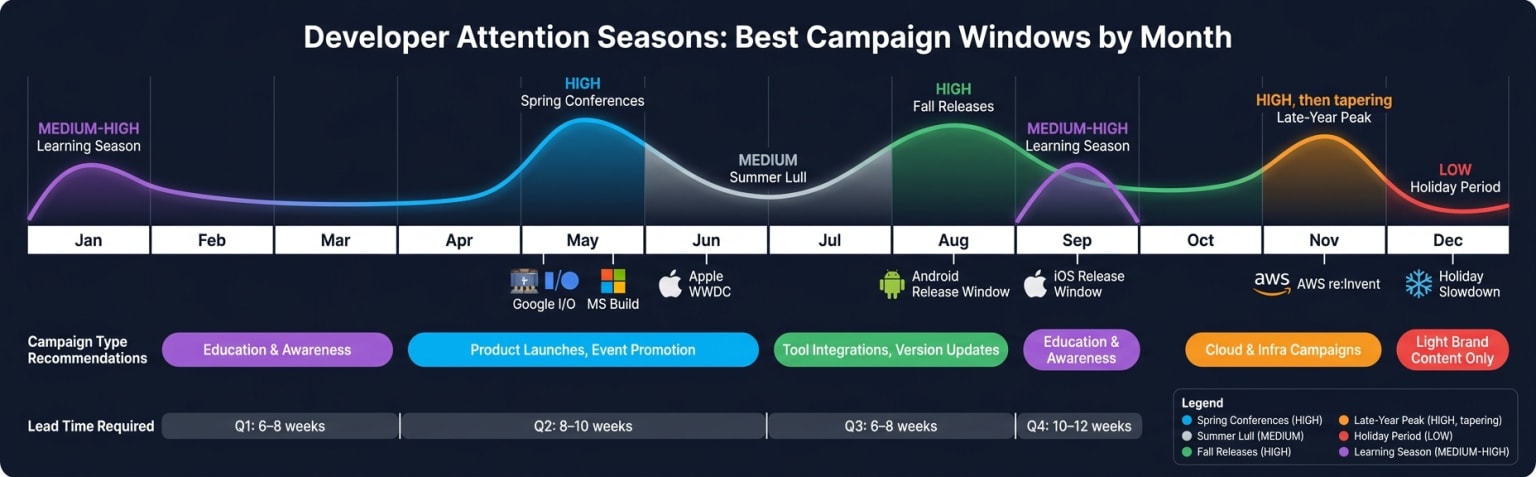
Developer attention rises and falls through the year. Some stretches are much stronger than others because of conference clusters, release cycles, hackathons, and holiday slowdowns. That matters because timing changes how much attention you can get for the same spend. Start with the broad season, then narrow in on the exact event or release window.
The five developer attention seasons
A useful rule of thumb is to think in five practical windows. Each one comes with its own attention level and campaign angle.
| Season | Months | Attention Level | Primary Driver |
|---|---|---|---|
| Spring conferences | May | High | Google I/O and Microsoft Build |
| Summer peak | June | High around WWDC | Apple WWDC |
| Fall releases | Aug–Oct | High | Android and iOS releases |
| Late-year peak | Late Nov–early Dec | High, then tapering | AWS re:Invent |
| Holiday period | Late December | Low | Holiday slowdown |
Spring conferences (May) are a strong window for conference-aligned awareness and consideration campaigns.
Summer peak (June) brings a clear spike around Apple WWDC. Outside that stretch, attention is less concentrated.
Fall releases (Aug–Oct) are a strong window for product- and framework-related campaigns.
Late-year peak (Late Nov–early Dec) creates a short surge in cloud and infrastructure attention before the holiday slowdown sets in.
The holiday period (late December) is a weak window. Major launches are usually better saved for another season.
Big seasonal patterns set the backdrop. Specific events decide the exact launch week.
Macro seasons vs. micro seasons
Conference weeks, hackathons, product launches, and developer meetups create shorter bursts of attention around a specific topic. Use the season to choose the month, then use the event to choose the week.
| Event Type | Engagement Window | Targeting Focus |
|---|---|---|
| Tech Conferences | 2–4 weeks before event | Attendees, specific languages |
| Product Launches | Launch week + 2 weeks | Tool-specific devs, senior roles |
| Hackathons | Duration + 1 week prior | Active devs, tech specializations |
| Developer Meetups | Week of event | Local developer communities |
Layer both together. The macro season sets your overall timing. The micro window sharpens your exact launch date and messaging.
Combine public calendars with internal campaign data
Use public event calendars and community agendas as your baseline. Then compare past launches by month and week to spot your best-performing windows.
Once you know the seasonal backdrop, you can line up the launch window with the campaign goal.
Choose the right launch window for your campaign goal
Once you know the seasons, the next step is simple: match your campaign goal to the window that gives it the best shot. Different seasons reward different types of campaigns, so timing isn't just a scheduling detail. It shapes how much attention you get and how people respond.
Match campaign type to season
Some campaign types line up better with certain parts of the year:
- Product launches tend to work best during conference season and release season.
- Event promotion usually needs a 2–4 week lead-up to build interest and drive signups.
- Awareness and education campaigns fit well in the January and September reset periods.
Campaign length matters too. Longer campaign cycles need more runway, while beta campaigns can move on a shorter timeline.
Check for conflicts and relevance
Before you lock in a date, do a quick conflict check. Skip launch week during Thanksgiving and the year-end break. Attention drops, and even strong campaigns can get buried.
Then look at conference overlap. If your launch lands during AWS re:Invent, you're fighting for attention during a major industry moment. That can make things harder, especially if your audience is already tuned in elsewhere.
For practitioner tools, timing should also match how people work. Launches often land better when they line up with sprint planning or workflow reset points.
Season-by-objective comparison table
Use this table to choose the right window before you lock dates.
| Season Type | Advantages | Disadvantages | Recommended Campaign Types |
|---|---|---|---|
| Conference Season (May–June) | High industry buzz; developers in discovery mode | High competition for attention and ad spend | Product launches, event promotion |
| Release Season (Aug–Oct) | High relevance for platform-specific tools | Narrow focus; may exclude non-mobile/web devs | Tool integrations, version updates |
| Learning Season (Jan/Sept) | High engagement with educational content | Longer evaluation cycles; slower conversions | Awareness, tutorials, nurture |
| Holiday Season (Nov–Dec) | Low active coding and review time | Major drop in active coding and tool research | Brand awareness, year-in-review content |
Each season supports a different job. After you pick the window, the next move is to turn that timing into a dated campaign calendar.
Build a season-aware campaign calendar
Once you choose the season, turn that choice into a launch calendar with clear deadlines, enough runway, and the right launch week.
Collect the dates that matter
Start by putting four groups of dates into one shared document:
- Developer events and release dates: Major U.S. conferences like Google I/O, MS Build, WWDC, and AWS re:Invent; Android and iOS release windows; and hackathon clusters that pull in your target audience.
- Internal milestones: Product launch dates, feature releases, and beta programs with fixed timelines.
- Budget cycles: When budget gets approved, when spend must be committed, and when fiscal quarters close.
- Low-attention periods: Thanksgiving week, the stretch between Christmas and New Year's, and any other time when past data shows low developer engagement.
When all of those dates live in one place, it gets much easier to spot good launch windows and avoid collisions.
Work backward 6 to 8 weeks from launch
A workback from your target launch date gives your team time for strategy, asset production, targeting setup, landing page QA, tracking, approvals, and budget sign-off.
For most launches, 6 to 8 weeks is a solid default. Q4 campaigns usually need 10 to 12 weeks.
Use one shared timeline so creative, demand gen, product, and legal can catch conflicts early instead of scrambling at the last minute.
Quarter-by-quarter planning table
Use this table as a starting point. Then adjust it based on your product category and audience segment.
| Quarter | Key timing signals | Best-fit campaign themes | Target Outcomes | Required Lead Time |
|---|---|---|---|---|
| Q1 | Budget kickoffs; new project planning | Tool evaluation; productivity | Signups; trial starts | 6–8 weeks |
| Q2 | Google I/O (May); MS Build (May); WWDC (June) | Innovation; new frameworks | Awareness; event attendance | 8–10 weeks |
| Q3 | Android (Aug); iOS (Sept) releases; post-summer reset | Mobile dev; performance optimization | App deploys; downloads | 6–8 weeks |
| Q4 | AWS re:Invent (Nov/Dec); holiday dips | Cloud; year-end learning | Enterprise leads; training | 10–12 weeks |
Use this calendar to pick your launch week. From there, line up placements, targeting, and reporting around that date.
Q4, in particular, needs early commitment. As Trevor Rawls, Senior Marketing Manager at Postmark, put it:
"The hardest part is usually reaching developers in a way that feels relevant instead of generic. They're quick to tune out broad marketing, so context and audience fit matter a lot."
That relevance starts with timing. Your calendar should guide launch timing, placement choices, and when budget gets locked in.
Run season-timed campaigns with daily.dev Ads and track what timing changes
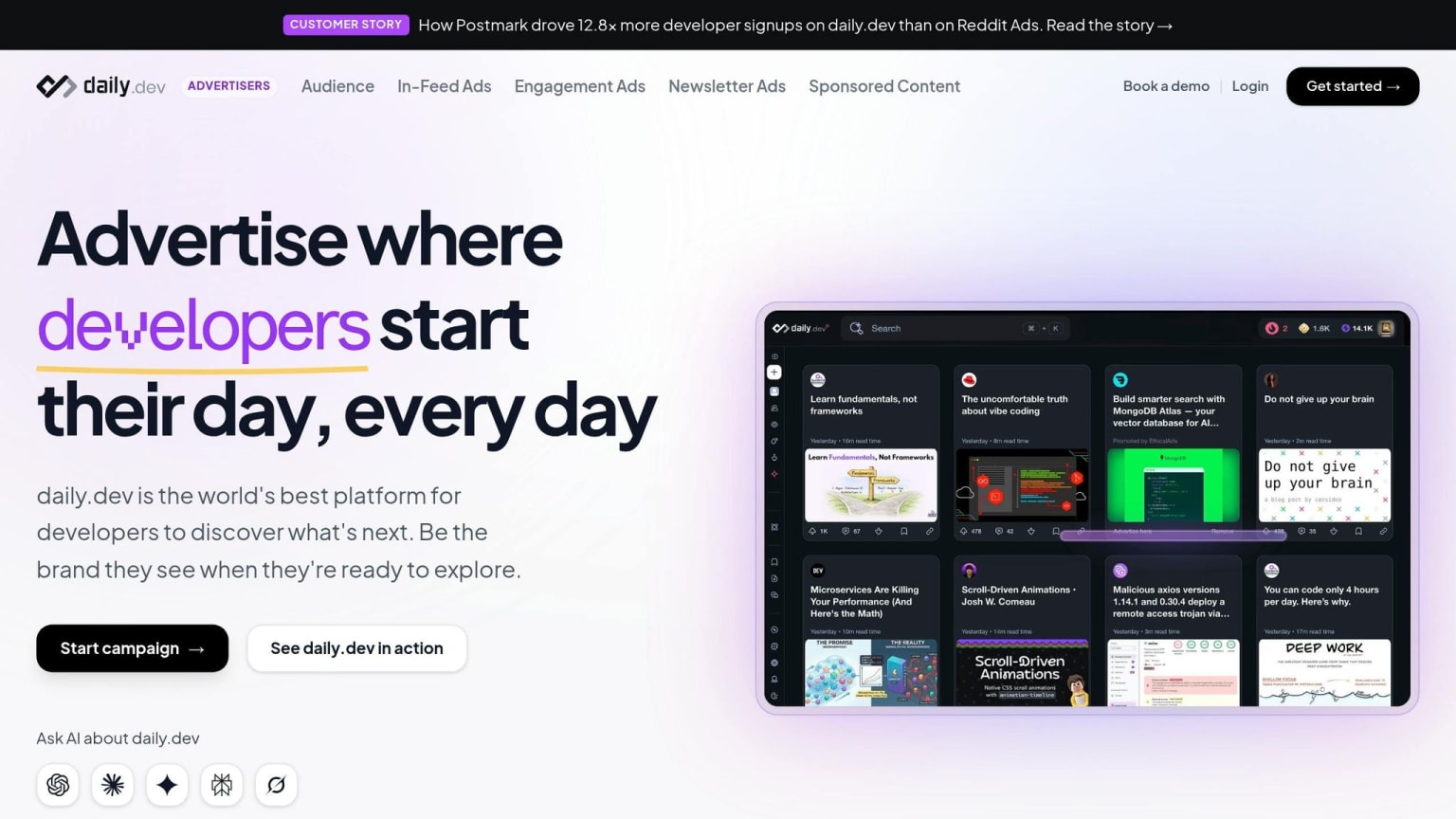
After you build a season-aware calendar, turn that timing into placement choices, targeting, and flight length. Once you've picked the season and launch week, the next move is simple: choose the placement that fits how developers are using content at that point in time.
Pick placements based on season and objective
When the launch window is locked in, match it to the placement that fits the moment. daily.dev Ads offers three native placement types:
- In-feed ads work best during planning periods and conference clusters, when developers are scrolling their feed and comparing tools. Use them for awareness.
- Post page ads show up when a developer is already reading an article. Use them during launch weeks and implementation windows.
- Personalized digest ads keep your message in context during announcement-heavy weeks. Use them for docs, templates, and guides.
Use targeting and scheduling to match developer moments
Placement is only part of the job. You also need to reach the people who are most likely to care during that seasonal window.
Targeting by seniority, programming language, tech stack, and topic interest helps you line up the message with the right developer at the right time. If you're promoting a DevOps tool during a release window, for example, target senior engineers and developers already working in that stack, not a broad general audience.
For scheduling, run burst flights around the event window, then keep a lighter baseline through the rest of the quarter.
Postmark's 2025 pilot targeted developers by stack, topic, and seniority, and reached a 1.54% new account creation rate. It then moved into an always-on monthly program.
"The biggest standout was the engagement quality, especially that the CTR looked amazing. That's the kind of result that gets attention internally, because it suggests the message is landing with the right audience." - Trevor Rawls, Senior Marketing Manager, Postmark
Conclusion: Make timing part of every developer campaign
The point isn't to chase every spike. It's to line up your campaign type with the moments when your audience is most open to the message.
Use this summary to pick the right placement and flight pattern at a glance.
| Placement | Best-Fit Season | Common Objective | Recommended Timing Pattern |
|---|---|---|---|
| In-feed ads | Planning periods and conference clusters | Awareness; trial signups | Always-on; burst around major events |
| Post page ads | Launch weeks and release windows | Conversions; tool adoption | Burst: launch week + next two weeks |
| Personalized digest ads | Conference weeks and announcement periods | Docs, templates, and guides; event promotion | Burst: 1–2 weeks around the event |
A season-aware calendar doesn't just help with launch timing. It also makes the next choices easier, from placement selection to budget timing.
FAQs
How do I choose the best launch week?
Choose your launch week around peak developer activity and the moments when interest is already high, like conferences, hackathons, or product releases.
For outreach, midweek usually works best. Aim for Tuesday through Thursday, with sends landing between 10:00 AM and 3:00 PM PST.
A simple way to time campaigns:
- For conferences or hackathons, start 2 to 4 weeks before the event and keep the campaign running through the event
- For product launches, run campaigns from launch week through the following 2 weeks
It also helps to stay out of obvious slow periods. Skip holiday slowdowns, keep an eye on major release spikes, and line your timing up with sprint planning or midpoint reviews when teams are already active and paying attention.
What if my campaign misses the ideal season?
Missing the ideal season doesn’t mean your campaign is doomed. Developers tend to respond when they need an answer - while fixing technical issues, comparing tools, or picking up a new skill.
To get better results outside peak periods, watch real-time analytics, lean into educational content, use remarketing, and match your messaging to project lifecycles instead of calendar dates.
How should I adjust timing for different developer audiences?
Adjust timing to when each audience is most likely to be actively learning or solving problems, not buried in deep coding. In the U.S., that usually means midweek, especially Tuesday through Thursday, from late morning into early afternoon.
It also helps to match timing to the audience itself. Junior and early-career developers tend to respond better during learning-heavy moments. Senior developers and technical leaders are more likely to engage during planning windows and review phases.
For events, start campaigns 2–4 weeks before major conferences. Then line up your messaging with release week and the two weeks right after.