

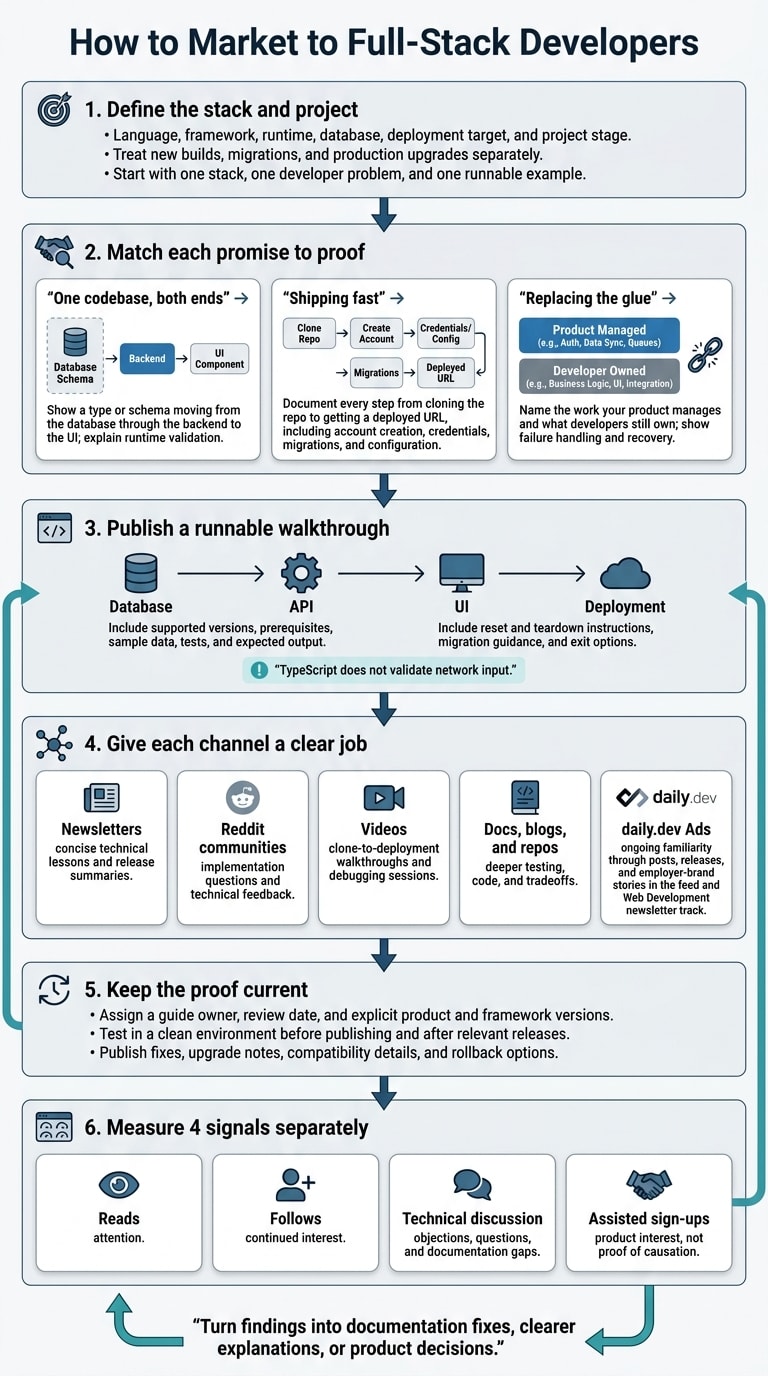
I’d start with one stack, one developer problem, and one runnable example - not a broad job title. For a React and Node.js tool, that means showing a working path from database to API to UI, with setup steps, supported versions, and deployment instructions.
Here’s the plan I’d follow:
- Make the claims testable. Show runtime validation, permissions, failure handling, costs, and what developers still need to configure. Include migration and exit options.
- Match the proof to the product. APIs need retry and webhook examples; UI kits need keyboard and error-state tests; hosting, auth, and database tools need clear setup and recovery steps.
- Use each channel for a clear job. Share short lessons through JavaScript newsletters and daily.dev Ads, answer questions in relevant Reddit communities, and use videos, docs, and repos for deeper testing.
- Keep the proof current. Retest examples after relevant releases and publish version dates, fixes, and upgrade notes.
- Measure 4 signals separately: reads, follows, technical discussion, and assisted sign-ups. A sign-up alone doesn’t prove which post drove it.
My rule: make evaluation easy. Give developers enough code and context to decide whether your tool fits their project.
How do I market my developer tool to full-stack developers?
Define your audience by language, stack, and project
Build an audience brief around the developer’s language, framework, runtime, database, deployment target, and project stage. Treat new builds, migrations, and production upgrades separately. Someone trying a tool needs different proof than someone replacing a dependency they already use. Refine your brief with the programming-language targeting guide and tech-stack targeting guide.
Then publish a repo developers can review. Show a task from start to finish, with supported versions, sample data, tests, and expected output. Add reset and teardown instructions, and have an engineer retest the tutorial when a framework or major dependency changes. Use the brief to guide your headline, demo, and repository.
With the stack and project stage clear, match each promise to proof.
What should your message say?
“One codebase, both ends”
Show a type or schema moving from the database through the backend to the UI. Explain where runtime validation happens and how the tool handles invalid data. Shared TypeScript types alone don’t explain validation.
“Shipping fast”
Document every step from cloning the repo to getting a deployed URL. Include account creation, credentials, database migrations, and deployment configuration. Without a measured result, show the steps rather than promising “deploy in minutes.”
“Replacing the glue”
Name the work your product manages - and what developers still own. Explain the required code, integrations, retries, auth, environment configuration, and recovery. Show what happens when things fail: a request times out, credentials expire, or a deployment fails.
Place these messages where full-stack developers already discover tools.
Where do full-stack developers get their news and discover new tools?
Full-stack developers find tools in feeds and newsletters, then check setup, integrations, and limits through tutorials, docs, threads, and code. Link these resources clearly so developers can start evaluating a tool in your content - not wait until they reach the product page. Each channel below serves a different part of that process.
On daily.dev, keep a verified company page active. Publish posts, releases, and employer-brand stories in the Web Development newsletter track. Post regularly about the technologies developers follow: #javascript, #typescript, #react, #nodejs, #nextjs, and #backend. Tag only the stack each post covers.
Newsletters, communities, and technical blogs
JavaScript Weekly, Bytes, and This Week in React share curated updates on JavaScript and React tooling. Give editors a useful technical lesson that names the stack and addresses a clear problem, rather than a broad product announcement. Use newsletters to help developers find your tool, then communities and video to help them assess it.
Communities surface questions your announcement may miss. Read r/webdev for general web-development concerns, r/reactjs for React patterns, and r/node for Node.js implementation questions. Stack Overflow content can point to recurring questions and gaps in your docs. When answering, include technical detail, disclose your company connection, and avoid promotional links. For more technical questions, point developers toward blogs and repos.
Web development YouTube creators show workflows visually, helping developers see how a tool works in practice.
Technical blogs, dev.to, Hashnode, open-source repos, and framework communities offer deeper explanations, code review, and maintenance checks. Implementation details, issues, and release history help developers judge whether a tool is current, maintainable, and safe to try.
What do full-stack developers buy and how do they decide?
Full-stack developers buy tools that cut integration work without locking them in long term. Before committing, they check stack fit, documentation, and maintenance costs.
For transactional tools, a working demo isn’t enough. Developers need proof that the tool handles failures, too.
Transactional email, payments and messaging APIs
Show the full event lifecycle, not just the SDK call. Include test environments, webhook verification, logs, retries, and error handling. Treat timeouts as ambiguous outcomes, and explain how the integration prevents duplicate side effects.
Postmark’s transactional-email documentation recommends checking a stable webhook identifier, such as MessageID or X-PM-Webhook-Trace-Id, against the application database before processing repeated deliveries. Test temporary failures, duplicate or out-of-order notifications, and invalid payloads.
UI kits need similar testing - with real data, errors, and keyboard interactions.
Component libraries and UI kits
Show components connected to API data, validation, and server-side errors. Developers need framework compatibility, TypeScript types, keyboard navigation, focus management, and design-token customization.
Include migration notes and dependency requirements. Explain how a team can update or replace a component without rewriting the interface.
Once the interface works, developers need a way to trace failures through the stack.
Monitoring and error tracking
Walk through debugging from a failed browser action to the backend request and the deployment that introduced the failure. Explain how source maps, request context, logs, and release identifiers connect the evidence.
Developers should test controlled failures, check that sensitive data is redacted, and confirm that alerts flag issues they can act on within their existing logging and deployment workflow.
How do I market full-stack frameworks and hosting platforms to full-stack developers?
Publish one repo that walks developers through project creation, database setup, the API, and the UI. Make clear what the framework generates and what developers need to configure.
Full-stack frameworks and hosting platforms
Start with compatibility. List supported React, Next.js, Node.js, and TypeScript versions, along with package managers, database connectors, and deployment targets. Explain which runtimes support serverless, containers, edge, and long-running processes. Cover differences between local and production setups for environment variables, file storage, caching, and database connections. Spell out when background jobs and WebSockets need separate services, plus any unsupported runtimes or provider-specific features.
Next, show the type and validation path from schema to UI. Follow one type from the database schema through a server function into form state. Then change a field and show where the compiler flags the mismatch. TypeScript does not validate network input. Add runtime validation at the API boundary, server-side checks for untrusted input and authorization, and database constraints for stored values.
With the data path in place, show how fast the stack reaches a live URL. Deployment speed needs evidence, not a slogan. Report time from clone to first live deploy only alongside a named source, date, repo, runtime version, database setup, deployment target, and test environment. Count success as a live URL that returns a working database response. Include provisioning, dependency installation, and manual steps in the measured time.
Show what happens after that first deploy, too. Diagnose a missing environment variable, fix it, and redeploy. Document migration order and rollback boundaries when schema changes break older code. For existing apps, list the required routing, auth, build, and deployment-script changes. Link those changes to setup, troubleshooting, and upgrade docs verified from a clean checkout.
How do I market backend-as-a-service, auth and databases to full-stack developers?
Shift the story from frameworks to services: identity, data, storage, and the connections between them. Lead with the backend work your product removes. Name the provisioning, sessions, generated APIs, or storage it manages. Then explain what developers still own: data models, business rules, permissions, secrets, and integrations. Be specific about which backend chores go away.
Backend-as-a-service, auth and databases
Publish a walkthrough developers can run on a side project in their own stack. Connect migrations, authenticated requests, and typed client state. Include local services or an emulator, seed data, and setup steps. Show which adapters and repeated configuration your product removes - and which it leaves in place. For type safety, demonstrate migration-aware generation and stale-client handling, rather than shared types alone.
Show authorization checks developers can run themselves. Authentication establishes identity; it doesn't grant access to every record. Test whether a signed-in user can access another team's data by changing a resource identifier. Enforce permissions at the server or database boundary, including admin and secondary endpoints.
Next, show what happens when the happy path breaks. Test expired sessions, rejected input, unavailable services, and failed integration calls. Document pagination, rate limits, and which operations are safe to retry. Explain how local, preview, and production environments keep credentials and data separate, plus who owns backups and recovery.
Make the exit path inspectable. Document the database engine, export formats, identity-transfer process, and ownership of migrations and generated logic. Separate portable assets from proprietary policy syntax, generated APIs, and hosted functions so developers can see what they can take with them. That control helps full-stack developers trust your product.
How do I build a brand that full-stack developers trust?
Make your claims verifiable. Back every technical claim with current docs, a repo or runnable example, and a clear “not a good fit when” note. Full-stack developers try tools on side projects, check how they fit their stack, and look for up-to-date docs. Use that proof to support the stack-specific claims readers have already seen about compatibility, type safety, and time to first deploy.
Keep technical content current and testable
Give each major guide an owner, a review date, and explicit product and framework versions. Test it in a clean environment before publishing and after relevant releases. Check installation commands, environment variables, expected output, and the deployment path.
If a guide asks developers to test your product, include a public repository or runnable example. For side-project trials, list the test date, prerequisites, and cleanup steps.
Treat migration guidance as part of the release. Explain who needs to upgrade, show before-and-after code, and list removed features alongside their replacements. Document compatibility or rollback options, too. Keep older guides available while you still support their versions. If your product covers both sides of the stack, connect UI and server concerns with the related guidance on reaching frontend web developers and reaching backend engineers.
Build a company presence developers can follow
Your company presence should back up your current docs. Keep product descriptions consistent and documentation links up to date on your verified company page on daily.dev.
Publish technical posts, releases, and employer-brand stories that explain what changed, why the team made that choice, and what it means for developers. Each post should teach something, document a process, or explain a product change.
Use daily.dev Ads to build familiarity through the developer feed and the opted-in Web Development newsletter track. Publish useful material between releases, answer technical questions consistently, and turn recurring questions into docs updates.
Which channels work best for marketing to full-stack developers?
Once you know what proof developers need, choose a channel that fits the job: build familiarity, explain a release, show a workflow, or invite technical discussion. No single channel works best for every product or evaluation stage.
| Channel | Best use | Suitable content | Strengths | Limitations | Evaluation signals |
|---|---|---|---|---|---|
| daily.dev Ads | Long-term brand and community building | Posts, releases, engineering articles, employer-brand stories | Verified company presence developers can follow; relevance by stack and topic; feed and newsletter distribution; one team-run plan | Needs useful code, a clear stack fit, and a path to testing in a side project | Reads, follows, discussion, assisted sign-ups |
| JavaScript newsletters: JavaScript Weekly, Bytes, This Week in React | JavaScript and React launches | Release summaries, integration guides | Suits timely announcements | Issue timing limits release schedules | Publisher-reported readership, content reads, assisted sign-ups |
| Reddit: r/webdev, r/reactjs, r/node | Technical discussion and feedback | Implementation questions, code snippets | Helps surface objections during evaluation | Promotional wording can derail discussion | Discussion quality, technical questions, recurring objections |
| Web development YouTube creators | Evaluating a complete workflow | Clone-to-deployment walkthroughs, debugging sessions | Shows setup and workflow visually | Takes production effort and a suitable creator | Watch time, comment themes, repository activity |
| Stack Overflow Ads | Infrastructure awareness during problem-solving | Messages tied to a technical problem | Fits a specific implementation need | Little room for end-to-end proof | Engagement on relevant problem pages, assisted sign-ups |
| dev.to and Hashnode | Detailed technical evaluation | Tutorials, engineering articles, comparisons | Offers room for code and tradeoffs | Needs regular writing and responses | Article reads, comments, follows |
| Carbon Ads and BuySellAds | Long-term awareness on developer sites | Brief contextual messages | Suits a concise product promise | Limited space for explanation; ad blocking can reduce visibility | Impressions, viewability rates |
Use the table to match your story to the placement, then shape the same proof for each format. JavaScript Weekly or Bytes suit broader JavaScript stories, while This Week in React fits React-specific work.
Keep the technical claim consistent. Give newsletters a shorter version, and use community discussions or videos to show more detail.
A database-to-form type-safety walkthrough can become a full article, a concise newsletter summary, or a creator-led build.
Don't squeeze an entire tutorial into a placement built for a short message.
Each channel produces different signals. Track the publication date, then measure reads, follows, discussion, and assisted sign-ups separately. Don't combine them into one score.
What is the best way to reach full-stack developers?
Pair a defined stack with a runnable walkthrough and a clear distribution plan. Start with the language, framework, application type, and project stage. Then name the problem developers need to solve, such as duplicated types or slow deployments. Use that brief to guide your outreach - not a broad job-title label.
Build a walkthrough developers can try in a side project. Include prerequisites, versioned code, deployment steps, and the parts they still own. Show where validation happens and what breaks when a schema changes. Let developers inspect the implementation rather than take your claims at face value. Use that walkthrough as source material for newsletters, communities, and your company page.
Publish the full tutorial in your documentation or a technical blog, then write a short version for a newsletter or community post. Use daily.dev Ads to maintain a verified company presence through posts, releases, and employer-brand stories. Have your team run the publishing plan over time, with migration notes, updated examples, and answers to recurring technical questions.
How do I measure marketing to full-stack developers?
Track reads, follows, discussion, and assisted sign-ups to compare formats, topics, and stack segments. Reads signal attention; follows suggest continued interest. In discussions, record objections, framework mentions, unanswered questions, documentation gaps, and integration requests.
Compare those signals with prior posts, and review them by stack, topic, and format. Treat assisted sign-ups as a sign of product interest - not proof that your marketing caused them.
After publication, use what you learn to shape the next update. Turn useful findings into documentation fixes, clearer explanations, or product decisions. Review product adoption separately.
How daily.dev Ads helps you reach full-stack developers
daily.dev Ads helps you maintain that presence with one managed plan built around a Verified Company Squad and a verified company page. It builds on the stack fit, runnable proof, and trust described above.
Use technical posts to share code and implementation details, releases to explain what changed and why it matters, and employer-brand stories to show the engineering practices behind your product.
Once your content is ready, daily.dev distributes it through the personalized feed and the Web Development newsletter track. Make the stack and developer problem clear in each headline.
The daily.dev team handles setup, audience fit, publishing cadence, and content updates. You bring your target stack and use case, the developer problem you solve, and draft content ideas.
Review plan details for the plan’s structure and what’s included. To align your stack, message, and publishing plan, discuss your developer audience and content plan.
Conclusion: Match the stack, show the code, and build trust
Full-stack developers respond to stack fit, runnable proof, and technical trust. Start with their stack. Then show a workflow from database to UI to deployment that they can test on a side project.
Build that story around one of three angles: One codebase, both ends, showing a type flowing from database to form; Shipping fast, documenting time to first deploy; or Replacing the glue, showing the work your product removes. Be clear about what developers still need to configure. Keep package versions, environment variables, deployment steps, and fixes up to date.
To see whether this work is building trust, measure reads, company-page follows, technical discussion, and assisted sign-ups together.
Use daily.dev Ads to support brand and community building with a verified company page, posts, releases, and employer-brand stories in the feed and the Web Development newsletter track. Our team runs the plan. Discuss your audience and content strategy with a clear stack, a developer problem, and a technical story backed by a runnable example. The FAQs below answer the most common planning and measurement questions.
FAQs
How do I prioritize stacks with limited resources?
Focus on the stacks where your tool solves a clear problem - like cutting time to first deploy or making it easier to connect the frontend and backend. Show developers how it works with technical walkthroughs for React, Node.js, or TypeScript codebases.
Use daily.dev Ads to reach developers working with those stacks. Share useful technical content to help them get to know your brand and build trust.
What if my tool has no free trial?
Show full-stack developers how your tool helps them ship fast, supports end-to-end type safety, and fits the frameworks they use. daily.dev Ads provides native, always-on visibility with stack-aligned targeting in the feed and newsletter developers choose.
Track reads, follows, discussion, and assisted sign-ups.
How soon should I expect developer brand-building results?
The focus is on discovery and consideration over time, with no set timeline. daily.dev Ads puts your brand in the feed and newsletter as full-stack developers find and compare tools.
Build trust with clear technical walkthroughs, easy trials for side projects, and content that keeps pace with their frameworks. Track reads, follows, discussion, and assisted sign-ups to measure progress.