

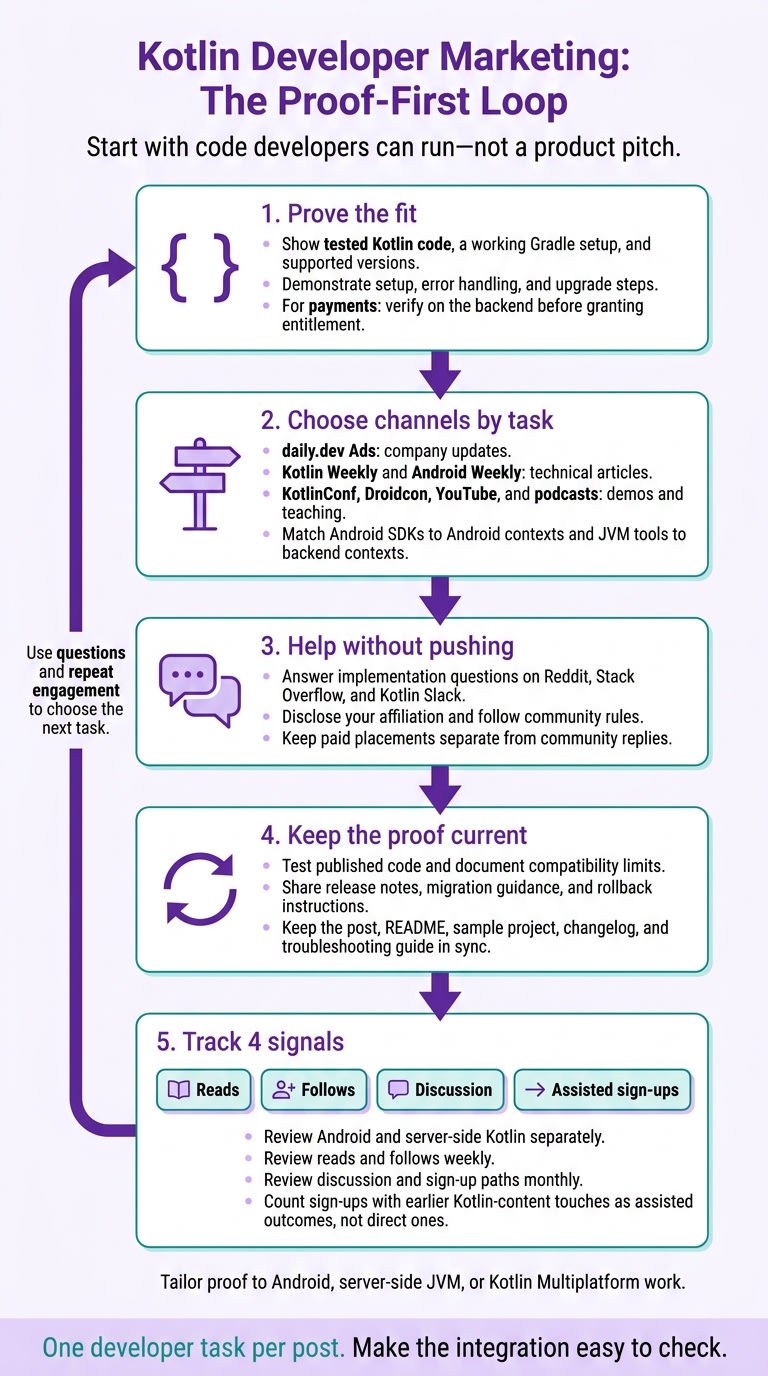
I’d start marketing to Kotlin developers with code they can run - not a product pitch. Show a tested Kotlin example, working Gradle setup, and supported versions. Then match your message to Android, server-side JVM, or Kotlin Multiplatform work.
Here’s the plan I’d use:
- Prove the fit: Show setup, error handling, and upgrade steps for SDKs, monitoring, CI, or build tools. For payments, show backend verification before granting access.
- Choose channels by task: Use daily.dev Ads for company updates, Kotlin Weekly and Android Weekly for technical articles, and KotlinConf, Droidcon, YouTube, and podcasts for demos and teaching.
- Help without pushing: Answer questions on Reddit, Stack Overflow, and Kotlin Slack. Disclose your affiliation and keep paid placements separate from community replies.
- Keep the proof current: Test published code, document compatibility limits, and share release notes and migration guidance.
- Track 4 signals: Reads, follows, discussion, and assisted sign-ups. Review Android and server-side results separately.
My rule: make the integration easy to check. Build each post around one developer task, then use questions and repeat engagement to decide what to publish next.
Where do Kotlin developers get news and discover tools?
Kotlin developers find tools through newsletters, events, forums, and technical communities. daily.dev feeds and newsletters surface technical reading. Kotlin Weekly curates language and ecosystem content. Android Weekly covers Android and Kotlin tutorials, screencasts, and news. Pitch code-first articles that fit each publication’s audience.
Conferences and meetups give developers a chance to evaluate tools in more depth. KotlinConf and Droidcon work well for hands-on teaching, so bring a demo project attendees can reproduce. Conference recordings and summaries can keep circulating through newsletters after the event. For Android YouTube channels, share an end-to-end integration walkthrough that covers setup and failure states. Podcasts such as Talking Kotlin are a better fit for engineering discussions than scripted product pitches.
For daily discussion and peer feedback, developers turn to Reddit and Slack. Use r/Kotlin for language, multiplatform, and tooling discussions, and r/androiddev for Android-specific questions. Read the rules, disclose your affiliation, and share announcements only where moderators allow them. Don’t pose as an independent user. Answer implementation questions rather than treating threads as a place to push a launch post.
Stack Overflow and Kotlinlang Slack help developers check technical claims, including whether your Kotlin example works. On Stack Overflow, answer the specific implementation question with self-contained Kotlin code, relevant versions, and an affiliation disclosure when needed. In Kotlinlang Slack, join topic-specific threads and answer technical questions without sending unsolicited promotional messages. Kotlin’s official FAQ directs developers to Stack Overflow and Kotlin Slack.
Some channels depend on participation; others call for paid placement and clear labeling. Keep paid distribution separate from community participation. For labeled reach, daily.dev Ads provides a verified company page, posts, releases, and employer-brand stories developers can follow. Newsletter sponsorships, conference sponsorships, and creator partnerships also need clear labeling as paid placements. Community participation calls for useful contributions and permission. Use the mobile developer outreach guide to plan Android-focused content across these formats.
What do Kotlin developers buy, and how do they choose?
Kotlin developers buy proof, not promises. Each category needs compatible versions, idiomatic code, and evidence that it works in their workflow.
Android SDKs for auth, analytics and payments
Show that the integration works: provide Kotlin-first APIs, a valid Gradle dependency, supported versions, and tests for expired auth credentials, offline requests, and duplicate payment attempts. Document permissions, coroutine behavior, and migration steps.
Adoption reviews also need security reviews, data-handling policies, maintenance ownership, and a rollback plan. Publish a compatibility matrix, not a blanket compatibility claim. Buyers need to see that the tool fits their workflow without extra cleanup.
Crash reporting and app performance monitoring
Demonstrate coroutine context, stack traces, breadcrumbs, ANR reporting, and startup behavior. Show how release markers, request timing, device data, and Android version data help teams investigate issues. Be clear about sampling and obfuscation limits.
Leaders assess privacy controls, retention, alert ownership, and release stability. Publish a redacted investigation that links the observed symptom to the affected code and a verified fix. Teams expect the same proof when evaluating server-side Kotlin tools.
Server-side Kotlin frameworks and JVM tooling
Show idiomatic Kotlin, Java interoperability, framework stability, observability, and deployment requirements. For Ktor, document routing, authentication, structured logging, health checks, and timeout handling, along with supported JDK and build-tool versions.
Keep Android lifecycle language out of server messaging. Explain security maintenance, upgrade practices, and who owns day-to-day operations across services.
Mobile CI and device testing
Show device and emulator coverage, Android versions, Gradle compatibility, and failed-test artifacts. Provide a reproducible pipeline with a fixed commit, declared JDK, locked dependencies, logs, and device metadata. Engineers can then judge whether the tool will hold up in release pipelines.
Explain how retry history separates flaky tests from infrastructure failures. Address queue time, reliability, access controls, and governance. Every quarantined test should have a named owner. When the pipeline fails, build tooling becomes the next decision point.
Build tooling and dependency management
For Kotlin developers, build setup is part of the product evaluation. A clean Gradle build is the first proof point. Provide the required settings.gradle.kts, build.gradle.kts, repository configuration, and Kotlin toolchain.
State whether you support dependency locking, verification, and the configuration cache. Document upgrade and rollback steps, and show that plugin compatibility and dependency changes won't disrupt release schedules.
How do I build a brand Kotlin developers trust?
Show Kotlin-specific proof - not Java dressed in Kotlin syntax. Write idiomatic Kotlin. In Android coroutine examples, show cancellation and lifecycle behavior, use main-safe suspend functions, and include test dispatchers. Keep Android and server-side posts separate. Lifecycle guidance belongs in Android content; deployment and service observability belong in backend content.
Test code, compatibility, and installation
Kotlin buyers check compatibility first, so give them proof they can verify right away. Require a technical review before publishing: compile the exact snippets, check API names against the released artifact, and test installation in a new project. List the tested versions and verification date, and distinguish minimum SDK from target SDK.
Put limits beside the claims they affect. In each release post, list unsupported configurations, permission changes, deprecated APIs, and migration steps. Assign one owner to keep the post, README, sample project, changelog, and troubleshooting guide in sync. Include rollback instructions and explain when a data or configuration migration makes rollback unsafe.
Publish useful company updates consistently
Build trust with posts that reflect how developers evaluate tools. Use a verified daily.dev company page to publish technical posts, releases, engineering stories, and employer-brand stories. Give each post one clear job: explain an engineering decision, clarify a compatibility change, or document a lesson from maintaining an integration.
Teach one Kotlin concept, one trade-off, or one documentation practice. Show how engineers work - not company perks. Use the daily.dev resources hub for editorial guidance, and revisit common developer questions in future posts.
Give your next channel mix material worth sharing again. A steady supply of useful posts also makes it easier to choose the next channel.
Which channels work best for marketing to Kotlin developers?
Once you know what Kotlin developers buy, choose channels that fit how they evaluate tools. Give each channel a clear job: building brand awareness over time, explaining a launch, or solving technical problems.
| Channel | Best use | Strongest Kotlin audience | Content that fits | Limitation |
|---|---|---|---|---|
| daily.dev Ads | Building brand awareness and community over time | Kotlin developers who choose technical news and company updates | Posts, releases, engineering stories, and employer-brand stories from a verified company page in developers’ chosen feed and newsletter | Requires a steady supply of useful technical material |
| Kotlin and Android newsletters (Kotlin Weekly, Android Weekly) | Timely discovery and announcements | Kotlin Weekly: language, multiplatform, coroutines, and server-side Kotlin. Android Weekly: Android engineers | Migration guides, Compose tutorials, and SDK integration articles | Editors select submissions, and space is limited |
| KotlinConf and Droidcon | Technical education and community relationships | KotlinConf: the broader Kotlin ecosystem. Droidcon: Android engineers | Talks, workshops, live debugging, and architecture demos | Takes longer to plan and requires technical depth |
| Reddit (r/Kotlin, r/androiddev) | Technical discussion and learning about developer problems | r/Kotlin: language, JVM, and multiplatform. r/androiddev: Android apps | Troubleshooting answers, postmortems, migration notes, and feedback requests | Promotion can hurt trust; community rules matter |
| Android YouTube creators and podcasts | Hands-on education and product evaluation | Android developers seeking walkthroughs and expert discussion | SDK walkthroughs, profiling, migration demos, and engineering interviews | Depends on the host’s expertise, independence, and accurate demos |
| Stack Overflow Ads | Reaching developers during searches and troubleshooting | Developers researching Kotlin, Android, Gradle, JVM, testing, and debugging | Integration guides, compatibility docs, and build-error explanations | Serves a narrow research need, not a lasting company relationship |
Match the channel to the product: place Android SDKs in Android contexts and JVM tools in backend contexts. Use the tech-stack targeting guide to define that fit before choosing placements.
For newsletters, submit one concrete lesson that fits the publication’s editorial focus. For creators and conference speakers, bring a demo they can reproduce - not a pitch. With Stack Overflow Ads, link to the doc that solves the exact problem the developer searched for.
Use daily.dev Ads to build the relationship over time through a verified company page, useful updates, and one plan run by the daily.dev team.
What is the best way to reach Kotlin developers?
Once you’ve chosen a channel, the message needs to show how the integration works - fast. Build a publishing loop around a real developer task. Publish the implementation, link it to a verified daily.dev company page, and use each update to solve the next problem.
The strongest Kotlin-facing posts show idiomatic code, explain Android release changes, and demonstrate server-side fit. Start with code developers can read and run.
Show idiomatic Kotlin
Use suspend functions for async work, extension functions for concise integrations, and Flow for state changes. Include the dependency, imports, initialization, error handling, and a verification step.
Cover cancellation, nullability, and lifecycle behavior. For Compose integrations, explain how state collection respects the lifecycle. Be clear about when developers shouldn’t use the approach, and link to migration documentation instead of making vague ease-of-use claims.
Explain support for the next Android release
Publish compatibility guidance the week the release ships. Distinguish behavior changes that affect existing apps from changes required when targeting the new API level.
Name the tested SDK release, Kotlin version, Android Gradle Plugin, device or emulator setup, and test date. Include required manifest or Gradle changes, deprecated APIs, and known limitations.
If the product covers both client and backend, show where shared code stops.
Show Kotlin on the server
Show a shared module or domain model across client and server. Kotlin Multiplatform lets developers share selected code without sharing the entire application.
Make that boundary clear: separate JVM runtime, deployment, authentication, and observability from Android permissions and lifecycle behavior. For Android SDKs, explain what this means for auth, analytics, and payment integrations.
How do I market Android SDKs for auth, analytics and payments to Kotlin developers?
Kotlin developers judge Android SDKs by how cleanly they install, whether initialization works, how safely they upgrade, and how they handle backend verification. Start each SDK page with supported versions, one tested Gradle dependency, and a complete Kotlin quickstart. Place upgrade changes next to setup instructions, including changes to initialization, the manifest, and backend contracts.
Start with auth. Login flows show whether an SDK puts Kotlin first.
Authentication SDKs
Make the boundary clear between SDK behavior and app responsibilities, including redirects, failure UI, and backend session checks. Show login and token refresh in a lifecycle-aware coroutine scope, with loading, success, cancel, and error states.
Explain who stores tokens, whether refresh tokens stay inside the SDK, and what triggers reauthentication. Show how to recover from interrupted redirects, expired tokens, revoked sessions, and process death. Include a migration path for callback-based integrations.
Analytics SDKs
Publish a typed Kotlin event model and show initialization after consent. Provide debug logs that flag malformed payloads without leaking secrets. Make clear that the app owner handles consent, disclosures, and retention choices.
Explain offline queue limits, batching, retries, and duplicate-delivery behavior. State which data collection is on by default and how to turn it off. Cover Compose and background workers separately where supported, and flag event-schema changes during upgrades.
Payments SDKs
Client-side success is not proof of payment. Verify it on the backend before granting entitlement. Show the full flow: request a session, launch the payment UI, receive the result, verify it on the backend, and then grant entitlement.
Document pending payments, cancellation, network loss, duplicate callbacks, and recovery after process death. Explain which retries are safe and how fulfillment prevents duplicate grants. Keep payment credentials and verification on the backend. Publish callback contract and fulfillment changes before developers upgrade.
Apply the same proof-first standard to crash reporting and app performance tools.
How do I market crash reporting and app performance monitoring to Kotlin developers?
Show the path from a production symptom to a verified fix. Build your technical post around an incident your team can document. Include the affected release, Kotlin integration, redacted logs and stack traces, root cause, and code change. Make clear whether the symptom was a crash, handled exception, slow request, or rendering delay. Then walk through the exact diagnostic trail that led to the fix.
For coroutine failures, trace the incident through the scope, dispatcher, and parent and child coroutine scopes. Show where exception reporting happens, and don't label normal cancellation as an application failure. Link the stack trace and relevant breadcrumbs to the root cause. Explain how mapping files make obfuscated traces readable. Briefly state what data you collect, how you redact it, and who can access stored data. This helps developers assess their Google Play disclosure obligations.
Use the same incident-to-fix approach for UI and startup problems: connect the visible delay to the code responsible. For Compose, explain whether your tool preserves the composable tree, along with any configuration or compatibility limits. Verify the fix with Macrobenchmark and system traces under the same device and launch conditions.
How do I measure marketing to Kotlin developers?
Measure reads, follows, discussion, and assisted sign-ups - not just raw reach. Together, these metrics help you assess qualified developer engagement. For daily.dev Ads, reads show attention, company-page follows show interest in future updates, and discussion shows whether the content prompted questions. Define a read the same way across campaigns, and apply the same measurement rules to posts, releases, and employer-brand stories.
Tag each post by audience, message angle, format, and publication date. Review Android and server-side Kotlin separately, and compare similar content: release updates with release updates, tutorials with tutorials. Use your previous Kotlin content as the baseline rather than an outside benchmark. This helps you compare message angles without mixing unrelated content types.
Read the comments alongside the totals. Group discussion into technical questions, feedback, feature requests, or troubleshooting. Specific questions about JVM behavior or SDK support usually tell you more about relevance than general compliments. Check whether new followers come back to read and discuss later company updates. Their comments help you judge whether the content solved a Kotlin problem or simply got attention.
Count sign-ups with earlier Kotlin-content touches as assisted outcomes, not direct ones. Use the same attribution window throughout, and separate matched sign-ups from unmatched ones.
Review reads and follows weekly. Review discussion and sign-up paths monthly to see which Kotlin audiences and message angles bring people back. Treat small samples as a signal, not enough evidence for a decision. Include campaign dates, sample sizes, and metric definitions in each report, and name the source and date for every number you publish.
How daily.dev Ads helps you reach Kotlin developers
If daily.dev Ads is part of your mix, make your verified company page the home for Kotlin-specific posts, releases, and employer-brand stories. With a managed plan, the daily.dev team brings your updates to developers’ chosen feed and Digest newsletter.
Create separate briefs for Android and server-side Kotlin, with assets that fit each workflow:
- Android: Include SDK integration, release compatibility, and mobile reliability material. Use #kotlin, #android, and #mobile where relevant.
- Server-side Kotlin: Include JVM tooling, backend architecture, and shared-module material. Use #kotlin, #java, #jvm, and #backend as appropriate.
Tags clarify the topic. They don’t determine distribution outcomes.
Keep each post focused on one workflow and one technical problem. Give the daily.dev team the audience, technical problem, release timing, supported versions, destination, approver, tested Kotlin code, installation steps, and brand assets.
Use employer-brand posts to show how your engineers work in practice, reinforcing the same Kotlin-first standards shown in your product posts.
Before preparing your Kotlin developer brand-building plan, schedule a conversation with the daily.dev team and review plan details.
Conclusion
Marketing to Kotlin developers starts with technical fit. Show the workflow with runnable Kotlin code, a working build.gradle.kts, and clear details about the toolchain you tested.
Choose channels that match how Kotlin developers learn. Publish release notes, migration guidance, and technical updates consistently. Let developer questions guide your next post or documentation update.
Evaluate reads, follows, discussion, and assisted sign-ups together. Use these signals to decide what to publish next: a code sample, migration note, or compatibility post. Implementation questions and repeat engagement help show whether your content is building trust - not just drawing attention.
Use daily.dev Ads to keep Kotlin posts, releases, and employer-brand stories on a verified company page that developers follow. Schedule a conversation about reaching Kotlin developers.
FAQs
Which Kotlin audience should I target first?
Focus on the technical challenge Kotlin developers face that your tool solves, whether it’s dependency management or build performance. Use daily.dev Ads to reach developers working with Kotlin and relevant tech stacks.
Match your content to their workflows. Use idiomatic Kotlin examples instead of Java, explain release compatibility, and make sure your Gradle configuration works on the first try.
How can I market a tool without a Kotlin SDK?
Reach Kotlin developers through daily.dev Ads, targeted developer newsletters, and technical conferences. Show how your tool solves a specific problem. If you don’t have a Kotlin SDK, lead with useful technical content and clearly explain compatibility and integration requirements.
Build trust with accurate documentation, clear engineering explanations, and idiomatic Kotlin examples - not Java examples. Keep Android content separate from server-side Kotlin content, and skip the promotional jargon.
How do I turn developer feedback into content?
Use developer feedback to write posts that answer their questions, including release compatibility and Gradle setup. Include Kotlin examples, with separate posts for Android and server-side Kotlin developers.
Promote those posts through daily.dev Ads in developers’ feeds and newsletters. Track reads, follows, discussion, and assisted sign-ups.