

I’d market to React developers by showing working code before asking for a demo. Start with a runnable example, tested React and Next.js versions, clear server/client boundaries, and production bundle sizes in KB - not broad claims about productivity.
Then I’d build the plan around three steps:
- Match the proof to the job. Show component behavior, deployment steps, data access, privacy controls, or generated code based on what your reader needs to assess.
- Choose channels by purpose. Use daily.dev Ads and newsletters for discovery, tutorials and events for evaluation, and community answers and release updates for follow-up.
- Track four signals: reads, company-page follows, technical discussion, and assisted sign-ups. Treat sign-ups as content influence, not proof that one post caused a purchase.
My rule: make every claim easy to check. Keep documentation, migration guides, and your company page current so developers can judge both the tool and the team behind it.
Who React developers are and what they build
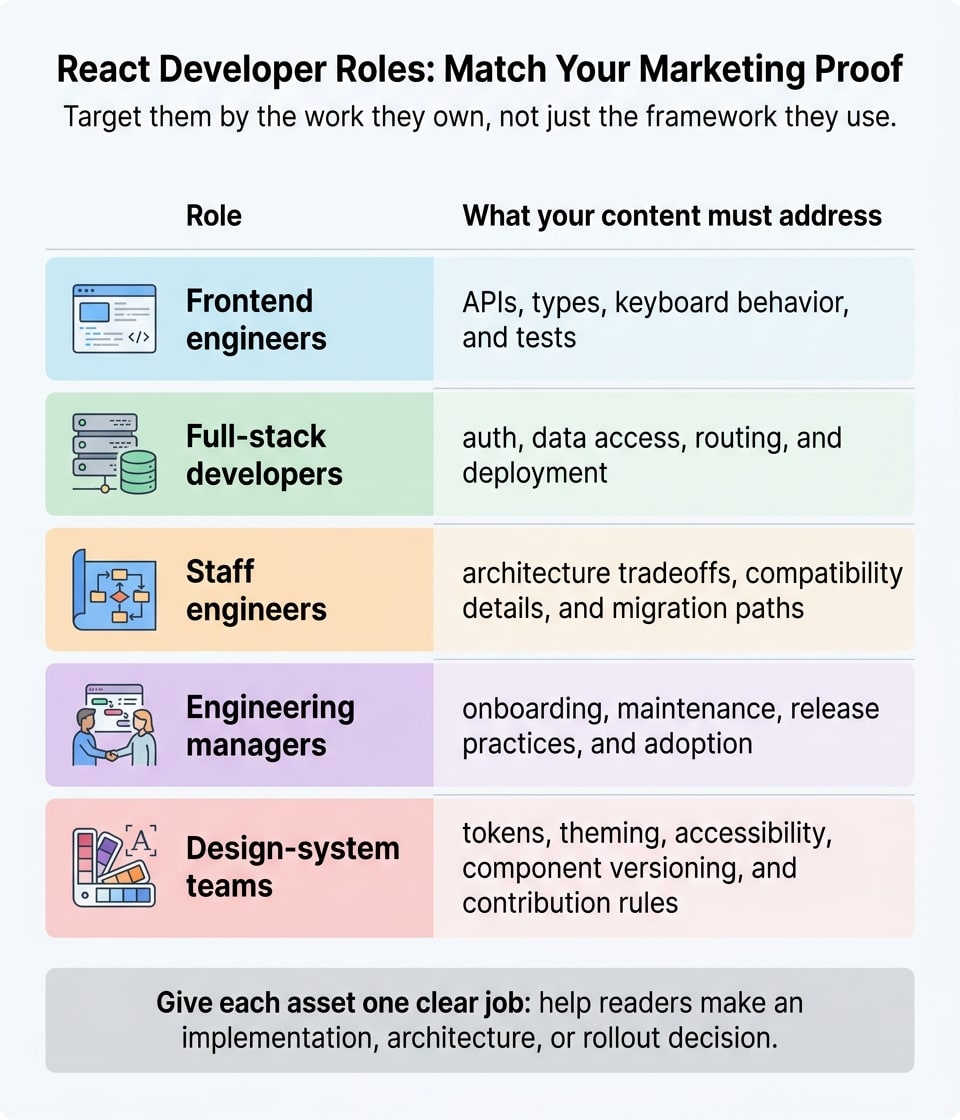
React developers build UI components in JavaScript or TypeScript. Their work covers state, routing, data fetching, rendering, testing, accessibility, and deployment. Target them by the work they own, not just the framework they use. Your message should change with their role.
Group developers by technical role
Frontend engineers want APIs, types, keyboard behavior, and tests. Full-stack developers want auth, data access, routing, and deployment. Show how your tool changes their work instead of sending both groups the same broad productivity pitch.
Staff engineers need architecture tradeoffs, compatibility details, and migration paths. Engineering managers need evidence about onboarding, maintenance, release practices, and adoption. Design-system teams need guidance on tokens, theming, accessibility, component versioning, and contribution rules.
Give each asset one clear job: help readers make an implementation, architecture, or rollout decision. Their role tells you what they need; their framework tells you how they work.
Match content to frameworks and interests
React and Next.js overlap, but they point to different workflows. Client-rendered React applications bring up different questions than Next.js applications using Server Components, caching, and Route Handlers. Choose topics based on that workflow: shared components, browser state, server data access, or production deployment.
Anchor topics in #react, #nextjs, #frontend, #typescript, #javascript, and #webdev, plus daily.dev’s Web Development newsletter track. Match each topic to the reader’s stack and role. For broader planning, see the programming-language targeting guide and the guide to reaching frontend web developers.
Next, show the problem your tool solves through working code and technical proof.
How do I market my developer tool to React developers?
Start with the React workflow your tool improves, the versions it supports, and the exact server or client boundary it needs. Explain the task, required integrations, and limits before asking developers to adopt it. Use the tech-stack targeting guide to plan your reach. These details help React developers check whether your tool fits their setup before evaluating the feature itself.
Define the problem and show a working solution
Place a dated “tested with” block beside the install steps. Include supported React and framework versions, TypeScript and package-manager requirements, runtimes, browsers, key integrations, and known limitations.
Give developers the install command, required configuration, complete code, and expected output. Lead with a sandbox or runnable repo - not a demo request. Let developers verify the setup themselves, then show how the implementation works through code and output.
Support your message with technical proof
For components, publish the import, working JSX, required styles, and accessibility behavior. Specify whether each feature runs on the server, client, edge, or during the build. Show any required "use client" boundary. Next.js layouts and pages are Server Components by default; browser APIs and interactivity require Client Components.
Publish the production bundle cost in KB beside each feature, with separate JavaScript and CSS figures. Explain what loads initially and what loads on demand. Document production-build settings, minification, and compression. Measure production output, not package size. Recheck after major releases and use the framework release calendar to schedule updates when those numbers change.
Publish around framework releases
React developers have more reason to trust updates when they track framework changes. Prepare compatibility notes, technical explainers, and migration guidance around React and Next.js releases. Update the sandbox and starter repository whenever support changes.
Share these updates through a verified daily.dev company page, and clearly label employer-brand stories. Ask developers where setup failed and what proof was missing. Use recurring feedback to fix documentation, add compatibility tests, and write follow-up posts.
Where do React developers get their news and discover new tools?
React developers find new tools through daily.dev’s feed and Web Development newsletter, specialist newsletters, conferences, Reddit, YouTube, and Stack Overflow. These channels put tools on developers’ radar before they decide whether those tools fit their needs.
Specialist newsletters filter ecosystem news. This Week in React covers React and React Native, React Status focuses on React news, and Bytes covers broader JavaScript and frontend news. Match your pitch to each publication’s scope, and keep sponsorship separate from editorial picks.
Conferences give developers technical context. React Conf centers on React platform and ecosystem news. React Summit covers broader React engineering topics, while Next.js Conf focuses on Next.js and related workflows. Have documentation ready before presenting. For post-event summaries, link to the original technical sources so readers can dig into the details.
Communities, video, and Q&A meet different needs. Use r/reactjs for React architecture and ecosystem discussions, and r/nextjs for framework-specific questions. Answer the question before sharing a link, disclose your affiliation, and follow subreddit rules.
React YouTube creators and courses show developers complete workflows. Stack Overflow helps them solve specific implementation problems. Repeated questions across these spaces point to missing proof or unclear documentation. Use those questions to close documentation gaps.
Paid placements introduce tools, too. When evaluating Carbon Ads and BuySellAds placements on technical publishing sites, or Stack Overflow Ads, check technical relevance, placement context, and clear sponsorship disclosure. Discovery is only the first step: developers still need to compare features, setup, and maintenance.
What do React developers buy and how do they choose?
Once React developers find a tool, they check three things: fit, proof, and maintenance cost.
Component libraries and UI kits
React developers compare component coverage, TypeScript support, styling control, accessibility, and framework compatibility. Before adopting a library, they also check its measured bundle cost and maintenance needs.
Show a sandbox with imports, JSX, states, keyboard behavior, and tree-shaking. Pair it with a dated changelog and a clear upgrade policy.
Full-stack frameworks and hosting
Buyers compare rendering modes, Server Components, routing, data fetching, caching, runtime support, and deployment fit. To help them assess deployment, spell out the server, client, edge, and build-time boundaries, along with support for deployment, observability, and rollbacks.
Show one route, one data request, loading and error states, and a production build. Next.js supports several deployment models, but features such as streaming depend on the deployment environment.
For products that bundle data and identity tools, buyers also weigh integration depth and the risk of running them in production.
Headless CMS, auth and backend-as-a-service
Developers evaluate React integrations, TypeScript SDKs, content models, auth, and authorization. Document server-side credentials, caching, preview mode, the local development environment, and how the service behaves under load or during outages.
Show a complete authenticated or content-driven page. Include schema export, data import, and migration guidance.
Frontend monitoring and session replay
Show diagnostics developers can inspect: error-boundary integration, stack traces, source maps, release tracking, performance data, and alerting. Be clear about whether the tool covers client errors, server errors, or both.
Make privacy controls testable, including masking, consent, retention, access controls, and scrubbing of URLs and network payloads. Masking inputs alone isn't enough - sensitive data can appear outside form fields.
Design-to-code and prototyping tools
Developers judge the React/TypeScript code a tool generates. Show that code beside the rendered result so teams can check reuse, props, semantic HTML, responsiveness, interactive states, accessibility, and styling.
Explain how the output fits existing framework and lint rules. Show how teams edit exported code, review designer-developer changes, and sync design tokens without maintaining a separate generated codebase.
How do I market component libraries and UI kits to React developers?
React developers want proof they can install, theme, test, and ship your components without hidden costs. Start with a getting-started checklist that covers the package manager command, peer dependencies, supported React and TypeScript versions, required context providers, and CSS imports. Include one complete JSX example so developers can assess the component before rollout. State whether it runs on the client, server, or both, and show how it fits into a server-rendered app.
Next, show teams how to customize components without changing their internals. Document props, theme tokens, styling overrides, and whether CSS is global, scoped, runtime-generated, or extracted at build time. For UI kits, explain how design files map to code, including matching token names, variants, and component states.
Go beyond appearance and show how components behave. Use Storybook to show interaction states, with configurable props and loading, error, disabled, and responsive states. Beside each control, explain who handles accessibility: which keyboard and focus behaviors the library provides, and which labels, error messages, and contrast choices the consuming team must supply. Include an accessibility test developers can run with supported tooling.
Measure the exact imports you show so developers can check adoption costs before committing. Document the import path, measurement date, package version, build tool, minification, compression, and included dependencies. Report JavaScript and CSS separately, and distinguish a single-component import from a full-library import. Use bundle analyzers and CI size checks to keep those claims accurate.
Publish an incremental migration guide with before-and-after code, wrapper patterns, deprecated APIs, and rollback guidance. Explain token ownership, contribution rules, and how you communicate breaking changes. Turn these materials into implementation and release posts on your verified daily.dev company page, giving developers useful work to follow - not another screenshot gallery.
How do I market full-stack frameworks and hosting to React developers?
React developers want proof of how full-stack frameworks and hosting behave in production - not just a demo. Publish a runnable application with a repository, setup commands, seed data, and a complete deployment guide. Let developers test one navigation flow, one data request, one form, and one failure case without a paid account.
Label the exact server, client, edge, and build-time boundaries in each example. Explain when each route fetches data, how caching and revalidation work, and what happens during navigation or refresh. Keep those labels consistent across the README, code samples, and screenshots.
Document the tested React, framework, package-manager, and runtime versions. Include build commands, environment variables, storage requirements, and unsupported features. Ask readers to run next build and next start before deployment. State which deployment options the application supports: static export, Node.js, Docker, or an appropriate managed runtime.
Replace speed claims with measurements developers can reproduce. Publish route-level build sizes and response times alongside the test date, runtime, region, cache state, and test method. Disclose edge API restrictions, database connection behavior, file-system assumptions, and streaming limitations. Show how logs, traces, and client errors link to a route and deployment identifier so teams can investigate regressions.
Before asking developers to trust the application with live traffic, show exactly how rollback works. Document who can run it, the command or dashboard action, and whether it requires a rebuild. Explain what happens to database migrations, cached content, and cached browser assets. State how long previous deployments remain available.
How do I build a brand that React developers trust?
Once developers assess your tool’s proof, they check whether your brand keeps it up to date. Make technical honesty part of your publishing standard: disclose unsupported use cases, and don’t claim universal compatibility without tests.
Check every technical claim
Have an engineer or technical writer review every post using a standard claims checklist. Approve only claims developers can verify, backed by evidence of compatibility and server or client behavior.
Bundle size is a live number. Store dated measurements alongside approved claims. If behavior changes, update the claims checklist and support matrix in that same release. Separate tested support from work still underway, and apply this standard to release posts, docs, and launch announcements.
Build a company presence developers can follow
Developers build trust when they have one official source they can follow for product facts. Maintain a verified daily.dev company page with an accurate product description, supported React and Next.js versions, runtimes, tooling, a documentation link, and a named owner. Make current proof easy to find in posts and release updates. Label each post as implementation, release update, or team story.
Name someone responsible for technical questions. Answers should include the relevant documentation, tested version, and any known workaround. If a claim is wrong, correct the post openly instead of silently editing it. Respectful answers about accessibility, bundle size, or runtime support show developers how your company makes decisions - not just how its product works.
What is the best way to reach React developers?
Start with daily.dev Ads to keep your brand in view, then add channels that fit the technical question you want to answer.
Match each channel to the problem your content solves. React and Next.js overlap, but they don’t have the same audience. Target by framework, tool, seniority, geography, and interest to reach developers working on that problem. These filters tie each channel to a specific technical decision rather than a general brand awareness push.
Give each channel one job: discovery, evaluation, or reinforcement. Short updates help developers discover your product. Demos and walkthroughs help them evaluate it. Follow-up discussions and migration guidance reinforce what they’ve learned.
Choose the format based on what developers need to learn. Keep the topic consistent, but make each touchpoint add new technical proof instead of repeating the pitch. Compare channels by how well they support the proof their assigned job requires.
Which channels work best for marketing to React developers?
Choose each channel for the job it does best: discovery, evaluation, or reinforcement.
| Channel | Best use | Message format | Strength | Limitation | Buyer-journey fit |
|---|---|---|---|---|---|
| daily.dev Ads | Keep a verified company presence that developers follow | Verified company page; posts, releases, and employer-brand stories in the feed and newsletter | Keeps useful company content in developers’ chosen reading routine | Requires a steady publishing plan and sound technical content | Discovery, evaluation, continued familiarity |
| React newsletters (This Week in React, React Status, Bytes) | Share announcements relevant to the ecosystem | Short release note, technical takeaway, or working example | Reaches readers who follow framework news | Space is limited; publishing calendars and editorial rules matter | Discovery and early evaluation |
| React Summit, React Conf and Next.js Conf | Teach, demonstrate, and build relationships | Technical talk, workshop, live demo, or release timed to the event | Allows detailed questions and direct conversations | Takes preparation; participation depends on event timing and access | Evaluation, adoption, relationship building |
| Reddit (r/reactjs, r/nextjs) | Get feedback and discuss implementation tradeoffs | Transparent technical post, reproducible code, or helpful answer | Offers candid feedback about developer concerns | Rules differ by community; overt promotion may be rejected | Discovery and validation |
| React YouTube creators and courses | Explain setup and show how the product works in practice | Build-along, integration tutorial, or migration walkthrough | Shows code, debugging, and the finished result | Production takes time; framework changes can make content outdated | Evaluation and adoption |
| Stack Overflow Ads | Introduce a tool while developers solve technical problems | Short, problem-led message linking to documentation or a sandbox | Places the message near programming questions and technical research | A placement alone can’t explain a complex implementation | Problem discovery, early evaluation |
| Carbon Ads and BuySellAds | Build familiarity on relevant technical sites | Site placement, publisher sponsorship, or short launch message | Reaches developers and designers on sites they read | Offers little room for technical depth or community discussion | Discovery and early consideration |
Check publishing requirements before committing content. Ask newsletters about deadlines and editorial scope. For conferences, confirm whether the opportunity includes a workshop, demonstration, or sponsorship only. On Reddit, read each community’s current rules and disclose your connection to the product.
For creator content, agree on who will update the tutorial when the integration changes. For short placements, link to a resource that answers the exact technical problem in the message. With daily.dev Ads, use one plan to connect posts, releases, and employer-brand content.
Once you’ve chosen a channel, match the message to the proof that format can show.
How do I measure marketing to React developers?
Track reads, company-page follows, in-depth technical discussion, and assisted sign-ups to assess attention, trust, and participation. Keep a dashboard with one row per asset. Include its publication date, format, topic, framework, all four metrics, and follow-up feedback.
Define a read as one consistent content-view event in your analytics system. Add reading depth or repeat readership when available. For company-page follows, track increases around publication dates and repeat engagement afterward. Together, these signals help show whether developers respond to your technical proof.
For technical discussion, count implementation questions, code feedback, peer answers, and compatibility concerns - not praise-only reactions. Review recurring questions monthly, then use them to fix documentation covering install steps, server-versus-client behavior, bundle size, and framework support.
Treat assisted sign-ups as content influence, not direct causation. If your analytics support it, record earlier content touches. Keep observed paths separate from self-reported discovery.
Compare similar content by type, topic, framework, and publication window. Use the same follow-up window, and account for release and newsletter timing. Report what changed, what developers asked, and what you updated. Every numerical claim should include a named data source and reporting date.
Use the results to choose which technical posts and company-page updates to repeat, which to revise, and which to run through daily.dev Ads next.
How daily.dev Ads helps you reach React developers
daily.dev Ads brings publishing and distribution into one workflow for React-focused updates. It pairs a verified company page with team-managed distribution for technical posts, release updates, and employer-brand stories.
Treat your page as a regular publication, not a one-off promotion. Steady, useful updates show developers that you actively maintain your products and give them a reason to recognize your brand as a reliable source.
Once your page is active, target each post by stack and experience level. Start with a brief that names the technical problem, then choose the content format. This keeps each update relevant to its audience and connected to the same company source.
The daily.dev Ads team handles setup, publishing cadence, and reporting. Bring your technical assets, release calendar, and audience brief so the team can coordinate the publishing plan. Review the plan page, then talk with the daily.dev Ads team.
Conclusion
Market to React developers with a clear workflow and technical proof they can verify. Put proof before promotion. React developers use that standard to decide whether to trust a tool.
Then keep your message consistent across channels that match their reading habits and decision stage. Use reads, follows, discussion, and assisted sign-ups to guide your next update.
daily.dev Ads connects a verified company page with posts, releases, and employer-brand stories in the feed and newsletter developers chose. Publish claims developers can check, and give them a reason to keep reading.
FAQs
How do I prioritize React developer segments?
Group React developers by their stack, interests, and current workflow - whether they’re researching tools or implementing and debugging code. Then use daily.dev Ads to reach each group with content that fits their needs.
For component libraries, share working JSX examples and show how the library keeps designs consistent. For full-stack frameworks and hosting, explain how your tool integrates, where it runs, and its measurable effects on bundle size or build times.
What should I publish before my tool launches?
Give developers something they can try: a working sandbox, JSX import examples, and real screenshots that show what your tool does.
State clearly whether it runs on the server or client, and share its measured bundle size in kilobytes. Build trust by timing your posts around framework releases.
How can I turn technical feedback into content?
Turn technical feedback into content React developers can put to work. Show working component imports, explain whether the code runs on the server or client, and include the measured bundle size alongside the feature. Tailor each post to the tools developers use, such as React, Next.js, and TypeScript.
Share these posts through daily.dev Ads, React newsletters, and communities like Reddit.