
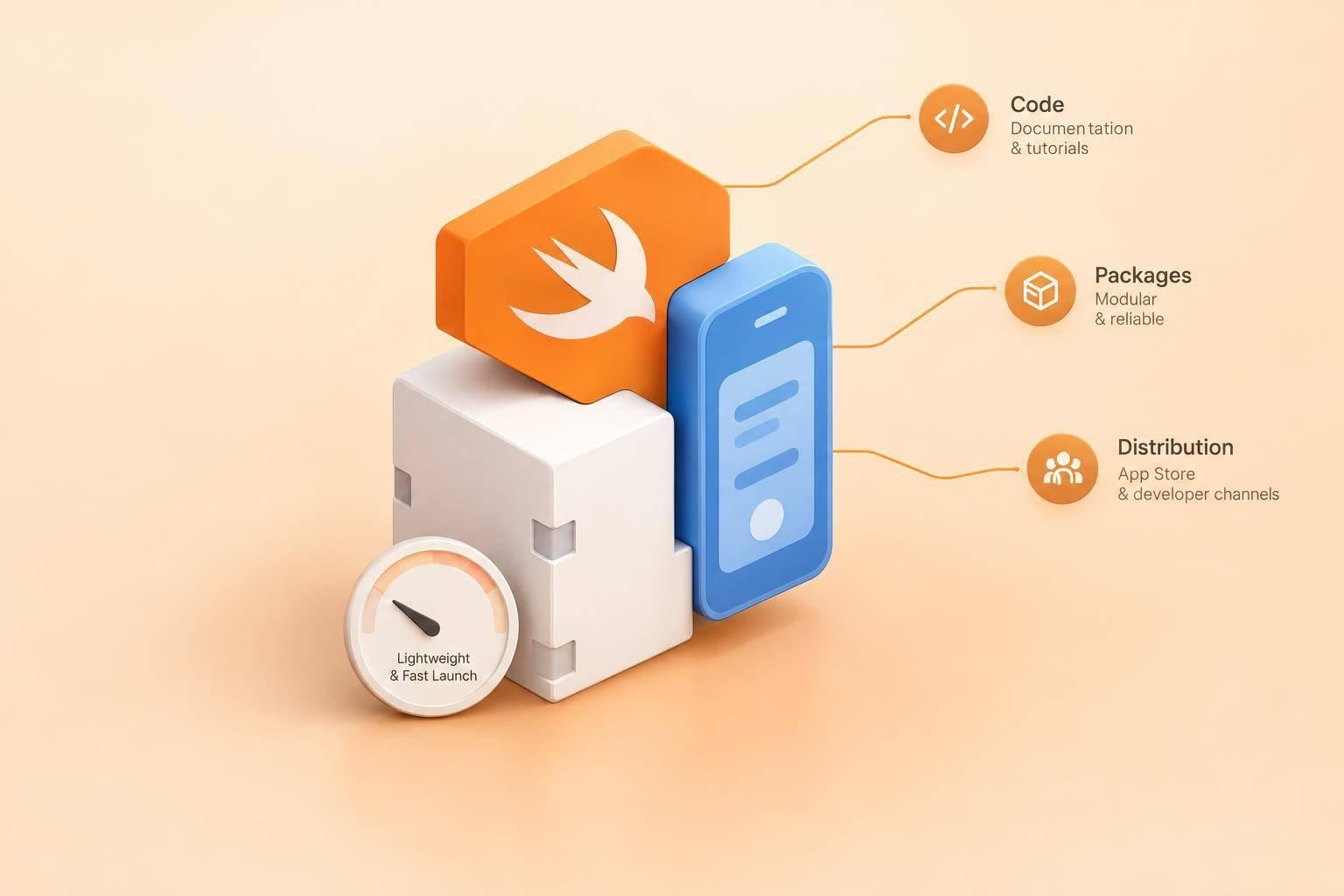
I’d start marketing to Swift developers with code they can run - not product claims. Publish Swift Package Manager setup, a working SwiftUI sample, supported versions, and measured app-size and launch-time costs.
Then I’d build the outreach around three steps:
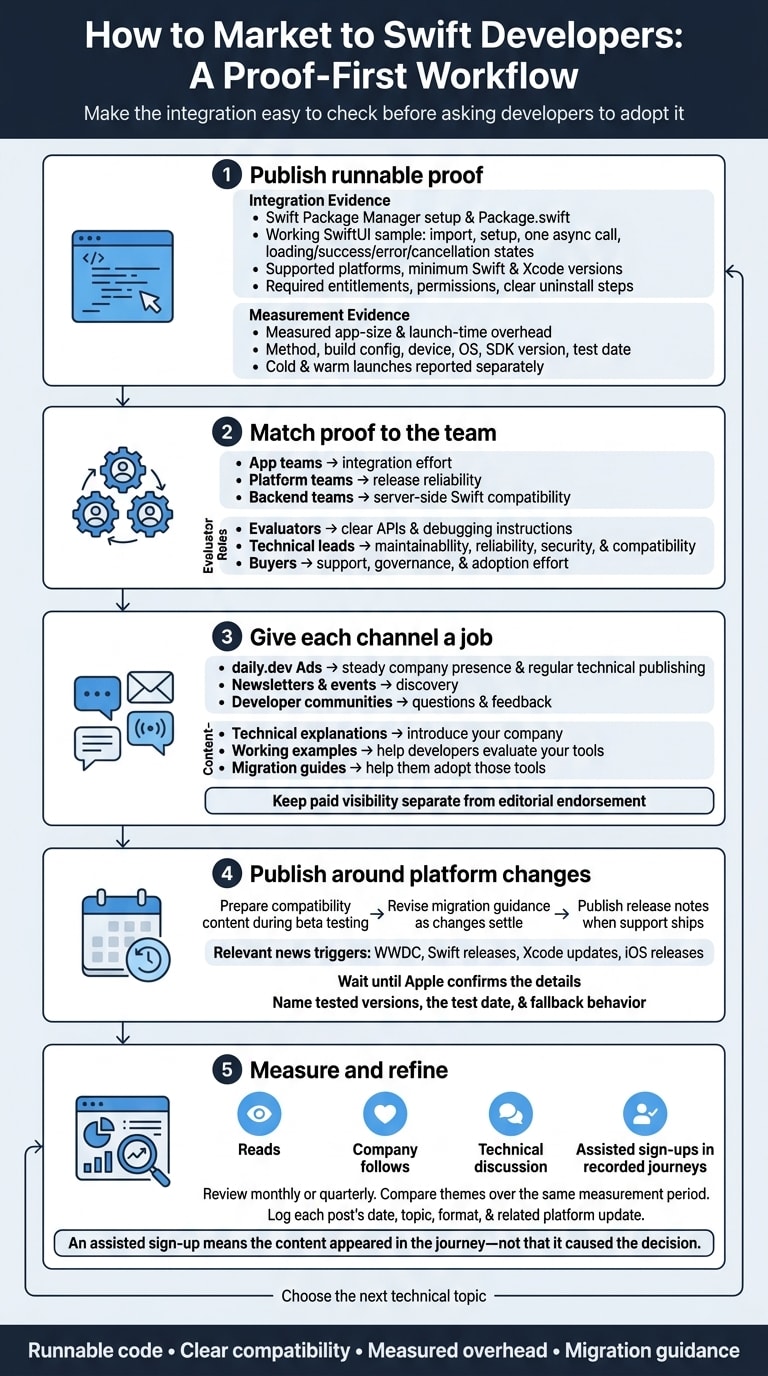
- Match the proof to the team. Show app developers, platform engineers, and server-side Swift teams how your tool handles their workflows, failures, privacy needs, and migrations.
- Give each channel a job. Use daily.dev for regular technical posts, newsletters and events for discovery, and developer communities for questions and feedback. Keep paid placements separate from editorial recommendations.
- Publish when developers need answers. Time tested compatibility notes and migration guides to Apple releases. Track reads, follows, technical discussions, and assisted sign-ups - without treating exposure as proof of a sale.
My rule: make the integration easy to check before asking developers to adopt it.
How do I market my developer tool to Swift developers?
Start with the workflow your tool changes. Show how it installs, runs, and fails. Publish Package.swift, supported platforms, minimum Swift and Xcode versions, required entitlements and permissions, and clear uninstall steps. Your SwiftUI sample should show the import, setup, one async call, and loading, success, error, and cancellation states.
Then match your proof to the team evaluating the tool.
Who Swift developers are and what they build
Treat iOS and macOS app teams, SwiftUI-focused developers, mobile platform engineers, and server-side Swift developers as separate audiences. App teams assess integration effort. Platform teams check release reliability. Backend teams need server-side Swift compatibility.
Also separate evaluators, technical leads, and buyers, even when one person fills several roles. Evaluators need clear APIs and debugging instructions. Leads need evidence of maintainability, reliability, security, and compatibility. Buyers need details about support, governance, and adoption effort.
With the audience defined, connect your product to the part of the stack they own.
Mobile backends and push notifications
Show the full path from authentication to a delivered notification. Request permission at a relevant moment in the product, register with Apple Push Notification service (APNs), send the device token to the backend, and route the notification to the right screen or state.
Explain what happens when permission is denied, connectivity drops, or tokens change. Make it clear what the app, SDK, and backend each handle, including retries, offline data, and data storage.
Next, show how the tool fits into release engineering.
Mobile CI and device testing
Give mobile teams a way to test your tool in their release workflow. Publish a runnable workflow that covers tests, archiving, and signing, plus a dated compatibility matrix for Xcode, Swift, and supported platforms. Include checks on both simulators and physical devices.
Make failures easy to inspect. Logs should identify the failing test, device, OS version, and build configuration. Keep retries visible so they don't hide unreliable tests.
What is the best way to reach Swift developers?
Use daily.dev Ads as a home for your Swift brand and developer community. Maintain a verified company page that developers can follow. Share technical posts, releases, and employer brand stories in the feed and newsletter they already follow - all under one publishing plan.
Pair that steady presence with active participation in Swift and iOS communities. daily.dev gives your brand a stable home, while community discussions and posts timed to platform news help developers find you. Use the mobile developer outreach guide to coordinate these efforts and stay visible as developers evaluate tools over time.
Give discovery, evaluation, and adoption posts different jobs.
Match content to discovery and evaluation
Technical explanations introduce your company. Working examples help developers evaluate your tools. Migration guides help them adopt those tools.
Time posts to WWDC, Swift releases, Xcode updates, and iOS releases, but wait until Apple confirms the details. Lead with what changed for the developer, then explain your response and what you tested.
Respond publicly to questions and update the post when compatibility changes. Follow the same structure for each platform update so developers can find what changed, what you tested, and what still needs work.
Server-side Swift and tooling
Not every Swift developer builds mobile apps. Backend Swift developers need their own content track - not more iOS app posts.
Cover deployment targets, containerization, concurrency, observability, package compatibility, and maintenance. Make deployment requirements and troubleshooting steps easy to find. Use the tech-stack targeting guide to organize topics around the tools these teams use and the problems they handle.
Measure reads, follows, technical discussion, and assisted sign-ups
Review reads, company follows, technical discussion, and assisted sign-ups in recorded journeys monthly or quarterly. Log each post’s date, topic, format, and related platform update.
Compare content themes over the same measurement period. Look at the discussion, too: are developers asking implementation questions, offering corrections, or requesting follow-up guidance?
Be clear about attribution. An assisted sign-up means the content appeared in the journey - not that it caused the decision. Developers may encounter your company through several channels before adopting a tool. Use these signals to assess repeated exposure, growing familiarity, and trust, then choose the next technical topic.
Where do Swift developers get their news and discover new tools?
Swift developers use Apple Developer docs and release notes to verify behavior. They turn to Apple Developer Forums and Swift Forums for implementation issues, and discover tools through daily.dev, newsletters, podcasts, WWDC, conferences, Reddit, and Stack Overflow. Listen for implementation questions, then answer them with tested content. Those questions can guide your next post.
daily.dev brings technical posts into developers’ chosen feed and newsletter. iOS Dev Weekly and iOS Goodies curate updates, while Swift by Sundell and Under the Radar offer editorial and audio perspectives. WWDC-week events and Swift conferences introduce tools through talks, demos, and conversations. Keep verification and discovery separate when choosing where to share your message.
Peer recommendations also show up in r/swift and r/iOSProgramming. On Stack Overflow, developers may discover tools while working through implementation questions. Check channel activity before planning outreach: record recent issue or episode dates, current event schedules, relevant discussions, and submission rules. A directory listing alone doesn’t mean a channel is still active.
Plan technical posts around platform news
Platform news warrants a post when it creates a concrete developer question. Check official docs to see whether the change affects APIs, dependencies, or builds. Then turn your findings into a compatibility note, tested integration, or migration guide. Xcode release notes distinguish new features, deprecations, resolved issues, and known issues. Don’t assume every reported problem is an SDK defect.
Make your evidence easy to check. Name the toolchain and platform versions, include the test date, and explain fallback behavior. For package-related changes, document version constraints and transitive dependencies. Have a Swift engineer review the package declaration, API availability, and migration advice before publication. Clearly separate documented behavior from community reports you haven’t reproduced.
Which channels work best for marketing to Swift developers?
Give each channel a different job in how Swift developers evaluate your product. Use daily.dev Ads for a steady company presence. Let other channels support discovery, discussion, feedback, education, or implementation details. Pair that steady presence with proof, conversation, or depth elsewhere.
| Channel | Role and format | Trust-building value | Limitation |
|---|---|---|---|
| daily.dev Ads | Steady brand building through technical, release, and employer-brand stories | A verified company page developers can follow, with technical stories in the feed and newsletter | Requires regular, useful publishing |
| iOS newsletters (iOS Dev Weekly, iOS Goodies) | Curated discovery through articles and release notes | Editorial selection puts resources in front of developers evaluating options | Publisher fit, space, and schedule |
| WWDC-week events and Swift conferences | Technical conversations through demos and talks | Direct questions bring integration details and tradeoffs into the discussion | Event timing and agenda |
| Reddit (r/swift, r/iOSProgramming) | Peer feedback on technical walkthroughs | Open scrutiny tests claims and product fit | Community rules and sensitivity to promotion |
| iOS podcasts (Swift by Sundell, Under the Radar) | Education through engineering discussions | Explains architecture and maintenance decisions | Preparation and limited control over framing |
| Stack Overflow Ads | Implementation context linked to technical guides | Documentation helps developers verify integration | Cannot replace a complete answer or working example |
Give each channel a clear role
For daily.dev Ads, plan a series of posts around the verified company page developers can follow. Connect technical posts, releases, and employer-brand stories instead of publishing disconnected announcements. Place these stories in the feed and newsletter developers have chosen.
Then match the message to the channel. A newsletter pitch needs a clear takeaway. An event speaker needs a working example and time for questions. Reddit participation needs someone who will disclose their company affiliation and respond to criticism. A podcast guest should explain engineering decisions, not recite product claims.
Keep paid visibility separate from editorial endorsement. A newsletter sponsorship is not an editor’s recommendation, and a Stack Overflow placement is not a community answer. Label paid placements clearly, and make sure the linked resource is useful on its own.
How do I build a brand that Swift developers trust?
Swift developers trust what they can inspect, build, and measure. Swift Package Manager support is a baseline requirement. Publish a complete package manifest, compatibility matrix, and changelog that developers can check quickly. Back them up with proof in your sample app, performance notes, and the release updates developers read before installing.
Start with the integration developers will test first.
Show a complete SwiftUI integration
A working SwiftUI example is your tool’s first trust test. Provide a complete sample project that builds from a clean checkout - not just a UIKit-only snippet.
Include the import, App entry point, view modifier, and async call. Make loading, success, and error states visible. List the Swift, Xcode, iOS, and macOS versions you used to test the project, and explain what happens offline or when permissions are denied.
Next, show what adding the SDK costs.
Explain SDK overhead and cross-platform support
Publish measured app-size and launch-time overhead. Include the measurement method, build configuration, device, operating system, SDK version, and test date. Explain differences between debug and release builds, and report cold and warm launches separately.
Be clear about Flutter and React Native support: is it full, partial, community-maintained, or unavailable? Identify missing APIs, release delays, and any fallback to native APIs. Teams need these details to understand what the library adds, what it supports, and what might otherwise stay hidden.
Use that proof to shape messages around how Swift developers evaluate tools.
Write messages about developer concerns
Lead with SwiftUI first, The next iOS release, and App size and launch time. Give each message proof behind it: show the view modifier and async call in a working example, explain tested compatibility changes and migration steps, and report the kilobytes and milliseconds your framework adds.
Support every number with a named source, method, and date.
How do I market iOS SDKs for auth, analytics and payments to Swift developers?
For auth, analytics, and payments SDKs, the fastest way to earn developers’ trust is to give them a complete integration they can run end to end. Make the tutorial your main asset. Start with Swift Package Manager installation, walk through the SwiftUI workflow, and link privacy and migration docs along the way.
Cover the normal workflow, failure cases, and migration steps so developers can judge what installation, testing, and maintenance will take. Then show how the SDK behaves in actual app states.
Show how auth, analytics, and payments work
For auth, walk through sign-in, token storage, refresh, sign-out, account deletion, and failure states. Include a SwiftUI sign-in button, observable authentication state, and clear error messages. Document secure token storage, Keychain access, and refresh-token revocation, plus tests for invalid credentials and interrupted requests.
For analytics, show exactly which events the SDK sends, when they leave the device, and how developers can inspect rejected payloads. Document typed event names, allowed properties, validation, consent handling and withdrawal, offline queues, retries, and deduplication. Debug mode should show rejected properties and upload status without exposing production user data. Link to the SDK’s PrivacyInfo.xcprivacy file and explain its declarations.
For payments, spell out which layer - StoreKit, your SDK, or the app’s backend - loads products, verifies transactions, grants entitlements, handles refunds, and processes server notifications. Show pending purchases and interrupted delivery, and explain when processed transactions are finished. For server validation, document signed transaction data or the App Store Server API rather than making the deprecated verifyReceipt endpoint the default.
Once developers understand the workflow, show how they can replace an existing integration without breaking production. Publish API mappings, token and entitlement transfer rules, queued-event handling, validation tests, and rollback instructions. Explain when the old and new integrations can run in parallel during migration.
For auth, include a migration checklist for custom OAuth flows or another provider. Pair the guide with a support policy that covers platform updates, security advisories, and deprecations.
How do I market crash reporting and app performance monitoring to Swift developers?
Swift developers trust monitoring tools that show a repeatable path from issue to fix. Show the investigation, not vague performance gains. Give developers a way to inspect what caused a crash, main-thread hang, slow launch, or network failure - not just view an alert. Apple’s MetricKit separates aggregated performance metrics from event-based diagnostic reports, including crash, hang, CPU, disk-write, and app-launch diagnostics.
Trace a crash or slowdown from report to fix
Publish a SwiftUI sample that triggers a repeatable test crash, hang, or failed request. Include the exact Swift Package Manager dependency and initialization code. Explain when reports arrive: crash reports are commonly saved locally and uploaded after the next launch, rather than sent while the process is crashing.
Walk developers through affected release, device, and OS → symbolicated stack trace → fix verification. Show how matching dSYMs turn raw addresses into readable functions and source locations, and explain what happens when symbols are missing. After shipping a fix, compare the affected issue across releases. Account for release adoption before calling it resolved.
Apply that same trace-to-fix approach to slowdowns. Document launch-phase timing for startup delays and the main-thread call stack for hangs. For network failures, record request duration, HTTP status failures or transport errors, retry behavior, and app state - with credentials and payloads redacted. Explain how traces follow async/await work, link failed tasks or network calls to the code that started them, and separate cancellation from genuine production errors.
Include privacy controls and repeatable overhead measurements developers can check. Document URL redaction, breadcrumb limits, and whether the tool collects request bodies or session replay. Back every overhead claim - including zero-overhead claims - with CPU, memory, and network measurements. Specify the device, OS, build configuration, test method, and measurement date.
How daily.dev Ads helps you reach Swift developers
Once you’ve chosen your channel mix, use daily.dev to keep your Swift messaging in one place. daily.dev handles setup, ad content guidance, pacing, delivery, and reporting. Back your content with the same technical evidence Swift developers expect on any channel.
Build a regular company publishing plan
Make your company page the main hub for Swift content, not just a feed of announcements. Publish SwiftUI examples, release updates, migration guides, and engineering stories. Give each post a clear job: teach, explain a change, reduce upgrade risk, or show how your team works. Keep the same proof points across posts: Swift Package Manager support, SwiftUI setup, compatibility, and maintenance details.
Let the Apple release cycle guide when to teach, update, or reassure readers. Prepare compatibility content during beta testing, revise migration guidance as changes settle, and publish release notes when support ships.
Between releases, share implementation notes, compatibility updates, and maintenance details. These keep the page active without repeating the same message. Link every post to maintained documentation or a useful technical resource.
Plan your Swift developer outreach
Bring your goals, best technical assets, upcoming releases, and an engineering reviewer to the planning call. Work with the daily.dev team to agree on a publishing calendar and reporting priorities.
Track reads, company follows, discussion, and assisted sign-ups across the series - not post by post. These signals help you gauge growing familiarity, trust, and movement toward adoption.
Plan your Swift developer outreach with daily.dev Ads to align content, timing, and reporting. Explore available plans, or prepare your brief using the guides to programming-language audiences, tech-stack targeting, and mobile developer outreach.
Conclusion
Start with the workflow your product changes. Share a Swift Package Manager URL, supported versions, and a working SwiftUI sample that covers setup, one async call, and loading and error states.
Once developers can see how the integration works, align your publishing with Apple’s release cycle. Explain what changed and how it affects compatibility. Use your verified daily.dev company page as the home for release notes and migration updates, and review your established metrics on a fixed reporting schedule.
Swift developers want runnable code, clear compatibility, measured overhead, and migration guidance that answers their current questions.
FAQs
How do I prioritize Swift developer audiences?
Use daily.dev Ads to reach Swift developers who are already researching tools. Pair those ads with iOS-focused newsletters and Swift conferences. Focus on developers facing the problems your SDK or framework solves, and lead with useful technical content - not broad advertising.
Build trust with working SwiftUI examples, Swift Package Manager support, and clear details about app performance and cross-platform support.
What if my SDK lacks SwiftUI support?
Be upfront that your SDK doesn’t support SwiftUI, and focus on what it offers for iOS and Swift. Swift developers choose SDKs based on trust and technical fit. Swift Package Manager support is a baseline requirement.
Share that value through daily.dev Ads, Swift-focused iOS newsletters, and Swift conferences or WWDC-week events - places where developers already find tools.
How can I keep Swift samples current?
Plan your updates around the platform’s release calendar. Show what’s changing in the next iOS release and how your SDK handles those changes. Include a working SwiftUI example with the view modifier and async call.
Share the updated samples through daily.dev Ads, iOS newsletters, and Swift conferences - the places Swift developers go to find tools.