

I’d market to TypeScript developers with code they can check - not claims they have to take on faith. Start with one workflow, such as a Next.js app or Node.js API, and share inspectable types, a runnable example, and clear support limits.
Here’s the approach I’d use:
- Match the proof to the product. Show build times in seconds for tooling, generated code for SDKs, and source-map debugging for monitoring.
- Explain what types don’t catch. Separate compile-time checks from runtime validation, permissions, and request failures.
- Give each channel a job. Use daily.dev for a steady company presence, newsletters for releases, videos and events for demos, and communities for technical questions.
- Make adoption easier to assess. Publish tested versions, setup steps, migration notes, and known limits.
- Measure continued interest. Track engaged reads, follows, technical discussions, and assisted sign-ups - not just visits.
My rule: show the work before asking for the sign-up. Then use developers’ questions to decide what to explain next.
Where do TypeScript developers get their news and discover new tools?
On daily.dev, TypeScript developers find technical posts through a personalized feed and the Web Development newsletter track. They look for proof they can inspect: types, code, and a runnable example.
JavaScript Weekly, Bytes, and TypeScript Weekly introduce tools through curated updates. Match your pitch to each outlet. Show how the tool fits the JavaScript ecosystem for JavaScript Weekly, keep news and commentary brief for Bytes, and focus on TypeScript-specific tooling details for TypeScript Weekly. Explain what changed and how it affects developers in one sentence.
TSConf and JSNation introduce tools through talks and demos. For YouTube creators and courses, publish a runnable repository with framework support, setup steps, and limits. Give developers something they can run, not just watch.
On Reddit, r/typescript, r/reactjs, and r/node give developers space to question claims. Share technical answers, disclose your connection to the product, and respond to objections directly. Repeated questions can point to gaps in your docs or unclear integration steps.
Developers also search when they need to verify a fix. On Stack Overflow, docs, technical blogs, and GitHub, they check implementation details, migration steps, and release history before adopting tools. Link troubleshooting posts to the docs and maintained repository they need to test the fix.
The next question is which of these channels deserves priority for your category.
What is the best way to reach TypeScript developers?
TypeScript developers inspect type definitions, generated code, and failure modes before adopting a product. Reach them with technical proof, community answers, and a steady company page presence. Turn repeated questions into follow-up posts on your verified daily.dev company page.
Show what goes into the decision: type definitions, configuration changes, generated files, and maintenance requirements. Demonstrate an integration in an existing application - not just a blank project - and include an upgrade path and removal instructions. Treat strictness as a selling point by showing what it catches and what still needs runtime checks. Match the proof to the product: speed for tooling, safety for typed clients, and traceability for monitoring.
Linters, build tools, and monorepo tooling
Publish a reproducible workspace with package boundaries, project references, and declaration output. Change a dependency, then rerun tsc --build to show dependency ordering and rebuild behavior . Buyers can then see how the tool behaves in an actual workspace.
Explain how .tsbuildinfo supports incremental compilation . Report build times in seconds alongside the source, date, hardware, project, command, and cache state. For rebuild speed comparisons, use the same project, command, and cache state.
Backend-as-a-service with typed clients
Walk through the path from schema to generated client to application code in an existing application. Show autocomplete, auth fields, and CI checks that detect stale generated types after a schema change.
Separate compile-time safety from runtime enforcement: types do not validate responses or authorize access. Demonstrate runtime validation, expired-session handling, unauthorized access, and typed errors. Once the generated client works, developers need to see whether it fits their app’s failure paths and permissions model.
Error tracking and monitoring
For a product running in production, developers need a clear path from error to source. Publish a debugging walkthrough that covers framework integration and typed request, user, and feature context data. Trace a production stack trace back to the original TypeScript source using source-map uploads and release settings .
Make each step clear so developers can assess debugging speed and source traceability. Explain what the product records automatically, what developers add, and how scrubbing, retention, permissions, and private source maps protect sensitive data.
How do I market typed API clients and SDK generators to TypeScript developers?
For SDK buyers, the generated client is the demo. Let the output do the selling. Show one source contract, its generated types, and the client method for one endpoint. Walk through autocomplete for required parameters, nullable properties, nested fields, enums, and pagination. Then pass an invalid value with strict TypeScript settings enabled and show the compiler error developers would see. Put handwritten fetch code beside the generated code. That comparison says more than a feature list.
Explain exactly how generation works: whether it uses OpenAPI or GraphQL, whether the source is a checked-in spec or a remote source, who owns the schema, how updates reach app teams, and whether CI blocks or accepts generated diffs. For GraphQL, separate schema types from operation-specific output so buyers can audit what the client includes. With that workflow laid out, show that the output changes only when the contract changes.
Show that regeneration produces predictable changes. Pin the generator version and commit its configuration and lockfile. Run generation twice in a clean environment using the same schema, and show the resulting diff. Then repeat after a documented contract change. Keep generator upgrades separate from schema updates so developers can see why the output changed. Put custom authentication and app logic outside files that regeneration replaces.
Next, show the same client in the frameworks and runtimes your buyers already ship: React, Next.js, Angular, Node.js, and edge runtimes. Document module formats, bundler behavior, authentication, file uploads, streaming, retries, cancellation, and custom transports.
Show what happens when a request fails, too. Does the client preserve the server’s error body? Does it expose the status, error code, and request ID? Spell out unsupported schema features, runtime validation requirements, and any documented workaround or escape hatch. Generated types describe the contract; they don’t prove that a live response follows it.
How do I market full-stack frameworks and hosting to TypeScript developers?
Show the same TypeScript app from local development to production. Publish one runnable project with typed props, route params, server-rendered pages, and API handlers. Document how to install dependencies, configure the environment, start the development server, and validate production behavior.
For Next.js, show
next buildfollowed bynext startso developers can check production behavior, not just hot reload.
Then deploy that same app to the production target developers plan to use.
Show
"strict": trueintsconfig.json, then demonstrate how a nullable database value forces the application to handle missing data before rendering. Show the migration cost in the same example.
Next.js production builds fail on TypeScript errors by default. Keep that safeguard in place unless another build step enforces type checking.
Name the exact framework versions and deployment targets you support. Treat Node.js servers, Docker containers, static export, serverless functions, and edge runtimes as separate targets. For each, explain where server rendering, background jobs, WebSockets, native modules, and filesystem access work - and where they have limits.
Next.js supports several deployment approaches, but static export cannot run every server-side feature. A passing TypeScript build does not mean every feature will run on every target.
Once the app runs in production, show how to trace failures back to the original TypeScript file. Walk developers from the framework’s hosted error output through source maps to that file. Explain how hosted diagnostics differ from local diagnostics, including runtime restrictions on source maps or debugging tools.
Publish build and deploy times only when readers can reproduce them. Report the same app’s type-check, build, and deployment times separately, in seconds. Name the source and measurement date, and include the repository commit, tool versions, hardware or hosting environment, commands, and cache state. Clearly distinguish cold runs from warm runs.
How do I build a brand that TypeScript developers trust?
TypeScript developers trust products that make their types, support boundaries, and release practices clear in code.
Publish types developers can inspect. In engineer-authored posts, link to exported interfaces, generic constraints, and error types. Show where inference helps and where any breaks the contract. Include these types in docs and changelogs, too. TypeScript’s documentation notes that any effectively disables type checking. A “fully typed” claim needs proof - not just a headline.
Write for the framework they already use. Keep separate quickstarts for React, Next.js, Angular, and Node.js. Include tested versions, module formats, compiler settings, and the last verified date. Back support claims with tests developers can reproduce or repository workflows they can inspect. Use the tech-stack targeting guide to match content to the tools developers use.
Make strict compilation a quality bar. TypeScript recommends strict compilation for libraries because declarations produced without it can fail in strict consumer projects. Keep a short, visible limitations note that lists unsupported checks and escape hatches.
Put engineers on the byline, including for speed claims. Name the engineer who wrote the post, and let them explain implementation choices and tradeoffs.
Write releases for the people upgrading. Publish changed types, affected integrations, deprecations, migration steps, and rollback steps. Separate required fixes from optional improvements, and link to known issues and workarounds. Keep release notes short, specific, and easy to scan. Make these trust signals visible wherever developers encounter your product.
Which channels work best for marketing to TypeScript developers?
Choose each channel for a specific job: maintaining a company presence, explaining a workflow, announcing a release, or inviting technical discussion. Match that job to awareness, education, discussion, or release news.
| Channel | Best use | TypeScript audience context | Content format | Strength | Limitation | Recommended message |
|---|---|---|---|---|---|---|
| daily.dev Ads | Long-term brand and community building | Developers’ chosen feed and newsletter, including the Web Development track | Verified company page developers follow; posts, releases, and employer-brand stories | One team-run plan keeps publishing consistent | Requires useful content over time | Show inspectable SDK types and framework fit, then invite developers to follow for updates |
| JavaScript and TypeScript newsletters (JavaScript Weekly, Bytes, TypeScript Weekly) | Timely release news | JavaScript projects, brief ecosystem coverage, or TypeScript-specific links | Short release summary or technical tutorial | Fits a recurring reading habit | Scheduled slots and editorial context limit control | Lead with changed types and the supported framework |
| TSConf and JSNation | Talks and demos | TypeScript-focused learning at TSConf; broader JavaScript context at JSNation | Talks, workshops, and demos | Gives you room to teach and answer questions | Attention centers on event dates | Trace a shared type from API schema to frontend autocomplete |
| Reddit (r/typescript, r/reactjs, r/node) | Technical discussion | Language, framework, and runtime communities, each with its own rules | Helpful replies and permitted project posts | Brings direct questions from practitioners | Promotional posts are often rejected | Share the types, disclose your affiliation, and ask about integration tradeoffs |
| TypeScript YouTube creators and courses | Visual workflow education | Developers learning integrations, generated types, and debugging | Tutorials, live code, and course modules | Shows the product working inside an editor | Depends on creator fit, judgment, and schedule | Inspect generated types, then demonstrate integration and error handling |
| Stack Overflow Ads | Problem-specific awareness | Developers investigating relevant technical questions | Short contextual ads linked to the docs | Connects your message to a defined technical problem | Placement is contextual, not an endorsement | Name the typing problem and link to framework-specific documentation |
| Carbon Ads and BuySellAds | Contextual awareness | Developers reading technical websites | Short sponsorship units | Helps developers discover your product near relevant content | Little room for detailed explanations | State the typed capability and supported environment |
Match the format to the channel. Newsletters need a sharp release takeaway. Videos need a working demo. Discussion channels need a question worth answering. Keep build-speed claims to measured seconds.
For a steady presence, plan a TypeScript publishing sequence with daily.dev Ads. Then match your message to the proof developers expect.
What should my message say to TypeScript developers?
Start with the workflow and framework: React props and hooks, Next.js server and client boundaries, Angular services and strict templates, or Node.js request handlers. Show the imports and setup, then show what TypeScript catches before runtime. TypeScript developers want proof, not positioning. For broader positioning, see our guide to reaching frontend web developers.
Place compatibility details beside each claim. Name supported stack versions, date the source, and spell out required configuration and known limits. Include unsupported compiler options and cases that need manual annotations.
With the stack established, focus on the proof developers check first: types, contracts, or speed.
Types as documentation
Let the types tell your product’s story. Show autocomplete or an inferred return type directly in the post so developers can check the editor experience right away. Explain what the suggestions show and which invalid uses the compiler catches.
Say whether type definitions are generated or handwritten, then link to the definition file or a sample project. Type inference can reveal useful information without explicit annotations.
Next, connect that editor experience to the contract shared by client and server.
End-to-end type safety
Show the same contract in the server handler and client code, along with where incoming data gets validated. Show how an incompatible contract change produces compiler errors at affected call sites.
Be clear about the boundary: TypeScript does not validate untrusted JSON at runtime, and a type assertion does not validate data. Explain which endpoints and consumers your product covers rather than promising zero runtime errors.
If speed is part of the pitch, give developers measurements they can check, too.
Build speed
Use testable facts, not superlatives, for speed claims. Report type-check and bundle times separately, in seconds, with a named source and measurement date. Separate clean builds from incremental checks.
State whether the timings include tests or cache restoration, and link to the benchmark setup so developers can repeat it. If you don’t have that evidence, leave the speed claim out.
How do I measure brand and community growth?
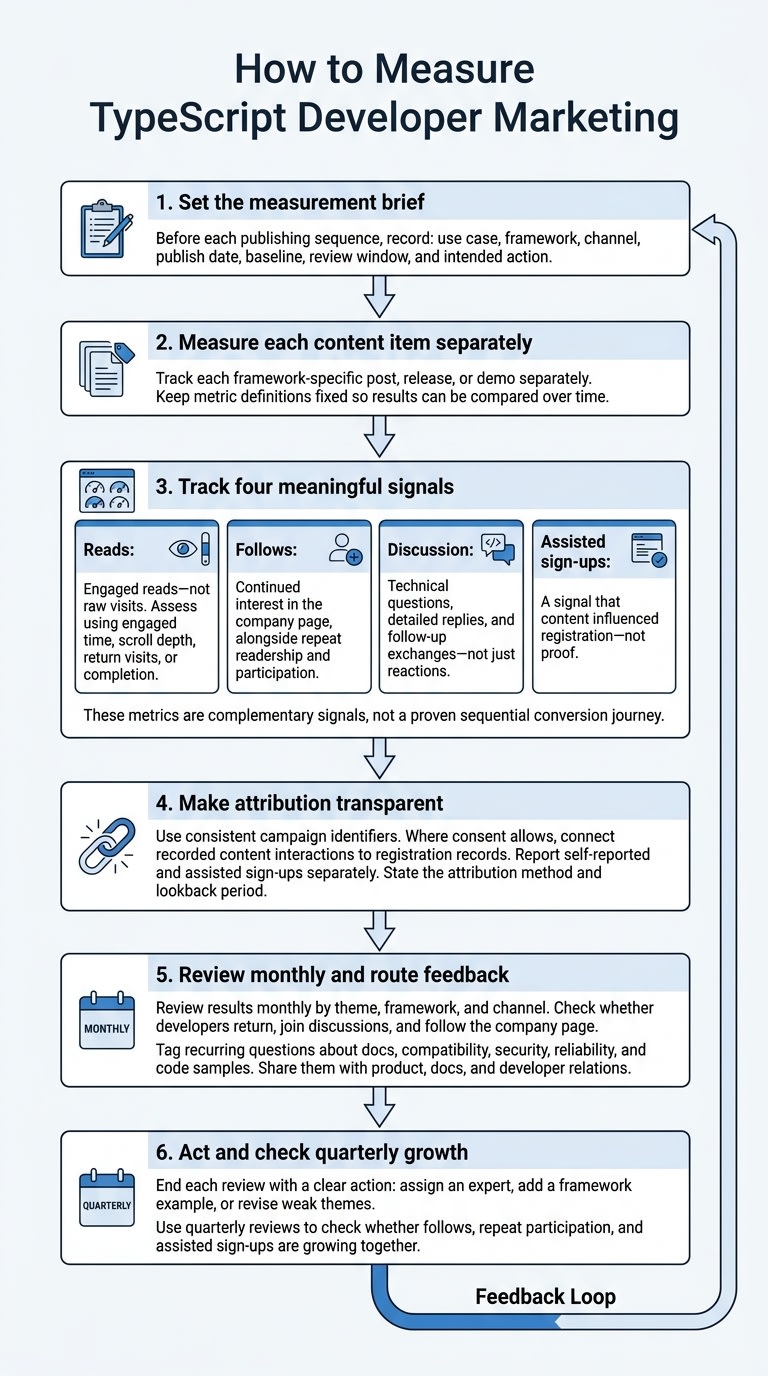
Once your content is live, check whether it drew attention or started conversations. Measure each framework-specific post, release, or demo separately. Set a measurement brief before each sequence that records the use case, framework, channel, publish date, baseline, review window, and intended action. Keep daily.dev Ads reporting focused on reads, company-page follows, meaningful discussion, and assisted sign-ups.
Define reads as engaged reads, not raw visits. Use engaged time, scroll depth, return visits, or completion to tell them apart. Keep these definitions fixed so you can compare results over time. Track follows as continued interest in your company page, alongside repeat readership and participation. For discussion, count technical questions, detailed replies, and follow-up exchanges - not just reactions.
Treat assisted sign-ups as a signal, not proof, that content influenced registration. Use consistent campaign identifiers and, where consent allows, connect recorded content interactions to registration records. Report self-reported and assisted sign-ups separately, and state the attribution method and lookback period.
Review results monthly by theme, framework, and channel to guide the next sequence. Check whether TypeScript developers return, join discussions, and follow your page. Tag recurring questions about docs, compatibility, security, reliability, and code samples, then share them with product, docs, and developer relations.
End each review with a clear action: assign an expert, add a framework example, or revise weak themes. Use quarterly reviews to check whether follows, repeat participation, and assisted sign-ups are growing together.
How daily.dev Ads helps you reach TypeScript developers
Once you’ve chosen your channels, use daily.dev Ads to bring your verified company page and TypeScript posts into one publishing sequence. A single team-run plan covers setup, placement, and reporting, keeping posts and placements consistent.
Use the same logo, product name, terminology, and links in every post. Developers who visit your company page should know what you build, who maintains it, and why they should follow your updates. With those details in place, order your posts around the proof developers want to see first.
Plan a TypeScript publishing sequence
Start with a framework-specific workflow post that includes inspectable types and runnable code. Follow it with a release or reproducible benchmark, backed by migration notes or measurement conditions. Include employer-brand stories only when they show practices that affect product quality.
Match each post to its technical context using #typescript and tags such as #javascript, #react, #nodejs, #nextjs, and #angular. Apply these across the feed and Web Development newsletter track, and keep each placement focused on one technical topic.
Use https://business.daily.dev/schedule/ to plan the sequence, choose tags, and coordinate feed and newsletter placements.
Conclusion
Marketing to TypeScript developers starts with their framework and use case. Give them proof they can inspect: types, runnable code, compatibility limits, and a clear distinction between compile-time checks and runtime validation. Support speed claims with timing in seconds, the command used, and test conditions.
Choose channels where developers already discuss that use case. Track reads, follows, discussion, and assisted sign-ups over a consistent reporting window. Let implementation questions guide what you explain next, rather than relying only on how much attention a post gets.
To maintain a consistent presence, schedule a conversation with daily.dev Ads. Build your brand and developer community through a verified company page, with your team managing feed and Web Development newsletter publishing.
FAQs
What should I publish before my tool launches?
Publish technical content that shows how your tool solves specific TypeScript workflow problems. Include real code snippets that demonstrate type safety, autocomplete, and how types stay in sync between the backend and frontend. If build speed is a selling point, share measured build times - not vague claims.
Use daily.dev Ads to share that content in developers’ feeds and newsletters. Focus on useful information, not a hard sell.
How can I share code without exposing proprietary logic?
Focus code examples on how your tool works with React, Next.js, or Node.js, not on proprietary implementation details. Show autocomplete and end-to-end type safety in action. Link directly to the documentation or a sandbox so developers can try the tool for themselves.
How do I turn developer questions into content?
Turn TypeScript developers’ questions into technical content tailored to the framework they use. Show autocomplete, type definitions, and code snippets from actual projects to explain how your tool works. Answer questions about end-to-end type safety and tool speed with examples and performance measurements in seconds, naming the project you tested.
Use daily.dev Ads to share this educational content with developers whose tech stacks and interests match your message.