
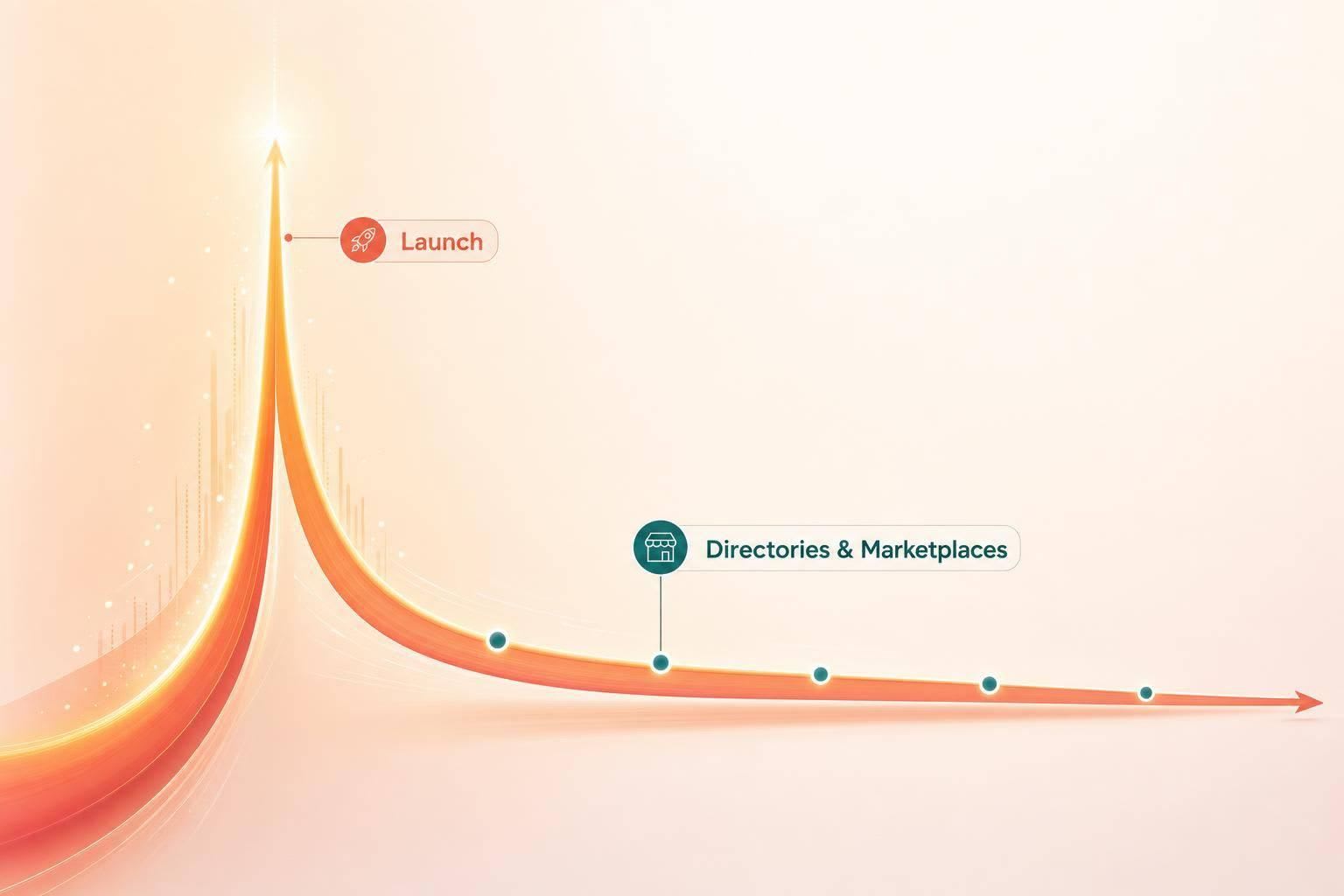
If I launch an AI tool in just one place, I usually leave growth on the table. The better move is to pair one traffic spike channel with one long-tail channel, then roll posts out over 1–2 weeks.
Here’s the short answer:
- I use Product Hunt for broad launch-day attention
- I use Hacker News when the tool has strong technical depth
- I use DevHunt for dev tools like CLIs, SDKs, and APIs
- I use AI directories for search and AI assistant visibility
- I use daily.dev for steady developer discovery
- I use VS Code Marketplace if the tool lives inside a dev workflow
A few numbers stand out:
- Product Hunt can bring 1,500–2,500 visitors for a top-three finish
- Hacker News can convert technical users at 5%–12%
- AlternativeTo gets 10 million+ monthly visits
- daily.dev reaches 1 million+ developers
- Product Hunt traffic often drops 90%–95% after 48 hours
Quick comparison
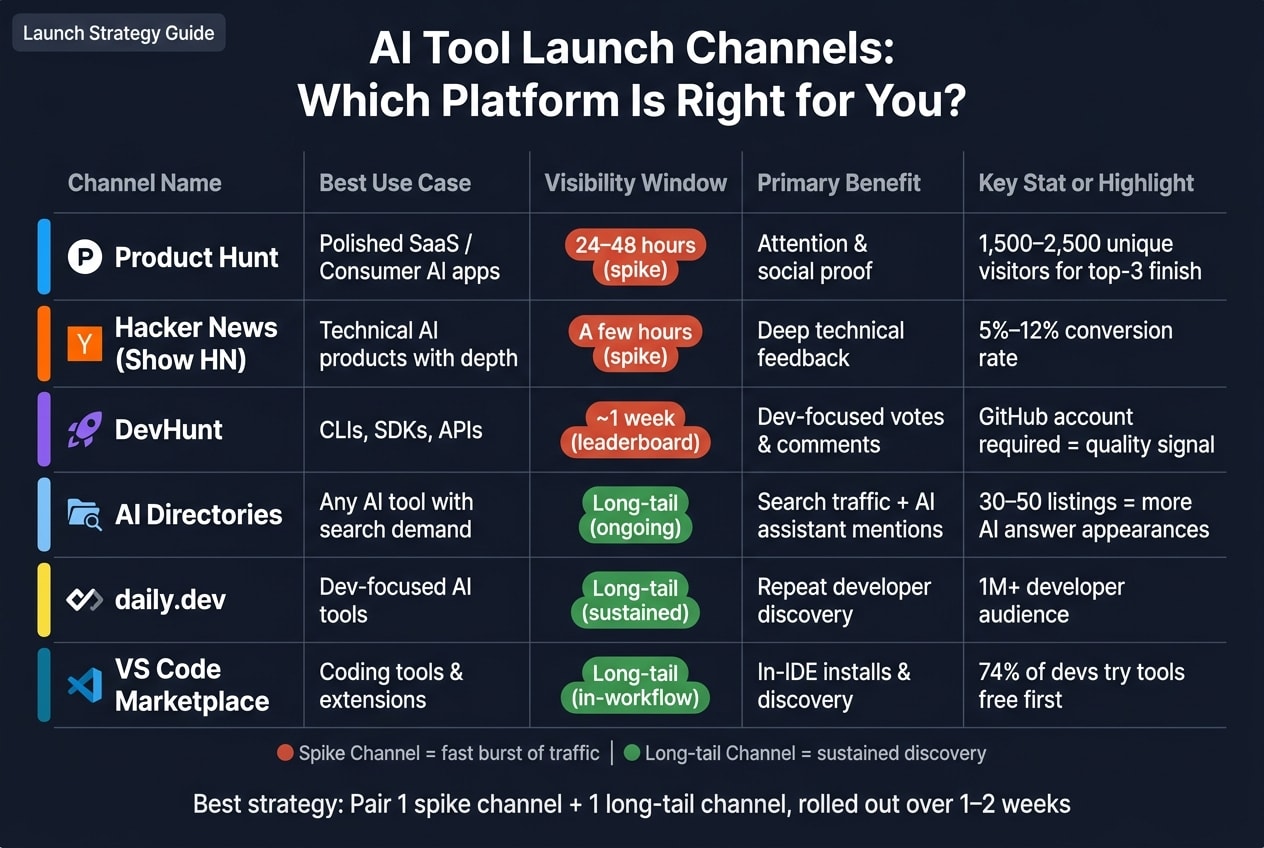
| Channel | Best use | How long it lasts | What I get most |
|---|---|---|---|
| Product Hunt | Polished SaaS or consumer AI app | 24–48 hours | Attention and social proof |
| Hacker News | Technical AI products | A few hours | Deep feedback |
| DevHunt | CLIs, APIs, SDKs | About a week | Dev-focused votes and comments |
| AI directories | Any AI tool with search demand | Long tail | Search traffic and mentions in AI answers |
| daily.dev | Dev-focused AI tools | Long tail | Repeat discovery from developers |
| VS Code Marketplace | Coding tools and extensions | Long tail | In-workflow installs |
The core idea is simple: match the channel to the product. If I want feedback, I post where engineers judge tools fast. If I want sign-ups over time, I add directories, advertisement campaigns for developers, or marketplace listings. And before I post anywhere, I make sure the landing page, screenshots, demo, pricing, and quickstart are ready.
How to choose the right launch channel before you post
Where you post should match what you built and what you need most right after launch.
If you're shipping developer tools like CLIs, APIs, SDKs, or open-source libraries, post where engineers already hang out and can judge the product on its technical strengths. A polished SaaS product or consumer app usually fits a different kind of launch surface. The main idea is simple: match the channel to the product and the result you want most.
Some teams want a day-one credibility boost. Others want broad awareness, direct feedback from technical users, or traffic that keeps coming after launch day. Each of those goals points to a different place to post.
Here’s a fast way to sort your options:
| Channel Type | Best For | Visibility Window | Feedback Depth |
|---|---|---|---|
| Launch leaderboards | Polished SaaS / Consumer apps | Short spike (24–48h) | Low to medium |
| Technical communities | Infrastructure / Open source | Short spike (2–6h) | High |
| Developer ad channels | Repeat developer discovery | Long-term / sustained | Medium |
| Dev tool directories | CLIs / SDKs / APIs | Weekly leaderboard | Medium to high |
It also helps to spread your launch across channels over 1–2 weeks. That gives you time to sharpen your message based on early feedback and helps you avoid traffic surges that can strain your site or product .
Once you choose the channel, the next step is to shape the message and assets for that specific audience.
1. Launch hubs
Use launch hubs when you want a fast jump in visibility and early technical feedback. The right pick depends on two things: how technical your AI tool is, and how fast you want people to react.
Product Hunt
Post here if you want day-one credibility and broad reach. A top-three finish can drive 1,500–2,500 unique visitors , which makes it a strong social proof signal at launch.
Hacker News (Show HN)
This works best when your AI tool has real technical depth. Engineers will dig into the details, and technical products can see conversion rates between 5%–12% .
DevHunt
Built for developer tools such as CLIs, SDKs, and APIs. Voting requires a GitHub account, so the feedback tends to stay technical and on-topic. Its weekly leaderboard also gives your tool a longer visibility window than a 48-hour spike.
Some launch surfaces can also help people find your tool after day one.
daily.dev
With an audience of over 1 million developers , daily.dev can keep your tool in front of developers after launch, not just during that first-day rush.
2. AI directories
Launch hubs can give you a short burst of attention. AI directories help your tool keep showing up after that. They can put your product in front of people using search and can also help it appear in AI assistant recommendations .
If your tool is listed in 30 to 50 trusted directories, it can show up in AI-generated answers far more often than tools with no directory listings at all .
Start with these three:
- There's An AI For That: Brings in high-intent traffic from people who are actively hunting for AI tools, and it can help with long-term search visibility .
- Futurepedia: A human-curated directory with strong search reach and a broad tech audience .
- AlternativeTo: With over 10 million monthly visits , it catches people who are looking for a replacement.
Before you submit, get your assets ready. A simple submission kit makes the whole process smoother:
- A 1-line value prop under 100 characters
- A 400–500 word description
- 3–5 screenshots at 1,280 × 800 or larger
When that kit is ready, submissions tend to move a lot faster .
If you need steady reach after launch week, move next to developer ad channels.
3. Developer ad channels
Launch hubs and directories help people find your tool. But developer ad channels put you in front of engineers and technical buyers who are already in the right mindset.
On daily.dev, you can target by seniority, programming language, and tools. That makes it easier to get your AI tool in front of the developers most likely to care.
For technical launches, the best fit is usually the channel that helps you reach the right developers fast.
Here’s the ad channel that fits this stage:
- daily.dev Ads: In-feed ad placements for reaching developers, with targeting by seniority, programming languages, and tools. Put more budget into desktop placements, since 90% of developer tool evaluations happen on desktop . Before launch, prepare 10 to 15 creative variants so the platform can test headlines and visuals .
Use ad channels for targeted reach. Use developer ecosystems for longer-tail discovery.
4. Developer ecosystems
Use developer ecosystems when you want discovery inside the tools developers already use. Put simply, this is how you show up where developers are already working: inside their IDE, code host, or workflow tool.
For AI coding assistants and other dev tools, VS Code Marketplace is a strong place to start. If your AI tool helps with code generation, debugging, or documentation, a VS Code extension puts it right inside the place where that work happens. That's a big deal. You’re not asking someone to switch tabs, open another app, or change how they work.
Best fit: VS Code Marketplace + daily.dev tutorial: Publish a VS Code extension, then pair it with a daily.dev tutorial that walks through install steps, examples, and core workflows. The extension helps people find the tool in context. The tutorial builds awareness and trust outside the IDE. This combo works best when your listing and launch assets are ready to convert.
About 74% of developers try a new tool free first, so start with a free tier and low-friction setup . Make the first run simple. Quickstart commands, sample prompts, and a clear onboarding flow help developers get to value without leaving their workflow.
It also helps to ask early users for ratings and reviews on the marketplace page. About one-third of developers read ratings and reviews on third-party sites when they size up tools .
What to prepare for a stronger launch
Once you’ve picked the channel, clean up the assets around it.
Before you submit anywhere, tighten your landing page. It should explain what the tool does in one sentence and point people to one clear next step - a free trial, a sign-up, or a demo.
Your core launch kit should include:
- A concise value proposition in one sentence
- Screenshots or a short demo video showing the tool in action
- Transparent pricing - free-tier details, paid plan costs in USD, and what’s included at each level
- A quickstart guide and minimal docs
- A single, clear call to action
Then shape those assets for the channel.
For launch hubs like Product Hunt, lead with strong visuals, a demo video, and a maker story. For developer ecosystems like GitHub, treat your README like the landing page - open with a one-line value prop, a quickstart, and a demo GIF. For daily.dev, keep headlines under 60 characters, use a 1,024×512 image, and include your favicon.
The first post can tell you a lot. Use that early feedback to sharpen the next one.
Each asset should answer a real developer question fast.
Conclusion
No single channel works for every AI tool. In most cases, that means mixing channels instead of going all-in on just one.
The strongest launches usually combine one spike channel with one steady discovery channel. Product Hunt traffic often drops 90% to 95% after the first two days , so putting all your weight on one source can dry up momentum fast.
Pick channels based on audience fit, launch goal, and product type. Use launch hubs for fast reach, developer communities for technical feedback, and daily.dev for repeat developer discovery .
Spread your rollout across one to two weeks . Launch in sequence, learn fast, and tune each post as you go.
FAQs
How do I choose my first launch channel?
Choose your first launch channel based on your goal and where your target users already hang out - not just on raw traffic numbers.
If you want steady discovery, look at daily.dev. If you want fast, high-intent feedback from technical users, Hacker News or DevHunt may be a better fit.
The main idea is simple: pick platforms that line up with your product’s technical depth. A deep developer tool will land differently than a lightweight app, and your launch channel should reflect that.
It can also help to spread your launch across one to two weeks instead of doing everything at once. That gives you room to learn, adjust your message, and show up where the right people are already paying attention.
Should I launch on multiple channels at once?
No. Launching on every platform at once can split your focus, put extra pressure on your servers, and make it harder to fine-tune your messaging based on early feedback.
A better move is to stagger your launch over 1 to 2 weeks. That gives you room to build momentum step by step and lets each platform play a clear part in your plan.
What should I prepare before launch day?
Before launch day, lock in your core product value. That means clear docs, working demos, and easy-to-find examples or a sandbox that people can try right away. If a developer lands on your site and can't get to "hello world" fast, you've already made things harder than they need to be.
Your developer-facing landing page should match the promise you're making. Put a code snippet above the fold, use a clear CTA, show pricing or usage limits without hiding them, and link straight to your docs. The page should make sense in a few seconds.
A few other pieces matter too:
- Set up analytics
- Set up error and uptime monitoring
- Prepare a short demo video
- Prepare runnable “hello world” code
- Freeze signup flow, onboarding, and content by the Friday before launch
- Run a live billing test transaction
This is the stuff that keeps launch day from turning into a fire drill. Small gaps - like a broken signup step, missing docs link, or failed billing flow - can trip people up fast.